

Delete contacts - ContactsBye
Anton Timonin Productivity iPhoneiPadiPod touch
Delete contacts - ContactsBye is a free Productivity app for iPhone and iPad by Anton Timonin. Requires iOS 16.0. Updated September 2, 2026.
- Price
- Free
- on the App Store
- Size
- 17 MB
- Age 4+
- Updated
- Sep 2
- 2026 · v3.1.0
Screenshots


About Delete contacts - ContactsBye
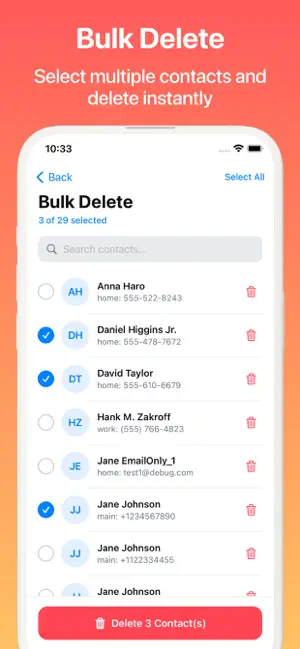
Delete contacts - ContactsBye helps you clean up your iPhone contacts quickly and safely — no manual busywork. Sound familiar? Your phone book is packed with hundreds of entries: "Pizza courier", "Airport taxi", "Notary", "Craigslist sofa", duplicates of the same number, and empty cards with no info at all. Finding the contact you actually need gets harder every day — and cleaning it all by hand takes hours. ContactsBye does it in minutes. The new Quick Scan checks your entire address book in one tap and sorts the clutter into clear categories: • Exact duplicates — identical contacts you can merge or delete • Service contacts — taxis, couriers, delivery, repairmen, salons and other one-time numbers • Temporary contacts — "order", "client", "interview", marketplace numbers and everything that lost its relevance long ago • Contacts with no number or data — empty cards where only a name is filled in Review each category, delete it in one tap, or pick contacts one by one — you always see exactly what you're deleting. With Delete contacts - ContactsBye you can: 1. Run Quick Scan to find duplicate, service, temporary and empty contacts 2. Delete junk and unused contacts in one tap — by category or one by one 3. Smart-merge contacts by matching phone numbers, names and other fields, choosing exactly what gets merged 4. Bulk-delete contacts: select multiple entries and remove them with a single tap 5. Clear out spam numbers, outdated contacts and cluttered lists with full preview and control 6. Create a backup / restore point before cleaning and bring back deleted, changed or added contacts anytime Accuracy first The completely rebuilt duplicate-detection engine compares names, numbers and emails more precisely and finds more matches — and nothing is ever deleted automatically: you confirm every action. Backup & restore, built for confidence Create a restore point before merging or deleting, review every change, and bring contacts back if anything looks wrong. Privacy first Your contacts are personal data. Delete contacts - ContactsBye works entirely on your device. Nothing is collected, stored or transmitted — your contacts stay on your iPhone. If your address book is a mess — run Quick Scan, delete duplicates, junk and temporary contacts, merge the cards worth keeping, and restore anything from backup if needed. A tidy contact list in just a few minutes.
What’s new
Version 3.1.0 · Updated September 2, 2026
Quick Scan now sorts your entire address book in one tap: exact duplicates, temporary numbers and empty cards, each category on its own with a preview before deletion. Improved merging shows matching fields, including Notes, and lets you choose exactly what gets combined
App privacy
The developer, Anton Timonin, reported these privacy practices to Apple.
Data Not Collected
The developer does not collect any data from this app.
Alternatives to Delete contacts - ContactsBye
Looking for apps like Delete contacts - ContactsBye? Here are 6 similar apps on the App Store. The highest rated is Delete Contacts+ (4.8/5), and all 6 are free to download.
-
 aContacts - Contact Manager
4.0
aContacts - Contact Manager
4.0
-
 Duplicate Contacts Manager
4.1
Duplicate Contacts Manager
4.1
-
 Cleaner: Merge Contact & Photo
4.7
Cleaner: Merge Contact & Photo
4.7
-
 MCBackup: My Contacts Backup
4.7
MCBackup: My Contacts Backup
4.7
-
 Delete Contacts+
4.8
Delete Contacts+
4.8
-
 Easy Cleaner.
4.8
Easy Cleaner.
4.8
| App | Rating | Price | Last updated | Compare |
|---|---|---|---|---|
| Delete contacts - ContactsBye | – | Free | September 2, 2026 | |
| aContacts - Contact Manager | 4.0 / 5 (45) | Free | Oct 4, 2026 | Compare |
| Duplicate Contacts Manager | 4.1 / 5 (807) | Free | Jul 24, 2026 | Compare |
| Cleaner: Merge Contact & Photo | 4.7 / 5 (3,977) | Free | Oct 12, 2026 | Compare |
| MCBackup: My Contacts Backup | 4.7 / 5 (2,351) | Free | Aug 16, 2026 | Compare |
| Delete Contacts+ | 4.8 / 5 (35,285) | Free | Oct 19, 2026 | Compare |
| Easy Cleaner. | 4.8 / 5 (29,121) | Free | Aug 10, 2026 | Compare |