

StayStill: Screen Time Control
Daniil Bystrov Productivity iPhoneiPadiPod touch
StayStill: Screen Time Control is a free Productivity app for iPhone and iPad by Daniil Bystrov. Requires iOS 17.6. Updated October 19, 2026.
- Price
- Free
- on the App Store
- Size
- 95 MB
- Age 4+
- Updated
- Oct 19
- 2026 · v1.1.2
Screenshots


About StayStill: Screen Time Control
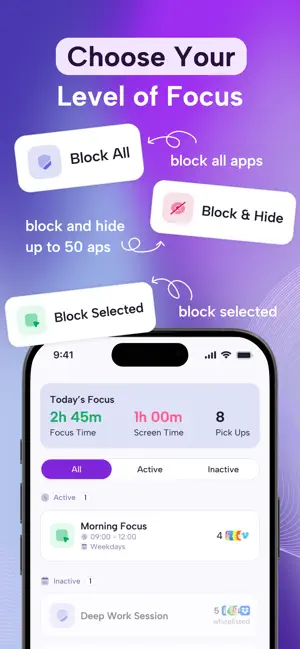
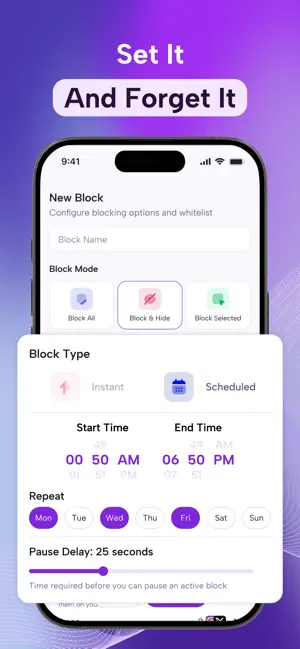
Still – Screen Time Control is a simple and powerful way to reduce screen time, block distractions, and stay focused. Whether you are working, studying, building better habits, or taking a break from endless scrolling, Still helps you stay present and intentional with your phone use. Take back your time and focus with Still — the intelligent screen time blocker and digital wellness companion. Still helps you reduce distractions, build healthier habits, and stay in control of your phone use with Premium features that require a subscription: * Block distracting apps and categories * Schedule blocking sessions in advance with flexible planning options * Set custom blocking durations from 2 minutes to 23 hours * Start focused sessions on demand with the "Instant" block type * Choose flexible blocking modes, including Block All, Block Selected, and Block & Hide * See detailed usage per app — Instagram, Snapchat, Facebook, and more * Track your focus time with rich analytics — Focused, Distracted, and Offline breakdowns by hour * Monitor trends with daily focus reports and insights Still is designed for people who want less mindless scrolling and more clarity, focus, and control. Whether you are working, studying, reading, building better habits, or simply need time offline — Still helps you stay present and intentional. Still is free to download and use with limited usage limits. Unlock extended usage with a paid subscription. Take back your time. Stay focused. Be Still.
What’s new
Version 1.1.2 · Updated October 19, 2026
Achievements open faster, and Parent Mode works more smoothly when you switch tabs or return to the app.
App privacy
The developer, Daniil Bystrov, reported these privacy practices to Apple.
Data Used to Track You
The following data may be used to track you across apps and websites owned by other companies:
- Usage Data: Product Interaction, Advertising Data
Data Linked to You
The following data, which may be collected and linked to your identity, may be used for the following purposes:
- Usage Data: Product Interaction, Advertising Data
- Purchases: Purchase History
- Diagnostics: Crash Data, Performance Data
- Contact Info: Email Address, Name
- Identifiers: User ID
Used for: Third-Party Advertising, Analytics, App Functionality
Alternatives to StayStill: Screen Time Control
Looking for apps like StayStill: Screen Time Control? Here are 6 similar apps on the App Store. The highest rated is Commercial: ScreenTime Control (4.8/5), and all 6 are free to download.
-
 Nookify: Garage Inventory
-
 Hourfall: Screen Time Tracker
-
 GapPilot
-
 finit: Screen Time & Life
4.0
finit: Screen Time & Life
4.0
-
 LockThem: App Lock & Focus
-
 Commercial: ScreenTime Control
4.8
Commercial: ScreenTime Control
4.8
| App | Rating | Price | Last updated | Compare |
|---|---|---|---|---|
| StayStill: Screen Time Control | – | Free | October 19, 2026 | |
| Nookify: Garage Inventory | – | Free | Oct 19, 2026 | Compare |
| Hourfall: Screen Time Tracker | – | Free | Jul 2, 2026 | Compare |
| GapPilot | – | Free | Jul 14, 2026 | Compare |
| finit: Screen Time & Life | 4.0 / 5 (1) | Free | Oct 15, 2026 | Compare |
| LockThem: App Lock & Focus | – | Free | Mar 25, 2026 | Compare |
| Commercial: ScreenTime Control | 4.8 / 5 (4) | Free | Sep 10, 2026 | Compare |