

Inventory & Sales Salelog
Emre Akcadag Business iPhoneiPadiPod touch
Inventory & Sales Salelog is a free Business app for iPhone and iPad by Emre Akcadag. Rated 3.0/5 from 2 ratings. Requires iOS 18.2.
- Rating
- 3.0
- 2 ratings
- Price
- Free
- on the App Store
- Size
- 113 MB
- Age 4+
- Updated
- Oct 23
- 2026 · v3.4.1
Screenshots


About Inventory & Sales Salelog
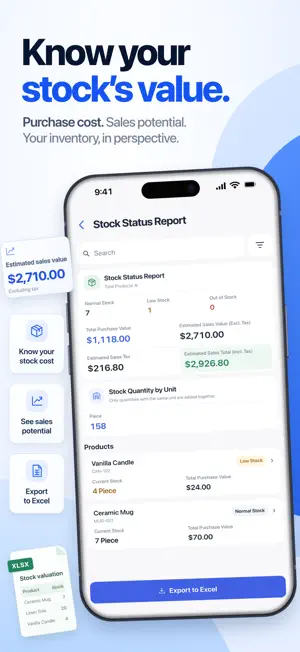
Salelog brings inventory, sales, purchases, expenses and customer balances together for small businesses. AI HELP INSIDE SALELOG Ask how to add a product or find a report, and follow links to the right screens. The assistant does not read or change your business records; you review and save them yourself. Requires internet, with a daily allowance based on your plan. Messages and chat context are sent to Cloudflare/OpenAI. Answers can be wrong. CONTROL INVENTORY • Add products with prices, taxes, units, categories, brands and barcodes • Add one product photo from your camera or gallery and crop it to a square • Scan barcodes to find products and build sales faster • Check stock by warehouse and spot low or out-of-stock items • Transfer stock between warehouses with a clear movement history RECORD SALES AND PURCHASES • Create sales in a few taps and update inventory automatically • Assign customers, suppliers, warehouses, payment methods and statuses • Record purchases to keep stock and latest purchase prices current • Review complete sales and purchase histories TRACK EXPENSES AND PAYMENTS • Organize expenses by category • Record customer collections, supplier payments and money movements • Follow customer receivables and supplier payables • Keep contact and balance details together UNDERSTAND THE BUSINESS • Choose today, this week, this month or a custom reporting period • Review sales, purchases, expenses and cash flow • See top products, customers, suppliers and payment methods • Analyze product performance, expense categories and stock status • Export detailed reports to Excel for deeper analysis or filing CREATE AND SHARE DOCUMENTS • Generate clear PDFs for sales, purchases, expenses and payments • Use your business details, logo, numbering, accent color and footer • Choose A4, 58 mm or 80 mm layouts • Print or share from your device WORK AS A TEAM • Manage multiple businesses or organizations • Invite staff and assign role-based permissions • Keep information available across devices • Work in multiple languages and currencies OFFLINE-FIRST BY DESIGN Record day-to-day activity even when the internet is unreliable. Salelog keeps local work responsive and syncs pending changes after the connection returns. Made for retail shops, boutiques, market sellers, wholesalers, distributors, warehouse teams and service businesses that manage products or parts. Replace disconnected notebooks and spreadsheets with one practical view of inventory, sales and business activity. SHARE A PRODUCT CATALOG • Prepare a catalog on your phone and choose which products and prices to show • Customers browse photos and product details in a browser, without an account • Share the link in a message; choose the contact details customers can see • Publishing requires active Plus, Pro or Max; product photos are available on all plans within limits • A catalog is for browsing and contact, not online checkout or payment processing Quotes and customer orders • Set quote validity and a separate personal reminder • Share a branded quote or order PDF • Convert to a sale after confirmation, without re-entering items Privacy Policy: https://salelog.app/privacy-policy/ Terms of Service: https://salelog.app/terms-of-service/
What’s new
Version 3.4.1 · Updated October 23, 2026
Salelog 3.4.1 • AI optimizations. • Performance improvements.
App privacy
The developer, Emre Akcadag, reported these privacy practices to Apple.
Data Linked to You
The following data, which may be collected and linked to your identity, may be used for the following purposes:
- Contact Info: Email Address
- Identifiers: User ID
- Other Data: Other Data Types
Used for: App Functionality
Data Not Linked to You
The following data, which may be collected but is not linked to your identity, may be used for the following purposes:
- Diagnostics: Crash Data
Used for: App Functionality