

InstaSquare Photo Editor
Hetal Kotadiya Utilities iPhoneiPadiPod touch
InstaSquare Photo Editor is a free Utilities app for iPhone and iPad by Hetal Kotadiya. Rated 3.8/5 from 33 ratings. Requires iOS 15.6. Updated June 6, 2026.
- Rating
- 3.8
- 33 ratings
- Price
- Free
- on the App Store
- Size
- 59 MB
- Age 4+
- Updated
- Jun 6
- 2026 · v1.0.5
Screenshots
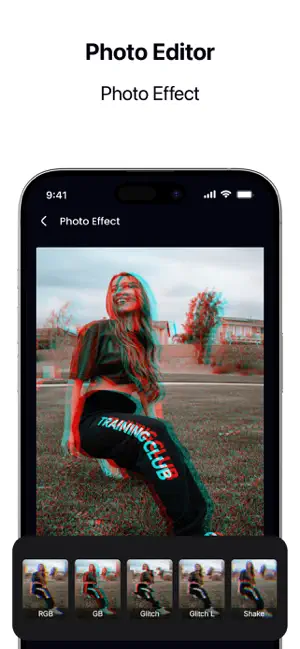
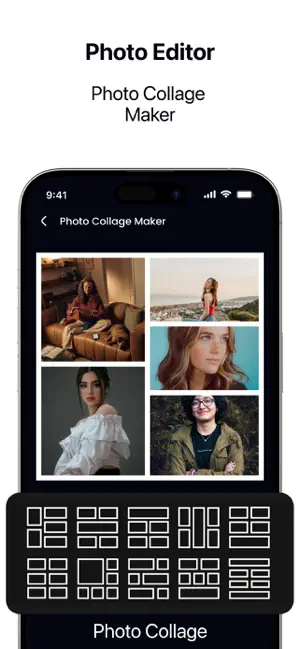


About InstaSquare Photo Editor
AI Photo Editor AI Photo Editor is an easy-to-use image editing app designed to help you enhance and improve your photos in just a few taps. With a clean interface and powerful editing tools, you can quickly adjust images and create high-quality results. Whether you want to crop a photo, resize it, compress file size, or build a collage, AI Photo Editor provides simple tools for everyday editing. Features Photo Editing Tools Edit images with basic and advanced options for quick improvements. Crop and Resize Adjust aspect ratios and image size for sharing, saving, or social media use. Compress Photos Reduce file size while maintaining good visual quality. Photo Collage Maker Combine multiple photos into clean and simple collage layouts. High-Quality Export Save your edited photos in high resolution. Subscriptions AI Photo Editor offers optional subscription plans to unlock premium features, including unlimited editing and an ad-free experience. Payments are processed through Apple’s App Store and can be managed in your Apple account settings. Privacy and Permissions The app requests access to your photo library only to allow you to select and edit images. Your photos are not stored or shared. Support For questions or assistance, please contact: [email protected] Built for iOS Optimized for iPhone with smooth performance and a simple user experience Privacy Policy: https://potorra.blogspot.com/2026/01/privacy-policy.html Terms and Conditions: https://potorra.blogspot.com/2026/01/terms-conditions.html Eula: https://potorra.blogspot.com/2026/01/end-user-license-agreement-eula.html
Ratings & reviews
3.8
33 ratings
What’s new
Version 1.0.5 · Updated June 6, 2026
Bugs fixes and performance enhancement
App privacy
The developer, Hetal Kotadiya, reported these privacy practices to Apple.
Data Used to Track You
The following data may be used to track you across apps and websites owned by other companies:
- Location: Coarse Location
- Identifiers: Device ID
- Usage Data: Advertising Data
Data Linked to You
The following data, which may be collected and linked to your identity, may be used for the following purposes:
- Location: Coarse Location
- User Content: Photos or Videos
- Identifiers: Device ID
- Usage Data: Product Interaction, Advertising Data
Used for: Analytics, App Functionality
Data Not Linked to You
The following data, which may be collected but is not linked to your identity, may be used for the following purposes:
- Diagnostics: Crash Data, Other Diagnostic Data
Used for: Analytics
Alternatives to InstaSquare Photo Editor
Looking for apps like InstaSquare Photo Editor? Here are 6 similar apps on the App Store. The highest rated is InSaver - Video Saver (4.8/5), and all 6 are free to download.
-
 Stylish Text : Keyboard Fonts
4.2
Stylish Text : Keyboard Fonts
4.2
-
 Photos: Fast Photo Organizer
4.1
Photos: Fast Photo Organizer
4.1
-
 Web Scanner - Dual App
-
 Photo Gallery - Gallery Lock
4.5
Photo Gallery - Gallery Lock
4.5
-
 InSaver : Reels, Story, videos
3.4
InSaver : Reels, Story, videos
3.4
-
 InSaver - Video Saver
4.8
InSaver - Video Saver
4.8
| App | Rating | Price | Last updated | Compare |
|---|---|---|---|---|
| InstaSquare Photo Editor | 3.8 / 5 (33 ratings) | Free | June 6, 2026 | |
| Stylish Text : Keyboard Fonts | 4.2 / 5 (5) | Free | Aug 3, 2026 | Compare |
| Photos: Fast Photo Organizer | 4.1 / 5 (16) | Free | Sep 29, 2026 | Compare |
| Web Scanner - Dual App | – | Free | Jul 10, 2026 | Compare |
| Photo Gallery - Gallery Lock | 4.5 / 5 (4,610) | Free | Jul 20, 2026 | Compare |
| InSaver : Reels, Story, videos | 3.4 / 5 (5) | Free | Jun 30, 2026 | Compare |
| InSaver - Video Saver | 4.8 / 5 (101) | Free | Aug 28, 2026 | Compare |