

Interior Design AI Home: Idori
Ess X LLC Lifestyle iPhoneiPadiPod touch
Interior Design AI Home: Idori is a free Lifestyle app for iPhone and iPad by Ess X LLC. Rated 1.0/5 from 1 ratings. Requires iOS 18.6.
- Rating
- 1.0
- 1 ratings
- Price
- Free
- on the App Store
- Size
- 47 MB
- Age 12+
- Updated
- Aug 11
- 2026 · v1.1.8
Screenshots


About Interior Design AI Home: Idori
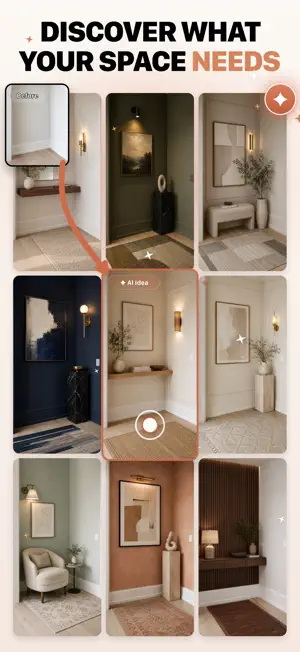
Not sure what to do with your space? Idori turns a real photo into realistic, editable design ideas made for your actual room, home, or outdoor space. Unlike AI apps that generate random makeovers or force a generic style, Idori is a flexible workflow: explore what could work, preserve what you want to keep, and refine until it feels right. FOUR WAYS TO DESIGN AI Ideas: Not sure what to do? Idori reads your actual space and suggests design directions based on what is already there. Each idea gives you a clear recommendation, explains what to change, and helps you understand why it could work. Tap any idea to visualize it on your photo. Styles: Already know the vibe? Apply curated interior and exterior styles instantly, including Japandi, Scandinavian, Minimalist, Mid-Century, Bohemian, Coastal, Industrial, Mediterranean, Modern Farmhouse, Rustic, Traditional, Contemporary, Art Deco, French Country, Tropical, Maximalist, and more. Prompts: Have a vision in mind? Describe it in your own words. Try prompts like "make this bedroom warmer," "turn this patio into a cozy Mediterranean space," or "keep the layout but make the kitchen feel modern." Specify styles, materials, colors, mood, layout constraints, and what should stay unchanged. Spot Edit: Want to change one exact part without regenerating the whole space? Pin specific areas in your photo and tell Idori what should happen there. Replace a sofa, repaint one wall, update cabinets, change a rug, add plants, refresh a facade, redesign a patio corner, or test a new material while keeping the rest intact. With Spot Edit, you can pin up to four spots, each with its own instruction and reference image in one generation. Keep the floors, preserve the layout, leave the windows alone, only change the backsplash, or test a new front door color without touching the rest of the house. COMPARE, REFINE, AND SHARE Every result becomes a version. Compare before and after, revisit or retry past versions, or branch any result in a new direction. Export any version in full quality to save, copy, or share — with friends, your contractor, or your designer. WORKS ON ANY SPACE Use Idori for living rooms, bedrooms, kitchens, bathrooms, dining rooms, offices, entryways, apartments, rentals, and full homes. Try outdoor ideas for facades, front doors, windows, garage doors, porches, decks, patios, pergolas, backyards, gardens, front yards, pool areas, and landscaping. WHAT YOU CAN DO WITH IDORI Idori isn't just a one-tap filter, it's a creative tool for real spaces. Everyday people use it to: Redesign any room or exterior from a single photo Restyle in one tap with curated styles Declutter and organize a messy room: upload the chaos, see it tidy and put-together Rearrange and swap furniture: move the couch, swap a chair, change the rug, add plants Replace one exact thing: "replace the bed with a velvet emerald one," leave the rest untouched Remove what you don't want: clutter, old furniture, a wall, a sign in a listing photo Repaint and recolor: walls, cabinets, trim, doors, or a whole exterior Change materials: new flooring, countertops, backsplash, or tile, keeping everything else Keep what you love: new walls, same hardwood floors; new cabinets, same layout Stage an empty room: furnish a blank space for a real-estate listing or a move Plan before you spend: preview the remodel before buying furniture, paint, or hiring anyone Get unstuck: let Idori read your space and suggest what to change and why AI Ideas and Spot Edit are Pro features. PRIVACY FIRST Your home is personal. Your photos and prompts are used only to create the designs you ask for — never to train AI, never stored on our servers. Your results and history stay on your device. https://www.apple.com/legal/internet-services/itunes/dev/stdeula/ https://idori.app/terms https://idori.app/privacy
What’s new
Version 1.1.8 · Updated August 11, 2026
Bug fixes and performance improvements for a smoother experience.
App privacy
The developer, Ess X LLC, reported these privacy practices to Apple.
Data Used to Track You
The following data may be used to track you across apps and websites owned by other companies:
- Identifiers: Device ID
Data Not Linked to You
The following data, which may be collected but is not linked to your identity, may be used for the following purposes:
- Identifiers: Device ID, User ID
- Usage Data: Product Interaction
- Diagnostics: Crash Data, Performance Data
- Contact Info: Email Address, Name
- User Content: Photos or Videos
Used for: Developer’s Advertising or Marketing, Analytics, App Functionality
Alternatives to Interior Design AI Home: Idori
Looking for apps like Interior Design AI Home: Idori? Here are 6 similar apps on the App Store. The highest rated is Revamp AI: Interior Design (5.0/5), and all 6 are free to download.
-
 AI Interior Design by Photo
4.5
-
 Nobia: AI Home Design
-
 Revamp AI: Interior Design
5.0
-
 Roomframe AI: Interior Design
-
 Room Design AI · RoomStylePro
-
 archelier — AI Interior Design
5.0
| App | Rating | Price | Last updated | Compare |
|---|---|---|---|---|
| Interior Design AI Home: Idori | 1.0 / 5 (1 rating) | Free | August 11, 2026 | |
| AI Interior Design by Photo | 4.5 / 5 (4) | Free | Oct 15, 2026 | Compare |
| Nobia: AI Home Design | – | Free | Sep 2, 2026 | Compare |
| Revamp AI: Interior Design | 5.0 / 5 (2) | Free | Sep 28, 2026 | Compare |
| Roomframe AI: Interior Design | – | Free | Oct 22, 2026 | Compare |
| Room Design AI · RoomStylePro | – | Free | Jun 8, 2026 | Compare |
| archelier — AI Interior Design | 5.0 / 5 (2) | Free | Oct 22, 2026 | Compare |