

Oopi - image to AI note
Marat Safutdinov Productivity iPhoneiPadiPod touch
Oopi - image to AI note is a free Productivity app for iPhone and iPad by Marat Safutdinov. Requires iOS 15.1. Updated February 22, 2026.
- Price
- Free
- on the App Store
- Size
- 54 MB
- Age 9+
- Updated
- Feb 22
- 2026 · v1.7.0
Screenshots


About Oopi - image to AI note
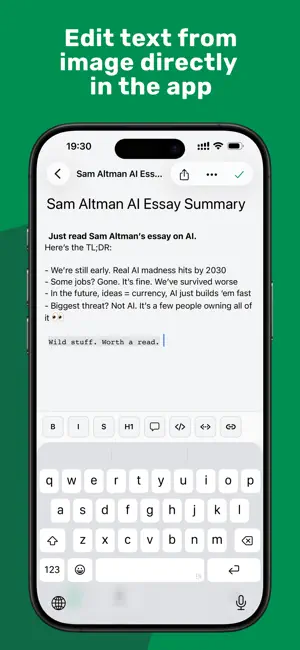
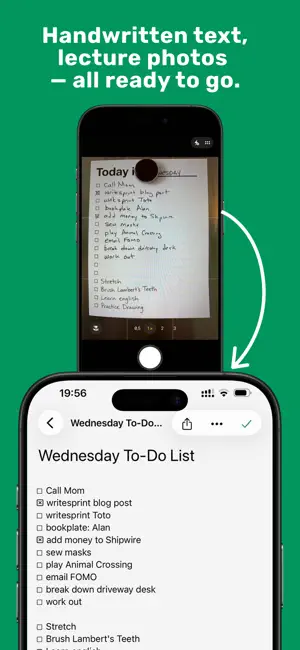
Oopi transforms any screenshot into an editable note in seconds. Our text recognition technology instantly extracts text and creates a convenient note ready for work. Tired of the tedious process of retyping text from screenshots? You capture screenshots of YouTube lectures, presentations, or handwritten notes, then spend hours on manual typing. Constantly switching between apps and online OCR services breaks my flow and kills productivity. INSTANT SCREENSHOT TO TEXT CONVERSION Forget about multi-step hassle and cumbersome copying. Oopi uses advanced OCR technology to extract text from screenshots of any type — from presentation slides to handwritten notes. One tap and your screenshot becomes a fully editable note with preserved structure. SOLUTION FOR STUDENTS AND PROFESSIONALS Recording video lectures? Oopi is perfect for taking notes from online courses and webinars. Capture important moments, and the app automatically creates editable notes you can enhance with your own thoughts. No more pausing videos to manually typing information. Working with presentation slides? Save key slides from meetings and conferences as text notes with one touch. Our image to text feature works even with complex layouts and diagrams. Digitizing handwritten notes? Oopi recognizes handwritten text, helping you transfer years of paper records into digital format without retyping every page. BENEFITS THAT SAVE HOURS OF YOUR TIME Offline OCR — extract text from images without internet connection. Your data remains confidential and isn't sent to external servers. Especially important when working with internal company documents. Automated process — no need to manually create notes, copy text, or switch between apps. Oopi does everything automatically: from text extraction to organizing convenient screenshot notes. Streamline workflow — one app instead of multiple tools. Screenshot, recognition, editing, and storage all in one place. This is a truly quick and straightforward solution for those who value their time. Smart notes with AI features — the app doesn't just convert screenshots, but helps structure information by highlighting key points and creating convenient navigation. REAL TIME SAVINGS Users report that the ability to extract text from screenshots saves them 15-20 copy-paste operations daily. Instead of the tedious 6-step ordeal of uploading each photo, prompting, copying results, and editing, Oopi offers an instant solution. No more cumbersome multi-step manipulations with lasso tool, selection, Share, and Copy. The process of digitizing notes becomes as fast as taking the screenshot itself. FOR ANY USE CASE Meeting notes — quickly capture information from whiteboards and flipcharts during meetings Scanned PDF — extract text from scanned documents for further editing Study materials — create summaries from textbooks with one tap Research — collect quotes and excerpts from articles without manually retyping PRODUCTIVITY WITHOUT COMPROMISE Oopi is more than just an OCR scanner. It's a comprehensive note taking solution that understands your workflow and adapts to it. Intelligent note organization, quick text search, tags, and categories — everything for maximum productivity. No waiting for server uploads or downloading results — everything happens instantly, ensuring maximum processing speed and data protection. SIMPLICITY AND POWER Intuitive interface requires no training. Took a screenshot? Oopi automatically suggests to convert screenshot to editable text. One tap and you're done. This is truly a one-step solution that was so missing. START SAVING TIME TODAY Stop wasting precious minutes on manually typing text. Let Oopi automate the routine and focus on what really matters — working with information, not transferring it. Download Oopi and feel the difference between a tedious multi-step process and instant conversion. Your productivity deserves better tools. Oopi — turning screenshots into knowledge, not routine.
App privacy
The developer, Marat Safutdinov, reported these privacy practices to Apple.
Data Used to Track You
The following data may be used to track you across apps and websites owned by other companies:
- Location: Coarse Location
- Contact Info: Email Address
- Identifiers: User ID, Device ID
- Usage Data: Product Interaction, Other Usage Data
- Diagnostics: Crash Data, Performance Data, Other Diagnostic Data
Data Linked to You
The following data, which may be collected and linked to your identity, may be used for the following purposes:
- Location: Coarse Location
- Contact Info: Email Address
- Identifiers: User ID, Device ID
- Usage Data: Product Interaction, Other Usage Data
- Diagnostics: Crash Data, Performance Data, Other Diagnostic Data
- User Content: Emails or Text Messages, Photos or Videos
Used for: Analytics, App Functionality
Alternatives to Oopi - image to AI note
Looking for apps like Oopi - image to AI note? Here are 6 similar apps on the App Store. The highest rated is Ground - Live Undistracted (5.0/5), and all 6 are free to download.
-
 Summify: AI Summary & Learn
-
 Vox: Text to Speech PDF Reader
-
 Ground - Live Undistracted
5.0
-
 Odie: AI Voice Notes
-
 ScreenNote - AI Auto Notes
-
 Sshot Screenshot Notes
| App | Rating | Price | Last updated | Compare |
|---|---|---|---|---|
| Oopi - image to AI note | – | Free | February 22, 2026 | |
| Summify: AI Summary & Learn | – | Free | Jun 9, 2026 | Compare |
| Vox: Text to Speech PDF Reader | – | Free | Jul 16, 2026 | Compare |
| Ground - Live Undistracted | 5.0 / 5 (3) | Free | Aug 14, 2025 | Compare |
| Odie: AI Voice Notes | – | Free | Mar 3, 2026 | Compare |
| ScreenNote - AI Auto Notes | – | Free | Oct 15, 2026 | Compare |
| Sshot Screenshot Notes | – | Free | Jun 21, 2026 | Compare |