

Merge PDF Files - Combine PDF
ESPRESSO TECH (SMC-PRIVATE) LIMITED Productivity iPhoneiPadiPod touchMac
Merge PDF Files - Combine PDF is a free Productivity app for iPhone and iPad by ESPRESSO TECH (SMC-PRIVATE) LIMITED. Requires iOS 16.1.
- Price
- Free
- on the App Store
- Size
- 20 MB
- Age 4+
- Updated
- Sep 4
- 2026 · v1.6
Screenshots

About Merge PDF Files - Combine PDF
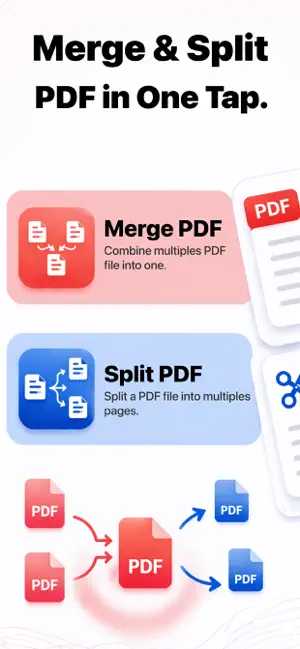
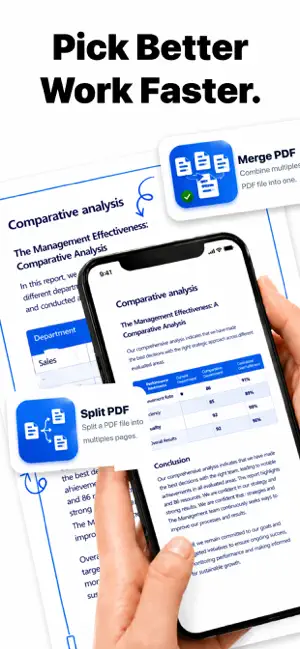
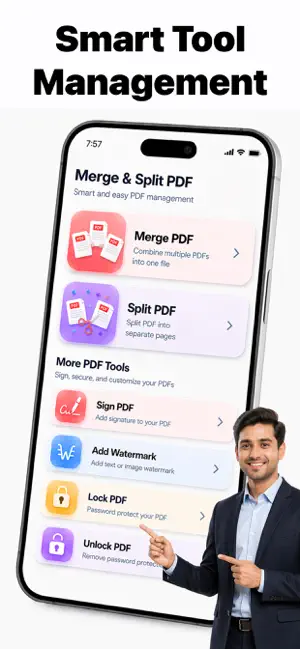
Merge & Split PDF – Smart & Easy PDF Management Manage your PDF files effortlessly with Merge & Split PDF – a powerful, fast, and easy-to-use PDF tool designed to simplify your daily document tasks. Whether you need to combine multiple PDFs into one file or split a large PDF into separate pages, this app gives you complete control over your documents in just a few taps. Perfect for students, office workers, business owners, and anyone who works with digital documents, Merge & Split PDF provides essential PDF tools in one simple and clean interface. Merge PDF – Combine Multiple Files into One Easily merge two or more PDF files into a single document without losing quality. Arrange files in your preferred order before merging and create a professional final document in seconds. - Combine multiple PDFs - Maintain original quality - Rearrange file order before merging - Fast and secure processing This feature is ideal for combining reports, assignments, invoices, contracts, or scanned documents into one organized file. Split PDF – Extract Pages Easily Need to separate pages from a large PDF? The Split PDF tool allows you to divide a PDF into individual pages or extract selected page ranges. - Split PDF into separate pages - Extract specific page numbers - Create multiple smaller PDFs - Simple and intuitive controls Perfect for sharing only the pages you need without sending the entire document. Sign PDF – Add Digital Signature Sign your documents directly from your device. Add your digital signature quickly and securely without printing or scanning. - Create and save your signature - Add signature anywhere in the document - Smooth and easy signing experience Ideal for contracts, agreements, and official paperwork. Add Watermark – Protect Your Files Protect your important documents by adding custom watermarks. Add text watermarks to secure and personalize your PDFs. - Add custom text watermark - Adjust size and position - Professional appearance Great for branding, copyright protection, and confidential documents. Lock PDF – Secure with Password Keep your sensitive files safe by adding password protection. Prevent unauthorized access to your important documents. - Add strong password protection - Secure confidential documents - Quick encryption process Unlock PDF – Remove Password Have a password protected PDF? Remove password protection easily when you have access credentials. - Unlock protected PDFs - Fast and simple process - Maintain original document quality Why Choose Merge & Split PDF? • Clean and modern interface • Fast processing speed • High-quality output • Easy navigation • All essential PDF tools in one app • Suitable for students, professionals, and businesses Merge & Split PDF is your all-in-one PDF solution for managing documents efficiently. Download now and experience smart, secure, and easy PDF management anytime, anywhere. Privacy policy: https://health-fitness-pro.fit/privacy Terms of use: https://health-fitness-pro.fit/terms
What’s new
Version 1.6 · Updated September 4, 2026
Hi there! We’ve made some great improvements to enhance your PDF experience: - Improved PDF merge & split performance - Faster file processing and smoother workflow - Minor bug fixes and stability enhancements - Better file selection and preview experience - Enhanced overall app reliability
App privacy
The developer, ESPRESSO TECH (SMC-PRIVATE) LIMITED, reported these privacy practices to Apple.
Data Used to Track You
The following data may be used to track you across apps and websites owned by other companies:
- Identifiers: Device ID
- Usage Data: Product Interaction, Advertising Data
- Diagnostics: Crash Data, Performance Data
Data Not Linked to You
The following data, which may be collected but is not linked to your identity, may be used for the following purposes:
- Identifiers: Device ID
- Usage Data: Product Interaction, Advertising Data
- Diagnostics: Crash Data, Performance Data
Used for: Third-Party Advertising, Analytics, App Functionality
Alternatives to Merge PDF Files - Combine PDF
Looking for apps like Merge PDF Files - Combine PDF? Here are 6 similar apps on the App Store. The highest rated is Merge PDF Files-Split PDF Docs (4.9/5), and all 6 are free to download.
-
 Split PDF : Extract PDF Pages
3.0
Split PDF : Extract PDF Pages
3.0
-
 Merge PDF Files-Split PDF Docs
4.9
Merge PDF Files-Split PDF Docs
4.9
-
 PDF Combiner - Merge & Split
4.8
PDF Combiner - Merge & Split
4.8
-
 UniPDF: PDF Converter, Scanner
-
 Merge PDF - Combine PDF
4.8
Merge PDF - Combine PDF
4.8
-
 Combine & Merge PDF Converter
4.4
Combine & Merge PDF Converter
4.4
| App | Rating | Price | Last updated | Compare |
|---|---|---|---|---|
| Merge PDF Files - Combine PDF | – | Free | September 4, 2026 | |
| Split PDF : Extract PDF Pages | 3.0 / 5 (2) | Free | Aug 29, 2026 | Compare |
| Merge PDF Files-Split PDF Docs | 4.9 / 5 (39) | Free | Sep 8, 2026 | Compare |
| PDF Combiner - Merge & Split | 4.8 / 5 (291) | Free | Sep 1, 2026 | Compare |
| UniPDF: PDF Converter, Scanner | – | Free | Sep 24, 2026 | Compare |
| Merge PDF - Combine PDF | 4.8 / 5 (348) | Free | Sep 24, 2026 | Compare |
| Combine & Merge PDF Converter | 4.4 / 5 (7) | Free | Jul 16, 2025 | Compare |