

Floathing: PiP for everything
Luu Thi Tuyet Minh Productivity iPhoneiPadiPod touch
Floathing: PiP for everything is a free Productivity app for iPhone and iPad by Luu Thi Tuyet Minh. Rated 5.0/5 from 1 ratings. Requires iOS 18.6.
- Rating
- 5.0
- 1 ratings
- Price
- Free
- on the App Store
- Size
- 17 MB
- Age 4+
- Updated
- Oct 19
- 2026 · v1.6
Screenshots
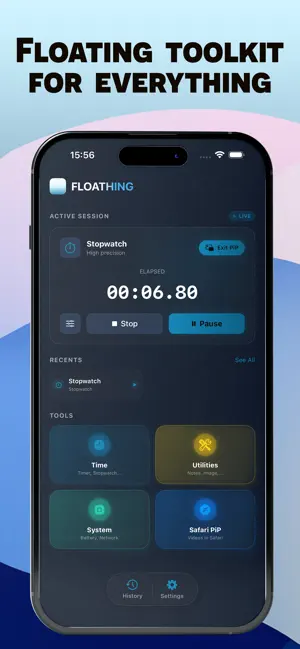


About Floathing: PiP for everything
Floathing – Floating Everything on iPhone Floathing turns your iPhone into a powerful floating toolkit: teleprompter, timer, stopwatch, countdown, world clock, sticky notes, reference images, system monitors, and even web videos — all running in a Picture-in-Picture window that stays on top of any app. Stop switching apps just to check your teleprompter, timer, notes, or videos while recording, studying, or presenting. Keep everything visible in one small floating window. Always-On-Top Floating Window -Picture-in-Picture keeps your tools floating over Camera, Safari, Notes, and social apps. -Start from the dashboard: pick a tool, configure it, preview it live, then tap to float. -Floating Teleprompter & Time Tools Floating teleprompter with auto-scroll, perfect for TikTok, Reels, vlogs, and speaking to camera. Floating timer, stopwatch, and countdown for study sessions, workouts, presentations, and focus time. Sticky Notes & Reference Images -Floating sticky notes for key points, to-dos, or reminders during meetings and online classes. -Pin reference images, slides, mockups, or formulas as an overlay while you draw, code, or write. Safari Web Videos -Watch almost any web video in Picture-in-Picture mode using our Safari Extension. -Keep videos floating while browsing, chatting, taking notes, or multitasking. -Tested on popular sites such as YouTube, Vimeo, Dailymotion, Twitch, and more. System Monitors -Floating widgets for network status, battery & thermal info, and speedometer, always visible at a glance. Fast & Simple -Save presets for videoprompters, floating study timers, or your favorite setups. -Live preview before floating anything on screen. Unlimited access to all features - You can subscribe to enjoy all the app's features without limit. - Subscription fees are charged monthly or annually, depending on your chosen subscription plan. Or lifetime pro, purchase once, own forever. - Subscriptions automatically renew unless auto-renewal is turned off at least 24 hours before the end of the current subscription period. By using Floathing, you agree to our Privacy Policy and Terms of Use: * Privacy Policy: https://mecapps.fun/floathing/privacy * Terms of Use: https://mecapps.fun/floathing/terms
What’s new
Version 1.6 · Updated October 19, 2026
- Now you can import multi images. - Optimize and fix bugs.
App privacy
The developer, Luu Thi Tuyet Minh, reported these privacy practices to Apple.
Data Not Collected
The developer does not collect any data from this app.
Alternatives to Floathing: PiP for everything
Looking for apps like Floathing: PiP for everything? Here are 6 similar apps on the App Store. The highest rated is Cue: Floating Teleprompter (5.0/5), and all 6 are free to download.
-
 Pip Up: Persist/Float Post-It
4.0
-
 Picture in Picture Notes - PiP
3.9
-
 Floaty - PiP & Floating Viewer
-
 Cue: Floating Teleprompter
5.0
-
 Monyo - AI Bill Split!
5.0
-
 HelloTimer — All-in-One Timer
5.0
| App | Rating | Price | Last updated | Compare |
|---|---|---|---|---|
| Floathing: PiP for everything | 5.0 / 5 (1 rating) | Free | October 19, 2026 | |
| Pip Up: Persist/Float Post-It | 4.0 / 5 (2) | Free | Sep 15, 2025 | Compare |
| Picture in Picture Notes - PiP | 3.9 / 5 (7) | Free | Oct 19, 2025 | Compare |
| Floaty - PiP & Floating Viewer | – | Free | Aug 27, 2026 | Compare |
| Cue: Floating Teleprompter | 5.0 / 5 (2) | Free | Oct 7, 2026 | Compare |
| Monyo - AI Bill Split! | 5.0 / 5 (1) | Free | Jun 4, 2026 | Compare |
| HelloTimer — All-in-One Timer | 5.0 / 5 (2) | Free | Dec 3, 2025 | Compare |