

MetalGraph
Digital Toys LLC Developer Tools iPadMac
MetalGraph is a free Developer Tools app for iPad and Mac by Digital Toys LLC. Requires iOS 18.0. Updated April 25, 2026.
- Price
- Free
- on the App Store
- Size
- 7 MB
- Age 4+
- Updated
- Apr 25
- 2026 · v1.10.0
Screenshots


About MetalGraph
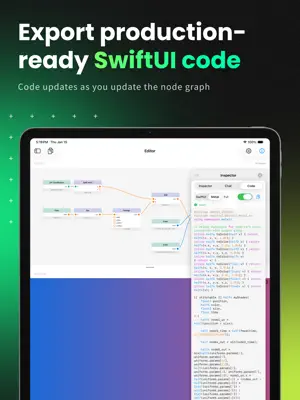
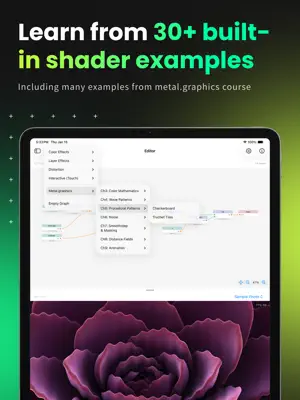
MetalGraph is a visual node-based editor for creating Metal shaders on iPad and Mac. Design stunning visual effects, learn GPU programming concepts, and export production-ready code—all without writing a single line of shader code. VISUAL SHADER CREATION • Drag-and-drop node editor with 50+ nodes • Real-time preview shows your shader instantly • Connect nodes to build complex effects • Animated preview with time-based effects LEARN BY DOING • 30+ built-in examples covering: - Color effects (gradients, plasma, voronoi) - Layer effects (glass, chromatic aberration) - Distortion (waves, ripples) - Interactive touch effects • Perfect companion for metal.graphics course PRODUCTION-READY EXPORT • Generate complete Metal Shading Language code • SwiftUI-ready .colorEffect and .layerEffect variants • Copy code directly into your Xcode project • Syntax-highlighted code display AI ASSISTANT • Ask questions about shader techniques • Get help building complex effects • Claude and OpenAI integration ADVANCED FEATURES • Create reusable custom nodes • For loops for iterative computations • Touch-responsive interactive effects • Multi-window support on iPad Whether you're learning Metal shaders, prototyping visual effects, or building production graphics—MetalGraph makes GPU programming accessible and fun. --- From the creator of metal.graphics. Terms of Use: https://metal.graphics/terms
What’s new
Version 1.10.0 · Updated April 25, 2026
- Drop a wire end in empty space to open a searchable picker that creates and connects a new node in one motion. - Drag a node from the sidebar onto the canvas to place it where you drop. - Drag a wire from any input port (not just outputs) to start a connection. - Fix tap target on "Get MetalGraph Pro" and "Redeem Code" buttons in License settings — the full row is now clickable.
App privacy
The developer, Digital Toys LLC, reported these privacy practices to Apple.
Data Not Linked to You
The following data, which may be collected but is not linked to your identity, may be used for the following purposes:
- Identifiers: User ID, Device ID
- Usage Data: Product Interaction
- Diagnostics: Crash Data, Performance Data, Other Diagnostic Data
Used for: Analytics, App Functionality
Alternatives to MetalGraph
Looking for apps like MetalGraph? Here are 6 similar apps on the App Store. The highest rated is PoseKit: Quick 3D Mockup (3.0/5), and all 6 are free to download.
-
 ShaderMania
-
 FeedbackKit - User Insights
-
 Noesis A.I.
-
 Core Image Labo
-
 PoseKit: Quick 3D Mockup
3.0
PoseKit: Quick 3D Mockup
3.0
-
 Charts: App Tracker
| App | Rating | Price | Last updated | Compare |
|---|---|---|---|---|
| MetalGraph | – | Free | April 25, 2026 | |
| ShaderMania | – | Free | Apr 30, 2026 | Compare |
| FeedbackKit - User Insights | – | Free | Oct 27, 2026 | Compare |
| Noesis A.I. | – | Free | Mar 16, 2026 | Compare |
| Core Image Labo | – | Free | Feb 25, 2025 | Compare |
| PoseKit: Quick 3D Mockup | 3.0 / 5 (2) | Free | Oct 19, 2026 | Compare |
| Charts: App Tracker | – | Free | Aug 11, 2026 | Compare |
Compare MetalGraph with the top alternatives: ratings, updates, ASO score and keyword gaps →