

Mochi: Swipe to Delete Photos
llapps Productivity iPhoneiPadiPod touch
Mochi: Swipe to Delete Photos is a free Productivity app for iPhone and iPad by llapps. Rated 4.5/5 from 2 ratings. Requires iOS 18.0.
- Rating
- 4.5
- 2 ratings
- Price
- Free
- on the App Store
- Size
- 65 MB
- Age 4+
- Updated
- Oct 10
- 2026 · v1.3.0
Screenshots


About Mochi: Swipe to Delete Photos
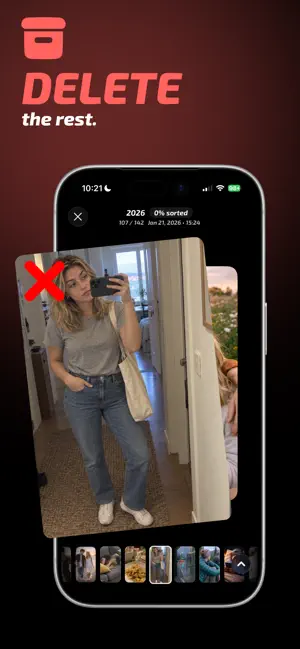
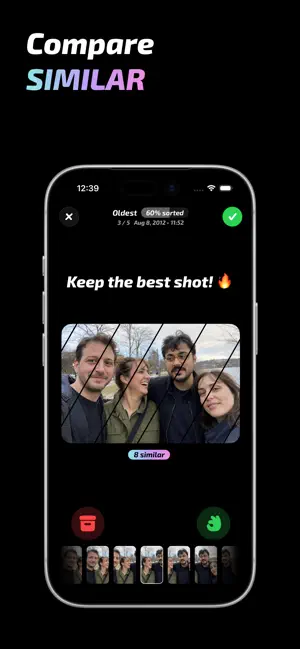
Swipe through your camera roll. Keep the best. Delete the rest. Mochi is a swipe-first photo cleaner for iPhone. Make quick Keep, Archive, or Delete decisions, then review the entire batch before anything changes in your Photos library. SWIPE TO CLEAN YOUR CAMERA ROLL • Turn a crowded library into one simple decision at a time • Clean screenshots, old trips, bursts, and everyday clutter • Choose a year or album instead of tackling everything at once • Archive uncertain photos and decide later FIND DUPLICATES & SIMILAR PHOTOS • Find duplicate and near-identical shots with private, on-device analysis • Compare similar photos side by side • Keep the strongest frame and mark the rest for deletion REVIEW BEFORE YOU DELETE • Nothing is deleted while you swipe • Check every photo marked for deletion in one final review • Apply changes only when you are ready PHOTOS, VIDEOS & LIVE PHOTOS • Review photos and videos in a full-screen viewer • Play videos and Live Photos before making a decision REDISCOVER YOUR LIBRARY • Explore photo memories on a map • Revisit past moments with Flashback • Clean one year at a time and see your progress grow PROGRESS THAT FEELS GOOD • Track kept and deleted items, space saved, and overall progress • Build a streak with short, focused cleanup sessions • Use an optional daily swipe limit to keep the habit manageable PRIVATE BY DESIGN Your photo library stays personal. Core sorting and similarity analysis happen on your device. Mochi does not upload your photos for cleanup. Mochi is free to download. Optional paid plans unlock unlimited cleanup, including subscription and lifetime options where available. Terms of Use: https://gallerycleaner.app/terms
What’s new
Version 1.3.0 · Updated October 10, 2026
Meet Photo Ninja, a new Ninja Mode for sorting any collection. Slice photos to archive, let them fall to keep, and review your choices before deleting. This update also adds support for iPhone Duo, with adaptive layouts built for both sides of the display.
App privacy
The developer, llapps, reported these privacy practices to Apple.
Data Not Linked to You
The following data, which may be collected but is not linked to your identity, may be used for the following purposes:
- Usage Data: Product Interaction, Other Usage Data
- Purchases: Purchase History
- Diagnostics: Crash Data, Performance Data, Other Diagnostic Data
Used for: Analytics, App Functionality
Alternatives to Mochi: Swipe to Delete Photos
Looking for apps like Mochi: Swipe to Delete Photos? Here are 6 similar apps on the App Store. The highest rated is Frond: Personal Planning App (5.0/5), and all 6 are free to download.
-
 Photo Cleaner - Swipe & Sort
4.3
Photo Cleaner - Swipe & Sort
4.3
-
 Photo Cleaner: SwipeSweep
3.9
Photo Cleaner: SwipeSweep
3.9
-
 Purrmodoro: Pomodoro Timer
-
 Frond: Personal Planning App
5.0
Frond: Personal Planning App
5.0
-
 PromptVault
-
 Focus: Deep Work Timer
| App | Rating | Price | Last updated | Compare |
|---|---|---|---|---|
| Mochi: Swipe to Delete Photos | 4.5 / 5 (2 ratings) | Free | October 10, 2026 | |
| Photo Cleaner - Swipe & Sort | 4.3 / 5 (7) | Free | Jul 13, 2025 | Compare |
| Photo Cleaner: SwipeSweep | 3.9 / 5 (12) | Free | Aug 28, 2026 | Compare |
| Purrmodoro: Pomodoro Timer | – | Free | Oct 31, 2026 | Compare |
| Frond: Personal Planning App | 5.0 / 5 (1) | Free | Jun 26, 2026 | Compare |
| PromptVault | – | Free | Sep 26, 2026 | Compare |
| Focus: Deep Work Timer | – | Free | Jul 30, 2026 | Compare |