

Assembly Lab: 8086 NASM IDE
Chongqing Hyperits Network Technology Co., Ltd. Developer Tools iPhoneiPadiPod touchMac
Assembly Lab: 8086 NASM IDE is a paid Developer Tools app for iPhone and iPad by Chongqing Hyperits Network Technology Co., Ltd. Requires iOS 17.0.
- Price
- 1.99 USD
- on the App Store
- Size
- 14 MB
- Age 4+
- Updated
- Sep 17
- 2026 · v1.7
Screenshots



About Assembly Lab: 8086 NASM IDE
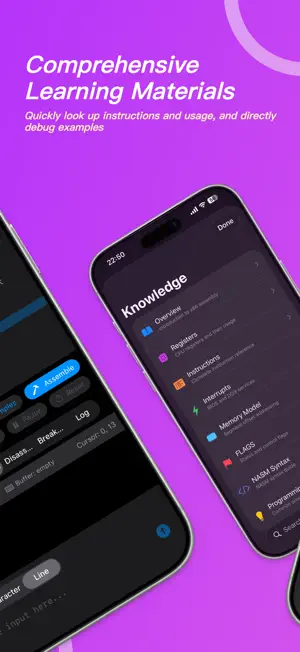
AssemblyLab is a powerful x86 16-bit real mode assembly language simulator designed for iPhone, iPad, and Mac. No complex setup required — learn and practice assembly programming anywhere, anytime. 【CORE FEATURES】 • Complete x86 16-bit CPU emulation with 60+ instructions • NASM syntax assembler — write and run instantly • Real-time disassembly view to understand machine code • Full 1MB memory space, authentic real mode simulation 【POWERFUL DEBUGGING TOOLS】 • Set breakpoints and step through code • Live register monitoring (AX/BX/CX/DX/SP/BP/SI/DI) • Visual FLAGS indicator display • Memory browser with hex view and editing • Execution log to trace every instruction 【BIOS/DOS INTERRUPT SUPPORT】 • INT 10h Video Services: cursor control, character output, screen scrolling • INT 21h DOS Services: keyboard input, string output, program termination 【LEARNING-FRIENDLY】 • Built-in example programs from Hello World to algorithms • Syntax-highlighted code editor • Console output for immediate feedback • Load and run .COM files 【CROSS-PLATFORM EXPERIENCE】 • iPhone: optimized portrait layout • iPad: split-view interface for the big screen • Mac: native support with keyboard shortcuts Perfect for: - Computer Science students - Operating Systems course learners - Reverse engineering beginners - Retro computing enthusiasts - Developers curious about low-level programming AssemblyLab is your ideal companion for exploring how computers really work at the lowest level. Download now and start your assembly journey!
What’s new
Version 1.7 · Updated September 17, 2026
- Turbo mode executes a batch of instructions per frame, lifting the 1000 instructions per second ceiling so interactive programs stay responsive. - New BIOS services: INT 16h keyboard reads with scan codes and INT 1Ah timer ticks, plus arrow keys and DOS extended keys in the console. - Float the registers, memory, console or log panel in a movable, resizable window; maximize it, minimize it to a bubble, and the layout is remembered. - The console is redrawn on a single canvas that fits the 80x25 grid to any screen, with pinch zoom and an on-screen D-pad in character mode. - Assembler and runtime errors can now be copied. Fixes for memory displacement, label addresses and NASM-style res* labels. - The 8086 model viewer now supports panning with two fingers, a right-drag, or an Option/Shift drag.
App privacy
The developer, Chongqing Hyperits Network Technology Co., Ltd., reported these privacy practices to Apple.
Data Not Collected
The developer does not collect any data from this app.
Alternatives to Assembly Lab: 8086 NASM IDE
Looking for apps like Assembly Lab: 8086 NASM IDE? Here are 6 similar apps on the App Store. The highest rated is JSON Navigator (5.0/5), and 1 of the 6 are free to download.
-
 ASM 8086 Emulator & Compiler
-
 SDK85
4.5
-
 Assembly Compiler–AI Assistant
-
 eBook Studio: Create & Publish
-
 C/C++$-LLVM Clang
4.5
-
 JSON Navigator
5.0
| App | Rating | Price | Last updated | Compare |
|---|---|---|---|---|
| Assembly Lab: 8086 NASM IDE | – | 1.99 USD | September 17, 2026 | |
| ASM 8086 Emulator & Compiler | – | 1.99 USD | Mar 5, 2026 | Compare |
| SDK85 | 4.5 / 5 (2) | Free | Nov 5, 2025 | Compare |
| Assembly Compiler–AI Assistant | – | 5.99 USD | Aug 27, 2026 | Compare |
| eBook Studio: Create & Publish | – | 0.99 USD | Jan 28, 2026 | Compare |
| C/C++$-LLVM Clang | 4.5 / 5 (2) | 2.99 USD | Sep 18, 2025 | Compare |
| JSON Navigator | 5.0 / 5 (2) | 4.99 USD | Oct 29, 2026 | Compare |