

PDF Tools - Create & Edit PDFs
PixelWave LLC Utilities iPhoneiPadiPod touch
PDF Tools - Create & Edit PDFs is a free Utilities app for iPhone and iPad by PixelWave LLC. Rated 5.0/5 from 2 ratings. Requires iOS 17.0.
- Rating
- 5.0
- 2 ratings
- Price
- Free
- on the App Store
- Size
- 10 MB
- Age 4+
- Updated
- Jul 1
- 2026 · v1.5.1
Screenshots


About PDF Tools - Create & Edit PDFs
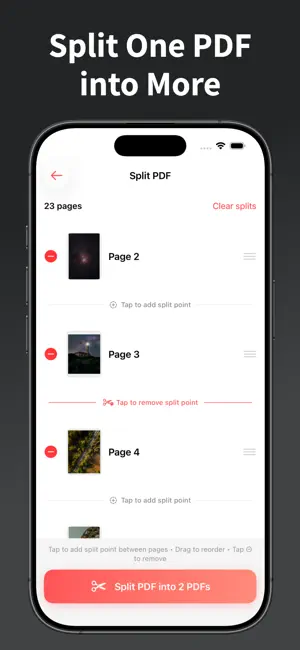
PDF Tools is your all-in-one PDF app for iOS. Create PDFs from photos, merge multiple files, split PDFs into separate documents, and reorder or delete pages—all in a simple, user-friendly interface. Perfect for students, professionals, and anyone who works with documents on the go. Key Features: Photos to PDF • Convert photos from your library into a professional PDF document • Combine up to 20 photos into a single PDF • Drag-and-drop reordering to arrange pages exactly how you want • Multiple page sizes: A4, Letter, Legal, A5, or B5 • Image fit options: Fit maintains aspect ratio, Fill crops to fit the page • High-quality output optimized for printing and sharing Reorder & Delete PDF Pages • Open any PDF and rearrange pages with intuitive drag-and-drop • Remove unwanted pages in a few taps • Save and share your edited PDF with ease Split PDF • Split one PDF into multiple files • Choose exactly where to split—by page or section • Get separate PDFs ready to share Merge PDFs • Combine multiple PDF files into one document • Select several PDFs and merge them in your chosen order • Ideal for assembling reports, contracts, or portfolios Perfect For: • Document scanning and archiving • Creating photo albums and portfolios • Sharing multiple images in one file • Organizing receipts and invoices • Merging reports or contracts • Splitting large PDFs for easier sharing • Reordering or removing pages before sending PDF Tools gives you everything you need to create, edit, and manage PDFs on your iPhone or iPad. Download now and handle all your PDF tasks in one app.
What’s new
Version 1.5.1 · Updated July 1, 2026
Bug fixes and performance improvements.
App privacy
The developer, PixelWave LLC, reported these privacy practices to Apple.
Data Used to Track You
The following data may be used to track you across apps and websites owned by other companies:
- Identifiers: User ID, Device ID
- Usage Data: Product Interaction, Advertising Data
Data Linked to You
The following data, which may be collected and linked to your identity, may be used for the following purposes:
- Identifiers: User ID, Device ID
- Usage Data: Product Interaction, Advertising Data
- Diagnostics: Crash Data, Performance Data
Used for: Third-Party Advertising, Analytics, App Functionality
Alternatives to PDF Tools - Create & Edit PDFs
Looking for apps like PDF Tools - Create & Edit PDFs? Here are 6 similar apps on the App Store. The highest rated is QReel: QR Code Generator (5.0/5), and all 6 are free to download.
-
 Simple PDF Page Remover
-
 JPG to PDF: Convert Picture to
-
 Easy Photo to PDF - Converter
-
 PDF: Reader, Scanner, Editor
4.0
PDF: Reader, Scanner, Editor
4.0
-
 Text to PDF: AI PDF Creator
1.0
Text to PDF: AI PDF Creator
1.0
-
 QReel: QR Code Generator
5.0
QReel: QR Code Generator
5.0
| App | Rating | Price | Last updated | Compare |
|---|---|---|---|---|
| PDF Tools - Create & Edit PDFs | 5.0 / 5 (2 ratings) | Free | July 1, 2026 | |
| Simple PDF Page Remover | – | Free | Apr 10, 2026 | Compare |
| JPG to PDF: Convert Picture to | – | Free | May 25, 2026 | Compare |
| Easy Photo to PDF - Converter | – | Free | Jan 26, 2026 | Compare |
| PDF: Reader, Scanner, Editor | 4.0 / 5 (4) | Free | Jun 1, 2025 | Compare |
| Text to PDF: AI PDF Creator | 1.0 / 5 (1) | Free | Dec 3, 2025 | Compare |
| QReel: QR Code Generator | 5.0 / 5 (2) | Free | Oct 13, 2026 | Compare |