

Media Transcript
David Paillot Utilities iPhoneiPadiPod touchMac
Media Transcript is a free Utilities app for iPhone and iPad by David Paillot. Requires iOS 16. Updated July 20, 2026.
- Price
- Free
- on the App Store
- Size
- 7 MB
- Age 4+
- Updated
- Jul 20
- 2026 · v1.1.2
Screenshots
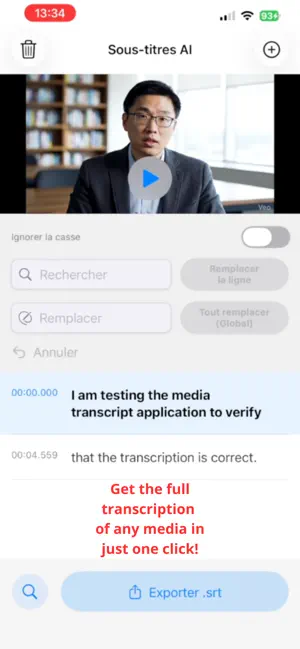
About Media Transcript
Media Transcript turns your audio and video into clear, accurate text, privately, directly on your device. No uploads, no accounts, no subscriptions. Just import a file and get your transcription. Whether you work with podcasts, interviews, voice memos, meetings, lectures, YouTube videos, or personal recordings, Media Transcript helps you capture every word effortlessly. The AI model runs fully offline. Your data never leaves your device. The first model load takes about a minute, then transcription usually finishes in a bit less than half the duration of the imported media. What you can do with Media Transcript • Create subtitles and captions • Transcribe podcasts, meetings, and interviews • Turn lectures into notes • Prepare articles • Keep written records Bonus: foreign languages and translation Transcribe audio in a foreign language (English, Spanish, Italian, etc.), then copy and paste the transcript into an LLM like ChatGPT to instantly translate what is being said. Bonus: YouTube metadata From your transcript, ask ChatGPT (or any LLM) to generate: • YouTube title ideas • tags and keywords • hashtags • a complete YouTube description • chapters with timestamps Why users choose Media Transcript • Works with audio and video • High-quality AI transcription • 100% offline, nothing is uploaded • Simple and easy to use • Your data stays private on your device Privacy Policy: https://removesilencevideo.com/media-transcript/privacy.php Terms of Use (EULA): https://www.apple.com/legal/internet-services/itunes/dev/stdeula/
What’s new
Version 1.1.2 · Updated July 20, 2026
• New subtitle enhancement workflow compatible with ChatGPT, Gemini, Claude, Mistral, and local LLMs. • Copy the generated prompt, send it to your preferred language model, then paste its response into Media Transcript. • Review every suggested correction before applying it. • Listen to the exact audio segment associated with each subtitle. • Choose corrections individually and freely edit the suggested replacement text. • Undo the entire correction batch in a single action. • Improved detection of spelling, contextual, and phonetic transcription errors. • Automatic scrolling to the corresponding subtitle during playback. • Modernized interface, more readable buttons, and an improved subscription screen. • More reliable audio and video file importing and processing. • General performance, stability, and user-experience improvements.
App privacy
The developer, David Paillot, reported these privacy practices to Apple.
Data Not Collected
The developer does not collect any data from this app.
Alternatives to Media Transcript
Looking for apps like Media Transcript? Here are 6 similar apps on the App Store. The highest rated is Demod: SDR Receiver (5.0/5), and 5 of the 6 are free to download.
-
 Lumo transcriptions
-
 Voxcribe
-
 Live Transcribe Audio To Text
3.0
Live Transcribe Audio To Text
3.0
-
 Demod: SDR Receiver
5.0
Demod: SDR Receiver
5.0
-
 TopTuber: YouTube SEO Tools
-
 Audiscript: Voice to Text
| App | Rating | Price | Last updated | Compare |
|---|---|---|---|---|
| Media Transcript | – | Free | July 20, 2026 | |
| Lumo transcriptions | – | Free | Mar 12, 2026 | Compare |
| Voxcribe | – | Free | Oct 6, 2026 | Compare |
| Live Transcribe Audio To Text | 3.0 / 5 (2) | Free | Aug 25, 2026 | Compare |
| Demod: SDR Receiver | 5.0 / 5 (6) | 9.99 USD | Oct 25, 2026 | Compare |
| TopTuber: YouTube SEO Tools | – | Free | Oct 24, 2026 | Compare |
| Audiscript: Voice to Text | – | Free | Oct 15, 2026 | Compare |
Compare Media Transcript with the top alternatives: ratings, updates, ASO score and keyword gaps →