

WallStage: Visualize Your Art
Dreamer Apps Photo & Video iPhoneiPadiPod touch
WallStage: Visualize Your Art is a free Photo & Video app for iPhone and iPad by Dreamer Apps. Rated 4.2/5 from 5 ratings. Requires iOS 18.0.
- Rating
- 4.2
- 5 ratings
- Price
- Free
- on the App Store
- Size
- 70 MB
- Age 4+
- Updated
- Oct 26
- 2026 · v2.0.1
Screenshots


About WallStage: Visualize Your Art
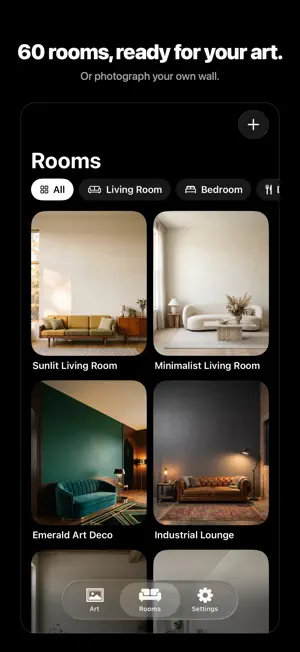
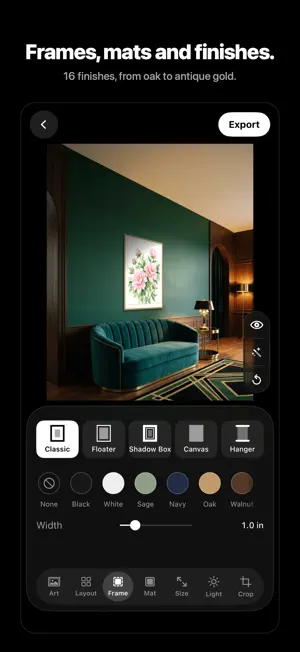
You've spent hours, maybe weeks, on a piece. Showing it off shouldn't take another afternoon in Photoshop. WallStage puts your artwork on real walls, at its real size, with the room's own perspective, light and shadow. Make a mockup in minutes and post it straight to Etsy or Instagram. SEE IT TRUE TO SCALE Set your print size in inches or centimeters and WallStage hangs it exactly that big. A 16×20 looks like a 16×20 above the sofa, not a guess. WallStage even suggests a size that suits the wall and the furniture below it. 80 ROOMS, OR YOUR OWN Start with 80 photorealistic rooms across 10 categories: living rooms, bedrooms, kitchens, nurseries, studios, beach houses, rooms with a view and more. Or photograph your own wall and measure it with your camera, so collectors can see the piece in a real home. PLACE IT BY HAND Drag and pinch your art on the wall. It snaps to the center, to the furniture and to sensible hanging heights, and steers clear of windows and doors in the built-in rooms. FRAME IT LIKE THE REAL THING Classic frames, floaters, shadow boxes, gallery-wrapped canvas and poster hangers in 16 finishes, from matte black and natural oak to antique gold. Add mats in 9 colors, with double and bottom-weighted options. BUILD GALLERY WALLS Duos, trios, grids of four, six or nine, and salon walls. Choose which piece hangs where. READY FOR EVERY POST Crop for Etsy, Instagram, Stories, print, web and banners, or zoom in for a close-up on the art. Export full-resolution images. KEEP EVERY MOCKUP Every mockup you save or share is kept in Mockups, ready to reopen, change, duplicate or share again. PERFECT YOUR ARTWORK FIRST Photographed your painting at an angle? Straighten it. Crop it, remove the background from sculptures and objects, and fine-tune exposure, contrast, saturation, warmth, sharpness and clarity. AI WHEN YOU WANT IT • Generate new rooms in any style you can describe, with a clear wall saved for your art • Restyle a room — new paint, new furniture, new light — without touching your art • Generate new artwork, or fix glare, edges and colors on your own photos with a sentence • Compare every AI edit with your original before you keep it. AI edits are saved as new pieces, so your original is never changed. ARTISTS AND SELLERS USE WALLSTAGE TO • Create Etsy and print-shop listings that stop the scroll • Help collectors picture the piece in their own home • Plan a gallery wall before a single nail goes in • Keep every listing consistent and professional FREE AND PRO Try WallStage free with the sample artwork and one piece of your own (exports carry a watermark). WallStage Pro unlocks all of your own art and rooms, every room, frame, mat and gallery layout, full-resolution exports with no watermark, and the AI tools. Choose weekly (with a 3-day free trial), monthly or yearly. Payment is charged to your Apple ID when you confirm. Subscriptions renew automatically unless cancelled at least 24 hours before the end of the current period. Manage or cancel anytime in your Apple ID settings. You've done the hard work. Give your art the stage. Questions? [email protected] Terms: https://www.wallstage.app/terms Privacy: https://www.wallstage.app/privacy
Ratings & reviews
4.2
5 ratings
What’s new
Version 2.0.1 · Updated October 26, 2026
• Mockups: every mockup you save or share is kept in the new Mockups tab, ready to reopen, change, duplicate or share again • 20 new rooms, from a vermilion Savannah parlor to a Patagonia lounge — now 80 in all • AI shows each step as it works, so you always know where your room or edit is • A quick welcome tour for new artists • Fixes and polish
App privacy
The developer, Dreamer Apps, reported these privacy practices to Apple.
Data Used to Track You
The following data may be used to track you across apps and websites owned by other companies:
- Purchases: Purchase History
- Identifiers: Device ID
- Usage Data: Product Interaction
Data Linked to You
The following data, which may be collected and linked to your identity, may be used for the following purposes:
- Purchases: Purchase History
- Identifiers: Device ID, User ID
- Usage Data: Product Interaction
- Location: Coarse Location
- User Content: Photos or Videos, Other User Content
Used for: Third-Party Advertising, Analytics, App Functionality