

MoneyTalks – Personal Finance
Dmytro Popov Finance iPhoneiPadiPod touch
MoneyTalks – Personal Finance is a free Finance app for iPhone and iPad by Dmytro Popov. Rated 5.0/5 from 1 ratings. Requires iOS 17.0.
- Rating
- 5.0
- 1 ratings
- Price
- Free
- on the App Store
- Size
- 39 MB
- Age 4+
- Updated
- Oct 18
- 2026 · v1.8.3
Screenshots


About MoneyTalks – Personal Finance
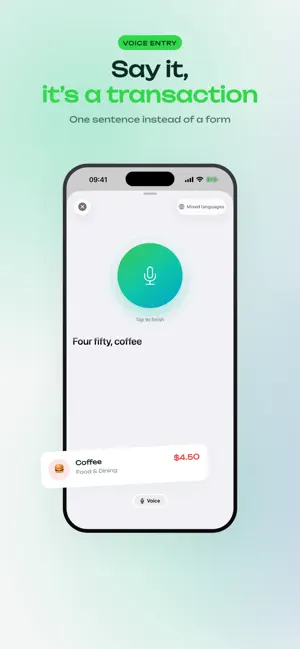
Most budget apps are overwhelming — heavy dashboards, endless menus, a setup that feels like homework. Money Talks is the opposite. Powerful enough to run your whole money life, simple enough that you'll actually keep using it. And now you barely have to type. Link your bank and transactions arrive on their own. Pay with Apple Pay and the purchase logs itself. Or just say what you spent, out loud. No signup, no learning curve. Open it and you're budgeting in 10 seconds. CONNECT YOUR BANK Link an account and transactions arrive already categorized — nothing to export, no receipts to photograph. You give consent on your bank's own page, so the app never sees your login. Pause refreshing or disconnect whenever you like. - Banks across the EU, plus monobank in Ukraine - Transfers between your own accounts pair automatically and stop counting as spending - Anything the app isn't sure about waits in one review queue, with a counter SAY IT INSTEAD OF TYPING IT "Twelve euros on coffee." That's the whole entry. Money Talks fills in the amount, the category, and the date, and you approve it before anything is saved. Ten a month are free. SEE YOUR WHOLE NET WORTH Add your bank, card, and cash accounts and see every balance in one place. Track what you own and what you owe, and Money Talks does the math: your real net worth, updated as money moves. - Bank, card, cash, savings, investments - Assets and what you owe in one honest number - Crypto holdings you enter yourself, valued live in your own currency BUDGET TOGETHER Money for two doesn't have to be messy. Share a space with your partner or family and budget as a team — same budgets, same goals, in sync across every device. Personal and shared finances stay completely separate. SPEND IN ANY CURRENCY Travel, live abroad, or earn and spend in different money? Track every expense in its own currency, with real exchange rates. USD, EUR, GBP, UAH, PLN, JPY, CAD, AUD, CHF, and 27 more — 36 in total. BUDGETS THAT STAY SIMPLE Set a limit, split it across categories — and go one level deeper into subcategories when you want the detail. Real-time progress and gentle warnings at 70% and 90%, so you stop overspending before it happens, not after. Daily, weekly, monthly, or yearly. No spreadsheets, no rules to learn. CLOSE THE MONTH IN ONE FLOW This is where other apps leave you on your own. Money Talks doesn't. When a budget ends, a guided wizard walks you through it: cover any overspending, then roll your leftover savings into next month or straight into a goal. One flow, no math, nothing lost. GOALS THAT MOTIVATE Vacation, emergency fund, paying off debt, a new car — set a target and watch it grow. Leftover budget can flow into your goals automatically, and milestones (25%, 50%, 75%, done!) keep you moving. COMING FROM ANOTHER APP? Import your history from your old app — Money Talks reads Revolut, Wise, YNAB, Wallet, Monefy, ZenMoney, Spendee and eight more, and matches your categories. Changed your mind? With an account, undo the whole import in one tap. YOUR DATA STAYS YOURS No data selling. No ads. Bank linking is yours to switch on, and disconnecting revokes it. Everything else lives on your device until YOU choose to sync — and you can leave anytime: export it all to CSV or PDF, no lock-in. It works fully offline, so you can log an expense on a flight and it syncs when you're back. Out in public? Incognito mode hides your amounts with a tap. FREE TO START, PRO WHEN YOU WANT MORE Everyday budgeting is free, ten voice entries a month included. Money Talks Pro lifts that limit and unlocks the full picture — bank connections, multiple accounts, subcategories, recurring transactions — with a 30-day free trial. No ads, no data selling, ever. Native design for iPhone and iPad. Simple. Private. Powerful — in that order. Download Money Talks and start in 10 seconds.
What’s new
Version 1.8.3 · Updated October 18, 2026
Totals that add up Your total matches what you entered If your money is in one currency, totals now add up to exactly what you typed. Before, a balance set during onboarding could drift by a few cents as exchange rates changed. With a Money Talks account, a purchase in another currency is converted at the rate of the day it happened, and rates refresh when you come back to the app. More Apple Pay purchases get logged Amounts are read the way your region writes them, like "1 234,50 €" or "190,00 грн.", and a refund is no longer saved as a purchase. If you used the app as a guest before creating an account, Apple Pay capture now works; before, it refused every purchase. The setup guide ends with a check that tells you whether your automation works. Invites open the app Tapping an invite to a shared space opens Money Talks instead of the browser. An expired or already used invite says so instead of showing a connection error. You stay signed in A session that refreshed while the phone was locked could sign you out without a word. That is fixed. If a session does end, your data stays on the phone, a card tells you, and signing back in picks up where you left off. Also in this update - Changing your main currency no longer rewrites your budgets - The widget and notifications show the same numbers as the dashboard - Goal progress counts contributions in another currency correctly - A transfer into a crypto wallet no longer raises net worth twice - One out-of-place subcategory no longer stops the rest of your history from syncing - Typing in the transaction form no longer stutters on large histories - Apple Pay can send purchases to a shared space someone else created - New currencies: Egyptian pound, Romanian leu, Saudi riyal, Jamaican dollar, Pakistani rupee
App privacy
The developer, Dmytro Popov, reported these privacy practices to Apple.
Data Linked to You
The following data, which may be collected and linked to your identity, may be used for the following purposes:
- Financial Info: Other Financial Info
- Contact Info: Email Address
- Identifiers: User ID
Used for: App Functionality
Alternatives to MoneyTalks – Personal Finance
Looking for apps like MoneyTalks – Personal Finance? Here are 6 similar apps on the App Store. The highest rated is Pocket Clear: Expense Tracker (4.9/5), and all 6 are free to download.
-
 MoneeUp: Expense Tracker
3.4
MoneeUp: Expense Tracker
3.4
-
 Pocket Clear: Expense Tracker
4.9
Pocket Clear: Expense Tracker
4.9
-
 Monee - Budget Planner App
4.9
Monee - Budget Planner App
4.9
-
 Cashew—Expense Budget Tracker
4.9
Cashew—Expense Budget Tracker
4.9
-
 Expense & Budget App: Spendee
4.6
Expense & Budget App: Spendee
4.6
-
 Fudget: Monthly Budget Planner
4.7
Fudget: Monthly Budget Planner
4.7
| App | Rating | Price | Last updated | Compare |
|---|---|---|---|---|
| MoneyTalks – Personal Finance | 5.0 / 5 (1 rating) | Free | October 18, 2026 | |
| MoneeUp: Expense Tracker | 3.4 / 5 (9) | Free | Aug 13, 2026 | Compare |
| Pocket Clear: Expense Tracker | 4.9 / 5 (161) | Free | Oct 27, 2026 | Compare |
| Monee - Budget Planner App | 4.9 / 5 (339) | Free | Oct 14, 2026 | Compare |
| Cashew—Expense Budget Tracker | 4.9 / 5 (534) | Free | Oct 22, 2026 | Compare |
| Expense & Budget App: Spendee | 4.6 / 5 (6,260) | Free | Oct 27, 2026 | Compare |
| Fudget: Monthly Budget Planner | 4.7 / 5 (1,829) | Free | Oct 22, 2026 | Compare |