

Old Photo Restore - ObjectsAI
Mobizion Photo & Video iPhoneiPadiPod touch
Old Photo Restore - ObjectsAI is a free Photo & Video app for iPhone and iPad by Mobizion. Rated 4.2/5 from 18 ratings. Requires iOS 15.6.
- Rating
- 4.2
- 18 ratings
- Price
- Free
- on the App Store
- Size
- 81 MB
- Age 17+
- Updated
- Oct 22
- 2026 · v1.1.0
Screenshots

About Old Photo Restore - ObjectsAI
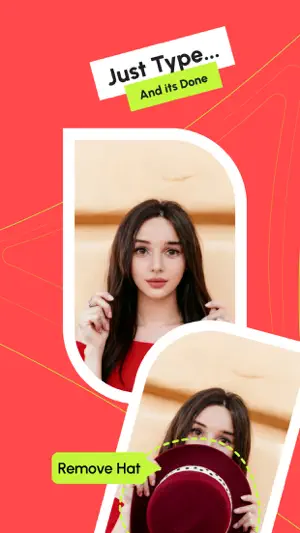
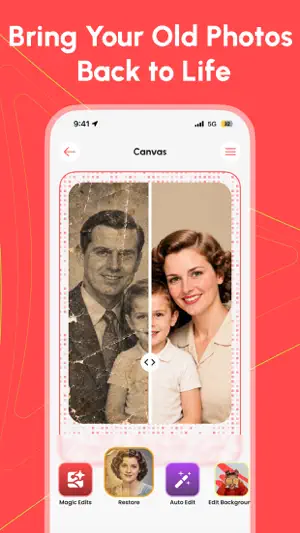
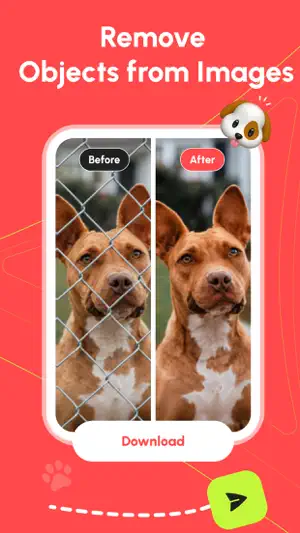
A shoebox of old photos. A wedding picture faded to yellow. A grandparent you have one good shot of. ObjectsAI brings those photos back, and erases anything you do not want in a picture. Open an old photo and the AI repair goes to work in a few seconds. Scratches, spots, stains and blur are cleaned up, faces come back sharper, and you can colorize black and white photos with one tap. Open any other photo, type what you want gone, and the AI eraser redraws that part of the picture with what should have been behind it. OLD PHOTO RESTORE Repair scratches, tears, creases, spots, dust and water damage Fix old photos that came out blurry, grainy or dark, and make them clear again Unblur and sharpen faces, eyes, hair and clothes Colorize black and white photos, or keep the original look Bring faded and yellowed prints back to life Lift the quality of an old picture without making it look fake Restore old photos from a scan, or from a phone shot of a print in an album Old picture restoration that still looks natural. Hold the compare button to see the original underneath. FOR THE PHOTOS THAT MATTER Most people open this app for family. A torn photo of your grandparents. A vintage picture from an album nobody has opened in years. A faded snapshot of your mum as a child. Photo restoration is about memories, so the result still has to look like the person you remember. A RESTORATION MAKES A GIFT Restore it, save it, print it, frame it. A repaired family photo works as a birthday gift, a Mother's Day or Father's Day present, or an anniversary surprise for your parents or grandparents. It takes seconds and it means more than something bought. AI ERASER AND OBJECT REMOVER No brush. No mask. You type it. Remove objects from photo backgrounds: bins, wires, poles, signs Remove people and photobombers from a group shot Text remover for dates stamped in the corner, logos and writing Small fixes too: a blemish, a stray hair, a red eye Type "remove the car on the left" and the object eraser handles the rest. Once it is erased, the gap is filled with what belongs there. It is the magic eraser people look for, driven by a sentence. ADD AND CHANGE Add: type something you want in the frame, like a cup on the desk Change: a different shirt color, or a new look for part of the shot ONE TAP AUTO EDIT Tap once and the app does the thinking. This AI enhancer keeps your subject, then fixes lighting, color and contrast, cuts noise and softens blemishes. A quick photo cleaner for a messy shot. No sliders. BACKGROUND TOOLS BG eraser: cut your subject out and get a clean transparent background Change background of photo: type where you would rather be, like a beach at sunset CARTOON AND ANIME Pick a photo, pick a style, done. Seven styles, including anime, chibi, 3D, cartoon, cyberpunk and pencil sketch. It starts from your own photo, so the result still looks like you. HOW TO USE Pick a photo from your gallery or the camera Choose Old Photo Restore, Magic Edits, Auto Edit, Background or Cartoonize Type a short sentence, or tap a style Save it to your gallery, or share it WHY PEOPLE KEEP IT Keep going on the same image: restore an old photo, then erase something No account, no sign up, no ads FREE AND PRO Free: 4 edits, then a 6 hour wait before the next 4. Free saves carry a small watermark, and you get 2 watermark free saves, once, so you can try it properly. Pro, weekly or monthly: unlimited edits, unlimited downloads with no watermark, and no waiting between edits. Subscriptions renew until you cancel in your App Store account settings. Results depend on the photo. Badly damaged prints sometimes need a second go, and rewording usually sorts it. Edits are processed in the cloud, so you need a connection. Other apps hand you a toolbar. ObjectsAI asks you a question instead. Support: [email protected] Terms of Use: https://objectsai.app/terms-of-use/ Privacy Policy: https://objectsai.app/privacy-policy/
Ratings & reviews
4.2
18 ratings
What’s new
Version 1.1.0 · Updated October 22, 2026
What's new: • Clearer messages when a photo can't be used or the connection drops • A finished result or download is never lost • Cancel an edit before it starts and it doesn't count • Purchases and Pro access are more reliable • Screen readers can now name every button and tool
App privacy
The developer, Mobizion, reported these privacy practices to Apple.
Data Not Linked to You
The following data, which may be collected but is not linked to your identity, may be used for the following purposes:
- User Content: Photos or Videos
Used for: App Functionality
Alternatives to Old Photo Restore - ObjectsAI
Looking for apps like Old Photo Restore - ObjectsAI? Here are 6 similar apps on the App Store. The highest rated is Radiant Landscape Camera (5.0/5), and all 6 are free to download.
-
 AI Prompts Art Photo Editing
-
 Radiant Landscape Camera
5.0
Radiant Landscape Camera
5.0
-
 Meme Maker & Text Behind Pic
4.7
Meme Maker & Text Behind Pic
4.7
-
 EditorPro: AI Video Editor
4.0
EditorPro: AI Video Editor
4.0
-
 SnapRenew: Restore Old Photos
5.0
SnapRenew: Restore Old Photos
5.0
-
 Portra Pic: AI Headshot Maker
4.6
Portra Pic: AI Headshot Maker
4.6
| App | Rating | Price | Last updated | Compare |
|---|---|---|---|---|
| Old Photo Restore - ObjectsAI | 4.2 / 5 (18 ratings) | Free | October 22, 2026 | |
| AI Prompts Art Photo Editing | – | Free | Dec 8, 2025 | Compare |
| Radiant Landscape Camera | 5.0 / 5 (2) | Free | Aug 21, 2026 | Compare |
| Meme Maker & Text Behind Pic | 4.7 / 5 (23) | Free | Aug 20, 2026 | Compare |
| EditorPro: AI Video Editor | 4.0 / 5 (9) | Free | Sep 28, 2026 | Compare |
| SnapRenew: Restore Old Photos | 5.0 / 5 (1) | Free | Apr 21, 2026 | Compare |
| Portra Pic: AI Headshot Maker | 4.6 / 5 (12) | Free | Oct 28, 2026 | Compare |