

EveryCount: Tally Counter
Softcoder EOOD Lifestyle iPhoneiPadiPod touch
EveryCount: Tally Counter is a free Lifestyle app for iPhone and iPad by Softcoder EOOD. Requires iOS 15.0. Updated October 20, 2026.
- Price
- Free
- on the App Store
- Size
- 144 MB
- Age 4+
- Updated
- Oct 20
- 2026 · v2.1.1
Screenshots



About EveryCount: Tally Counter
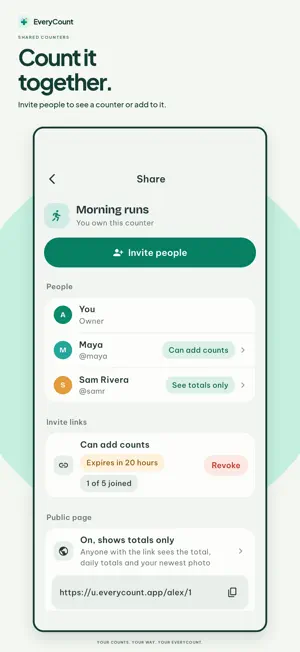
Make room for the things that matter. EveryCount helps you count everyday habits, personal milestones and the little things you want to remember, on your own or together. COUNT YOUR WAY Tap + to add one, log a value in your own unit, count the days since a moment that matters, or count down to something you're looking forward to. Day counters show their next milestones, like 1,000 days or one week to go, right on Home. Start with ready-made counters or make your own, each with its own color and icon. EVERY COUNT HAS A STORY Add a note or an earlier time to any count. Each counter has its own chart, history and calendar, so you can see your days add up. PHOTOS WITH EVERYCOUNT PLUS Add a photo to any count, or give a day counter a photo of its own, from the camera or your library. The newest photo fills its counter, tile and home-screen widget, and large widgets show it as a poster. Swipe across a counter's photo to go through them all, each with its count's time and note. Photos on shared counters are checked automatically before anyone else sees them. Seeing photos other people add is always free. EveryCount Plus is an optional yearly subscription you can buy without an EveryCount account. Payment is charged to your Apple Account when you confirm the purchase. Plus renews automatically unless you cancel at least 24 hours before the end of the current period. Manage or cancel it any time in your Apple Account settings. LOOK BACK Daily, weekly and monthly recaps show how your counters moved and which led the way. Recap notifications are optional, and their previews never show counter names or values. COUNT IT TOGETHER Sign in with Apple or Google to share a counter. Invite people with a link and choose what they can do: see the totals, see every count and note, or add counts of their own. Optional notifications tell you when someone else adds to a shared counter. PUBLIC PAGES Turn on a public page and share a short link anyone can open. Follow public counters right in the app, even without an account. SYNC WHEN YOU WANT IT Everything works offline, with no account. Sign in only if you want Sync across your phones or sharing. You can turn Sync off, export your data as CSV or JSON, export your photos, and delete your account in the app or on the web. KEEP YOUR COUNTERS CLOSE Home-screen widgets show a counter at a glance, with a day counter's next milestones, and you can add to a tally right from the widget. With Plus, they show its newest photo, and large widgets are yours too. DAILY REMINDERS, YOUR WAY On new installs the daily reminder starts on at 7:30 PM. Allow notifications, change the time or turn it off in Settings. Delivery depends on your device's settings. SAFE TOGETHER Report a counter, a count, a photo or a person, and block anyone you don't want in your counters. We review reports within 24 hours. MAKE IT YOURS Group counters into categories, pick a time range for your tiles, and switch between light and dark. Choose a language in You; your counters and notes keep their own names. From books and workouts to your next adventure, give the things you care about a place to add up. Terms of Use: https://everycount.app/terms Privacy Policy: https://everycount.app/privacy
What’s new
Version 2.1.1 · Updated October 20, 2026
Choose your language in You → Language: English, Deutsch, Français, Español, 日本語, 한국어, Tiếng Việt or 简体中文. The app, widgets, notifications and public pages follow your choice. Numbers and dates use your region’s format. Your counters and notes stay as they are. Fixes a startup issue after updating, keeping your counters and history intact.
App privacy
The developer, Softcoder EOOD, reported these privacy practices to Apple.
Data Linked to You
The following data, which may be collected and linked to your identity, may be used for the following purposes:
- Purchases: Purchase History
- Contact Info: Email Address, Name
- User Content: Photos or Videos, Other User Content
- Identifiers: User ID, Device ID
Used for: App Functionality
Alternatives to EveryCount: Tally Counter
Looking for apps like EveryCount: Tally Counter? Here are 6 similar apps on the App Store. The highest rated is The Guimares Group (5.0/5), and all 6 are free to download.
-
 ULTIMAL: Habit Streak Tracker
-
 The Guimares Group
5.0
-
 Gunluk-Journal
-
 EatAWhale: Habit Tracker
5.0
-
 Habitize - Great Habit Tracker
5.0
-
 InfoGen - Multi-functional app
| App | Rating | Price | Last updated | Compare |
|---|---|---|---|---|
| EveryCount: Tally Counter | – | Free | October 20, 2026 | |
| ULTIMAL: Habit Streak Tracker | – | Free | Aug 21, 2026 | Compare |
| The Guimares Group | 5.0 / 5 (2) | Free | Sep 4, 2026 | Compare |
| Gunluk-Journal | – | Free | May 11, 2026 | Compare |
| EatAWhale: Habit Tracker | 5.0 / 5 (4) | Free | Sep 9, 2026 | Compare |
| Habitize - Great Habit Tracker | 5.0 / 5 (1) | Free | Jun 12, 2025 | Compare |
| InfoGen - Multi-functional app | – | Free | Aug 30, 2026 | Compare |