

SafeBee: AI Scam Detector
Kris Chase Utilities iPhoneiPadiPod touch
SafeBee: AI Scam Detector is a free Utilities app for iPhone and iPad by Kris Chase. Rated 5.0/5 from 3 ratings. Requires iOS 15.1.
- Rating
- 5.0
- 3 ratings
- Price
- Free
- on the App Store
- Size
- 66 MB
- Age 4+
- Updated
- Sep 7
- 2026 · v1.1.7
Screenshots



About SafeBee: AI Scam Detector
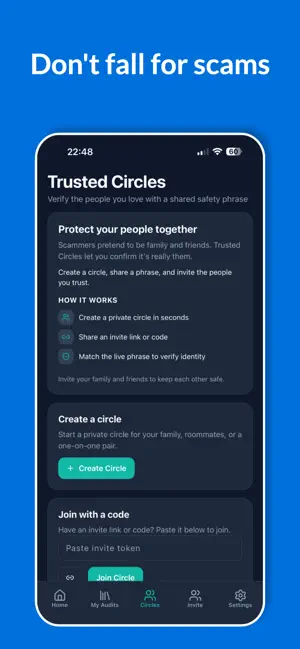
Protect the people you love from scams, phishing, and fraud — before they click, reply, or send money. SafeBee is the AI scam detector built for real life: suspicious texts, screenshots, links, QR codes, and emails. Scan in seconds, get a clear risk verdict, and know what to do next. Then invite parents, grandparents, and friends into a Trusted Circle so your family isn’t facing scams alone. WHY FAMILIES CHOOSE SAFEBEE • Protect parents & elders from grandpa scams, romance scams, and imposter fraud • Share peace of mind with Trusted Circles — your private family safety network • Spot phishing, smishing, fake links, and risky QR codes before harm happens • Learn the red flags with plain-language explanations (not jargon) • Stay aware of AI impersonation and voice-clone tricks scammers use today SCAN ANYTHING SUSPICIOUS • Text messages & SMS — paste or screenshot a scam text • Screenshots — analyze emails, chats, pop-ups, and alerts • URLs & links — check before you tap • QR codes — scan safely so a code can’t send you somewhere dangerous • Emails — catch phishing and account-takeover attempts HOW IT WORKS 1. Paste text, upload a screenshot, enter a URL, or scan a QR code 2. SafeBee’s AI checks for scam patterns, phishing signals, and fraud tactics 3. See a clear risk level, why it was flagged, and recommended next steps 4. Invite trusted contacts so loved ones can check with you — not guess alone BUILT FOR THE PEOPLE YOU WORRY ABOUT Seniors, busy parents, and anyone who isn’t a tech expert are top targets for elder fraud, tech-support scams, gift-card tricks, and “family emergency” calls. SafeBee makes checking simple — large, readable results and guidance you can act on immediately. TRUSTED CIRCLES Create a circle with the people you protect. When something feels off, they can scan and get clarity — and you can help without hovering. Family protection that respects privacy. EDUCATION OFTEN BEATS FEAR Browse guides on romance scams, phishing, QR dangers, AI impersonation, and how to verify who is really messaging you. Safer habits stick when everyone understands the playbook. PRIVACY-MINDED Scan what you choose to check. We focus on helping you decide safely — not selling fear. SUBSCRIPTION SafeBee Monthly and Annual plans unlock fuller scanning and protection features. Prices shown in the app may vary by region. Payment is charged to your Apple ID at confirmation. Subscriptions renew automatically unless canceled at least 24 hours before the end of the current period. Manage or cancel in Account Settings after purchase. SafeBee — AI scam detection for you, your parents, and your Trusted Circle. Terms of Use: https://safebee.io/terms Privacy Policy: https://safebee.io/privacy
What’s new
Version 1.1.7 · Updated September 7, 2026
SafeBee 1.1.7 • Safe Browsing protection improvements • Splash screen fix • Same Trusted Circles, scam scanning, and family protection Scan suspicious texts, screenshots, links, and QR codes before you click or send money.
App privacy
The developer, Kris Chase, reported these privacy practices to Apple.
Data Linked to You
The following data, which may be collected and linked to your identity, may be used for the following purposes:
- Contact Info: Email Address
- Usage Data: Product Interaction
- Diagnostics: Crash Data
- User Content: Photos or Videos
- Identifiers: User ID
Used for: Analytics, App Functionality
Data Not Linked to You
The following data, which may be collected but is not linked to your identity, may be used for the following purposes:
- Diagnostics: Performance Data
Used for: Analytics