

PhoneGuard – Anti Theft
HAWTHORNES COMPUTER REPAIR, LLC Utilities iPhoneiPadiPod touch
PhoneGuard – Anti Theft is a free Utilities app for iPhone and iPad by HAWTHORNES COMPUTER REPAIR, LLC. Rated 5.0/5 from 5 ratings. Requires iOS 17.0.
- Rating
- 5.0
- 5 ratings
- Price
- Free
- on the App Store
- Size
- 18 MB
- Age 4+
- Updated
- Oct 11
- 2026 · v3.1
Screenshots
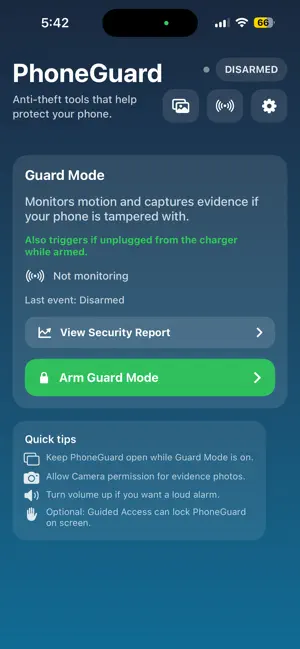


About PhoneGuard – Anti Theft
PhoneGuard – Anti Theft Protect your phone when you can’t watch it. PhoneGuard is an anti-theft security app designed to detect suspicious activity, alert you when your phone is moved, capture evidence, and help you find your phone with a simple clap. Whether you’re at the gym, work, school, or a public place, PhoneGuard gives you extra tools to help protect and monitor your device. Guard Mode Arm PhoneGuard before setting your phone down. Guard Mode monitors for physical movement and can alert you when your phone is picked up, shaken, or moved. When motion is detected, PhoneGuard gives you time to disarm before sounding the alarm and records evidence of the event. Find My Phone Can’t remember where you left your phone? Start Find My Phone and clap twice to trigger an alarm and help locate your device. Photo & Video Evidence PhoneGuard captures photo evidence when suspicious activity is detected. Premium users can also capture an 8-second evidence video with audio for additional context. Review captured activity anytime from your Evidence Vault. Security Report View recent PhoneGuard activity in one place, including Guard Mode activity, motion alerts, charger alerts, evidence activity, Find My Phone events, and other security events. Protected Evidence Create a PhoneGuard PIN to help protect access to your Evidence Vault and captured security activity. Why PhoneGuard? • Motion-based Guard Mode • Find My Phone with double-clap detection • Automatic photo evidence • 8-second video evidence with audio for Premium users • Security activity reports • PIN-protected Evidence Vault • Evidence stored locally on your device • Simple, easy-to-use security tools Important Notes • Keep PhoneGuard open while Guard Mode is armed. • Find My Phone requires microphone access and must be started before locking your iPhone. • Some features require PhoneGuard Premium. A 3-day free trial is available for eligible users. Download PhoneGuard and add an extra layer of protection to your iPhone. Terms of Use (EULA): https://www.apple.com/legal/internet-services/itunes/dev/stdeula/ Privacy Policy: https://sites.google.com/view/phoneguard-privacy/home
Ratings & reviews
5.0
5 ratings
What’s new
Version 3.1 · Updated October 11, 2026
• Added Silent Mode for Premium users to capture security evidence without triggering an audible alarm • Added automatic Bluetooth scan timeout after 3 minutes • Performance improvements and bug fixes
App privacy
The developer, HAWTHORNES COMPUTER REPAIR, LLC, reported these privacy practices to Apple.
Data Not Collected
The developer does not collect any data from this app.
Alternatives to PhoneGuard – Anti Theft
Looking for apps like PhoneGuard – Anti Theft? Here are 6 similar apps on the App Store. The highest rated is Boame by Sercs (5.0/5), and 5 of the 6 are free to download.
-
 Spike - Subscription Tracker
-
 Boame by Sercs
5.0
Boame by Sercs
5.0
-
 StayPut: Phone Motion Alarm
-
 Orion Sentry
5.0
Orion Sentry
5.0
-
 MoveGuard Detector
-
 Ward - Phone Guard & Alarm
| App | Rating | Price | Last updated | Compare |
|---|---|---|---|---|
| PhoneGuard – Anti Theft | 5.0 / 5 (5 ratings) | Free | October 11, 2026 | |
| Spike - Subscription Tracker | – | Free | Jul 15, 2026 | Compare |
| Boame by Sercs | 5.0 / 5 (1) | Free | May 13, 2026 | Compare |
| StayPut: Phone Motion Alarm | – | Free | Oct 10, 2026 | Compare |
| Orion Sentry | 5.0 / 5 (1) | Free | Jul 16, 2025 | Compare |
| MoveGuard Detector | – | 8.99 USD | Oct 20, 2026 | Compare |
| Ward - Phone Guard & Alarm | – | Free | Aug 29, 2026 | Compare |