

CueBell: Presentation Timer
Toru Kano Productivity iPhoneiPadiPod touchApple Watch
CueBell: Presentation Timer is a free Productivity app for iPhone and iPad by Toru Kano. Requires iOS 18.5. Updated October 25, 2026.
- Price
- Free
- on the App Store
- Size
- 10 MB
- Age 4+
- Updated
- Oct 25
- 2026 · v1.4.0
Screenshots


About CueBell: Presentation Timer
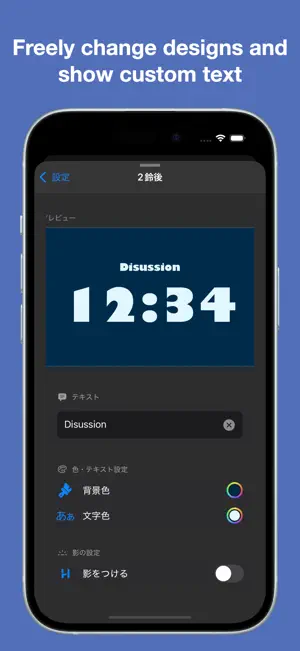
CueBell is a high-accuracy, feature-rich timer designed for presentations and conference talks. It works fully offline, contains no ads, and supports Apple Watch. Key Features - High-accuracy timer (references the system clock and corrects timing to minimize drift over long sessions) - Countdown / Count-up modes - Up to 10 bell (alarm) times - Apple Watch support (see the remaining time on your wrist, start / pause / reset, bells as haptics) - Bells ring via notifications even while the app is in the background (using your selected bell sound and ring count) - Bells play even when your device is in silent mode - Timer in the Dynamic Island and on the Lock Screen (Live Activities, enable in Settings) - Per-section styling and on-screen text labels - Choose from many fonts and bell sounds - Fine-grained appearance customization - Save frequently used setups as presets - Optimized for both portrait and landscape (iPhone / iPad) - Supports Japanese / English / Chinese (automatically follows your device language) - Clean, readable UI Apple Watch - Presets set on iPhone (bell times and section colors) sync automatically - Start, pause, reset and switch presets from the Watch - Bells arrive as haptics and notifications (sound and haptics can be toggled in the Watch settings) - Keeps timing on the Watch even when your iPhone is not nearby How to Use 1. Tap the gear icon to set bell times 2. Set the end bell (finish time) 3. Tap ▶ to start 4. On Apple Watch, use the synced presets as they are
What’s new
Version 1.4.0 · Updated October 25, 2026
• iPhone Duo support: unfold for a larger timer. When half-folded, the timer and buttons move to either side of the crease so nothing sits on the fold. • Fixed an issue where the timer could run twice when the app was open in two windows (for example on iPad). • Fixed an issue where iPhone bells might not ring when the timer was started or resumed from Apple Watch while the iPhone was locked. • Fixed an issue where a Live Activity could remain on the Lock Screen after the app was force-quit. • Improved syncing with Apple Watch.
App privacy
The developer, Toru Kano, reported these privacy practices to Apple.
Data Not Collected
The developer does not collect any data from this app.
Alternatives to CueBell: Presentation Timer
Looking for apps like CueBell: Presentation Timer? Here are 6 similar apps on the App Store. The highest rated is The Presentation Timer -Simple (5.0/5), and all 6 are free to download.
-
 The Presentation Timer -Simple
5.0
The Presentation Timer -Simple
5.0
-
 The Presentation Timer
4.0
The Presentation Timer
4.0
-
 プレゼン時計/PresenClock
-
 Goyoyak
-
 Dora-Gong Presentation Timer
-
 VisibleTime | See Time Flow
| App | Rating | Price | Last updated | Compare |
|---|---|---|---|---|
| CueBell: Presentation Timer | – | Free | October 25, 2026 | |
| The Presentation Timer -Simple | 5.0 / 5 (1) | Free | Jan 29, 2025 | Compare |
| The Presentation Timer | 4.0 / 5 (2) | Free | Jun 21, 2024 | Compare |
| プレゼン時計/PresenClock | – | Free | Aug 21, 2026 | Compare |
| Goyoyak | – | Free | Oct 28, 2026 | Compare |
| Dora-Gong Presentation Timer | – | Free | Oct 21, 2026 | Compare |
| VisibleTime | See Time Flow | – | Free | Oct 27, 2026 | Compare |