

Piyanomini · Ars
ISTEMI FURKAN YUR Music iPhoneiPadiPod touch
Piyanomini · Ars is a free Music app for iPhone and iPad by ISTEMI FURKAN YUR. Requires iOS 15.0. Updated October 19, 2026.
- Price
- Free
- on the App Store
- Size
- 26 MB
- Age 4+
- Updated
- Oct 19
- 2026 · v1.0.2
Screenshots

About Piyanomini · Ars
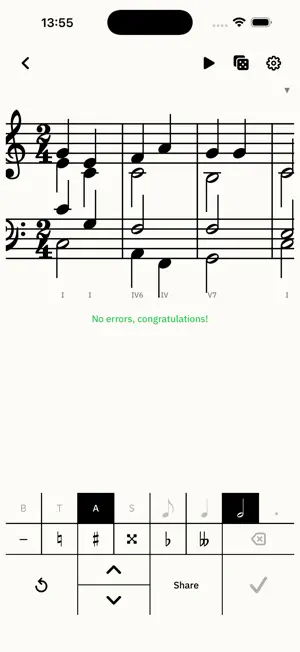
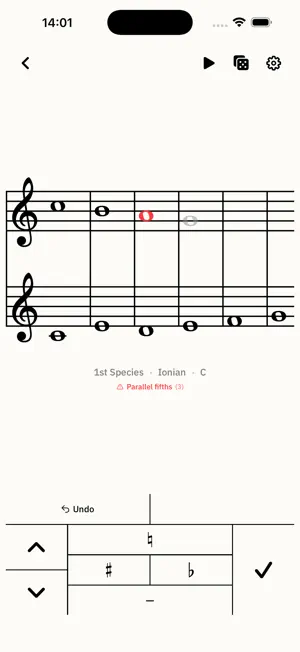
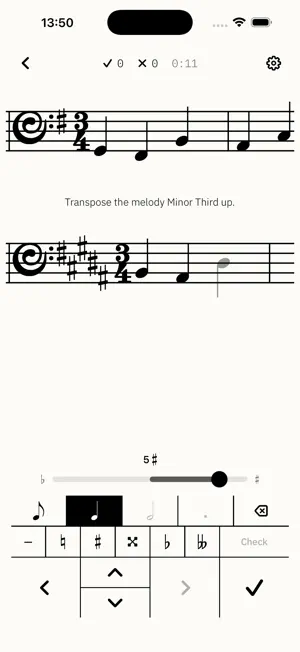
Piyanomini - Ars brings music theory, ear training, sight-reading, dictation, intonation, harmony and counterpoint into one carefully designed practice environment. Ars does not force you through fixed levels. Choose the key, range, clef, tempo, difficulty and content of each exercise. Every new exercise is generated from those settings, so you train the skill itself instead of memorizing a small question bank. 8 TOPICS, 32 EXERCISES - Rhythm: Repeat by ear, sight-read written rhythm, or complete rhythm dictation. Configure measures, tempo, beat unit, notes and rests, dots, ties, triplets and more. Practice with piano or percussion sounds; use one or two hands in the reading exercise. - Notes & Staff: Read notes in treble, bass, alto and tenor clefs, find notes on the piano, and train absolute pitch. Set the note range, key signature, accidentals and double accidentals. Optional adaptive practice brings weaker notes back more often. - Intervals: Compare intervals, recognize them on the staff, construct them, and identify them by ear. In written exercises, work melodically or harmonically from unison to octave, with a broad set of diminished and augmented qualities. - Scales & Keys: Identify and construct key signatures; recognize, build and hear scales. Beyond major and minor, study harmonic minor, melodic minor, harmonic major, Dorian, Phrygian, Lydian, Mixolydian and Locrian. - Chords: Recognize, construct and hear 34 triad, seventh and extended chord types. Practice root positions and inversions. Train scale degrees and harmonic function with Roman-numeral or functional notation, from individual chords to cadences and longer progressions. - Melody: Identify pitch direction, sing back what you hear, practice sight-singing and instrumental sight-reading, and write melody dictation. In the transposition exercise, transpose by interval, to a new key, or for B-flat, A, F and E-flat instruments. Generate new melodies with configurable meter, tempo, key, phrase length and chromaticism. - Intonation: Define your vocal range and practice scales, intervals and arpeggios. Compare microphone-detected pitch with target notes on a scrolling piano roll and live pitch trace. Use the synchronized metronome and piano playback. - Harmony & Counterpoint: Harmonize a given soprano or bass in four-part SATB texture, write freely, or use your own melody. Work with cadences, chromaticism, modulation to related keys, Roman numerals and functional notation, then inspect detailed rule feedback. Write cantus firmus and practice all five species of counterpoint, above or below the given voice. TOOLS FOR SERIOUS PRACTICE - 40 to 240 BPM metronome with spoken counts, tap tempo and custom two-voice patterns - Chromatic tuner with an adjustable 400 to 480 Hz reference and classic, helix and strobe views - Practice timer, detailed history, weekly reminders, and a searchable glossary with 300+ terms and notation signs - External and Bluetooth MIDI input in compatible exercises - Printable and shareable PDF exercise sheets in selected exercises - Share exercise setups as a link, QR code or compact code. A student opens it and the same settings are applied, with no account or server required. Turkish, English and Russian interfaces; nine themes; iPhone and iPad layouts. Russian primers are in preparation; the “What · How” sections currently appear in English. No account is required. There are no ads and no tracking. Practice data stays on your device, and core exercises work without an internet connection. Try every feature free for the first 14 days. There is no automatic charge. If you decide to continue, unlock lifetime access with one in-app purchase.
What’s new
Version 1.0.2 · Updated October 19, 2026
What's new: • Counterpoint rules have been rewritten following Jeppesen's system for the Palestrina style. Checking now separates errors (red) from suggestions (orange, no point deduction). The cantus firmus generator follows the same rules. • New chapter in the Counterpoint What · How lesson: Modes and Musica Ficta. • New typeface: Alte Haas Grotesk. Switch to Jost or IBM Plex Sans under Settings > Font; screen layouts stay the same. • Rhythm: with Hard Eighths or Hard Triplets turned off, ties no longer create syncopation. No more than three notes are tied in a row. • On the Home Screen the app is now simply called Ars.
App privacy
The developer, ISTEMI FURKAN YUR, reported these privacy practices to Apple.
Data Not Collected
The developer does not collect any data from this app.
Alternatives to Piyanomini · Ars
Looking for apps like Piyanomini · Ars? Here are 6 similar apps on the App Store. The highest rated is Guitar Scales in Colours (2.0/5), and 3 of the 6 are free to download.
-
 Harmony & Counterpoint
1.0
Harmony & Counterpoint
1.0
-
 Counterpoint Dojo
-
 Solfege - Vocal Sight Reading
-
 EarChord: Ear Training
-
 Guitar Scales in Colours
2.0
Guitar Scales in Colours
2.0
-
 ScoreFlow -Sheet Music Reader
| App | Rating | Price | Last updated | Compare |
|---|---|---|---|---|
| Piyanomini · Ars | – | Free | October 19, 2026 | |
| Harmony & Counterpoint | 1.0 / 5 (1) | 4.99 USD | Oct 11, 2026 | Compare |
| Counterpoint Dojo | – | Free | Sep 29, 2026 | Compare |
| Solfege - Vocal Sight Reading | – | 12.99 USD | Nov 5, 2023 | Compare |
| EarChord: Ear Training | – | Free | Sep 30, 2026 | Compare |
| Guitar Scales in Colours | 2.0 / 5 (2) | 3.99 USD | Jan 23, 2026 | Compare |
| ScoreFlow -Sheet Music Reader | – | Free | Oct 16, 2026 | Compare |
Compare Piyanomini · Ars with the top alternatives: ratings, updates, ASO score and keyword gaps →