

Clock Worksheet Maker
Fumihiro Kawasaki Education iPhoneiPadiPod touch
Clock Worksheet Maker is a free Education app for iPhone and iPad by Fumihiro Kawasaki. Requires iOS 18.2. Updated July 30, 2026.
- Price
- Free
- on the App Store
- Size
- 8 MB
- Age 4+
- Updated
- Jul 30
- 2026 · v1.0.9
Screenshots



About Clock Worksheet Maker
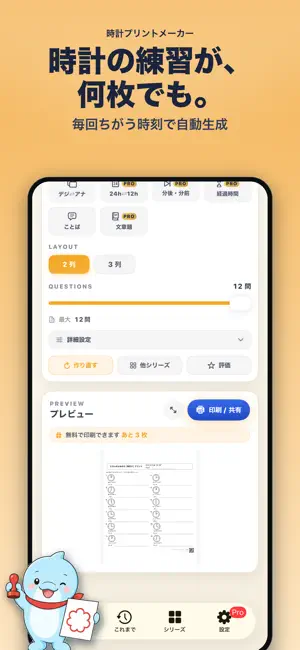
Clock Worksheet Maker is an app for instantly generating practice worksheets focused on reading clocks. Whether for home study, tutoring, or classroom materials, it has you covered. Reading clocks is a foundational skill that connects math with everyday life. This app offers a wide range of problem formats so learners can build up gradually from beginner to advanced. With just a few taps, you can generate a worksheet and save or print it as a PDF. ■ Main Features (10 problem types) • Analog clock reading (on the hour / 5-minute / 1-minute steps) • Time Words — pick the natural Japanese expression (e.g. "o'clock", "half past") • Match analog and digital clocks • Digital → Analog (draw the hands yourself) • 24-hour ⇄ 12-hour conversion • Time ±N minutes (before / after) • Find the elapsed time • Time word problems (departures, arrivals, durations) • Both question sheet and answer sheet output • Freely adjust problem count, columns, and problem type • Export, print, and share as PDF ■ For Teachers and Parents • Create homework worksheets quickly • Adjust difficulty to the learner's level • Practice repeatedly beyond what printed drills offer • Prepare flexible materials for tutoring and special education The app is designed with these needs in mind. Each worksheet is regenerated freshly, so you can produce variations of the same format as often as you need — ideal for repeated practice. ■ Try Before You Subscribe You can print or save up to 3 worksheets for free. Check the actual output quality first, then decide whether to upgrade to Pro. ■ Unlocked with Pro • Unlimited printing and PDF export • Advanced problem types (elapsed time, ±N minutes, 24h⇄12h, word problems) • Answer sheet output • School / class name printed in the header (great for classroom handouts) • Unlimited history with reprint • No ads Choose between monthly and yearly subscriptions. Perfect for tutoring centers, classrooms, and ongoing home learning. ■ Note This app is a learning support tool. Please use it under the guidance of a parent or teacher according to the learner's level. Terms of Use: https://lineocean.com/clockworksheetmaker/ Privacy Policy: https://lineocean.com/clockworksheetmaker/
What’s new
Version 1.0.9 · Updated July 30, 2026
We've added Study Reminders. ・Get a gentle nudge to create a worksheet at the day and time you choose — great for building a weekly study routine. ・Seasonal reminders for moments like the start of a new term or long holidays are now supported. ・Turn reminders on or off anytime (off by default). At most one notification per week — we'll never overdo it. You'll find it under Settings → "Notifications" → "Study Reminders." We've also made small usability improvements and bug fixes. Thank you for using the app!
App privacy
The developer, Fumihiro Kawasaki, reported these privacy practices to Apple.
Data Used to Track You
The following data may be used to track you across apps and websites owned by other companies:
- Usage Data: Advertising Data
Data Linked to You
The following data, which may be collected and linked to your identity, may be used for the following purposes:
- Usage Data: Advertising Data
Used for: Third-Party Advertising
Alternatives to Clock Worksheet Maker
Looking for apps like Clock Worksheet Maker? Here are 6 similar apps on the App Store.
-
 ShokyozanMaster
-
 Ruidaichan-Extra Math Practice
-
 漢字ドリルメーカー
-
 Math Adventure for Kids
-
 とけいよめるかな?
-
 TimeTower - Learn to Tell Time
| App | Rating | Price | Last updated | Compare |
|---|---|---|---|---|
| Clock Worksheet Maker | – | Free | July 30, 2026 | |
| ShokyozanMaster | – | Free | May 5, 2026 | Compare |
| Ruidaichan-Extra Math Practice | – | Free | May 19, 2026 | Compare |
| 漢字ドリルメーカー | – | Free | Jan 13, 2026 | Compare |
| Math Adventure for Kids | – | Free | Apr 13, 2026 | Compare |
| とけいよめるかな? | – | Free | Jul 13, 2026 | Compare |
| TimeTower - Learn to Tell Time | – | Free | Oct 12, 2026 | Compare |