

Doodle A Day
Jacob Wilmoth Lifestyle iPhoneiPadiPod touch
Doodle A Day is a free Lifestyle app for iPhone and iPad by Jacob Wilmoth. Requires iOS 17.6. Updated November 12, 2026.
- Price
- Free
- on the App Store
- Size
- 24 MB
- Age 12+
- Updated
- Nov 12
- 2026 · v1.1.2
Screenshots
Save to Pinterest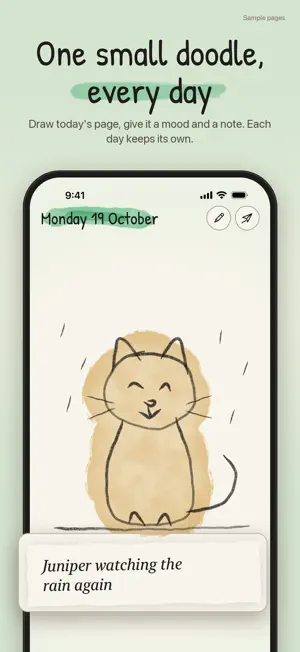

About Doodle A Day
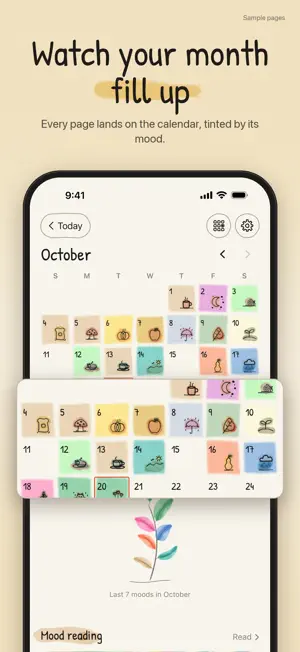
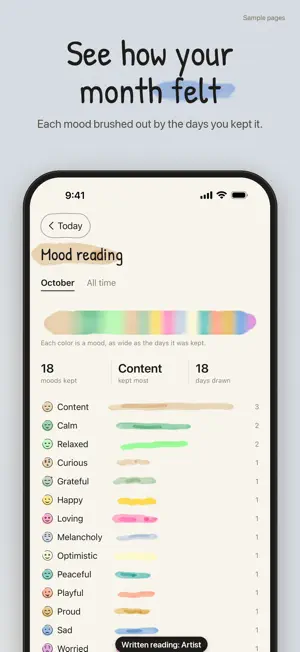
One tiny drawing a day. A year later, a hand-drawn journal you'll love flipping back through. Calm paper, a soft pencil, a splash of color, and a mood for every day. No skill needed, just a minute and whatever caught your eye today. A coffee cup. The dog asleep in a sunbeam. Rain on the window. Some days the doodle is three lines, some days it's the best thing you drew all week. Add a short note in your own words and the day is kept. Each day you also pick a mood. Over the weeks, the month view turns those moods into a soft watercolor summary, so you can see how the month really felt at a glance. With Artist, a written mood reading puts it into a few gentle lines. Then the pages start to add up. Scroll back through them full screen and the small moments come back, one drawing at a time. The year slowly fills in with your own little pictures. Doodle A Day lives on iPhone and iPad and syncs through your own iCloud, so your journal is right there on either one. Widgets keep today's doodle on your Home Screen, and a gentle reminder at the time you choose helps keep the habit going. FREE - Realistic pencil and pen, plus an eraser - Ink and paper colors - Notes up to 500 characters, shown as a torn-paper caption - Edit today's and yesterday's doodle - Share a page, a scrapbook of days or a flip-book GIF - A mood for every day, with a watercolor mood summary for the month - Home Screen and Lock Screen widgets - Daily reminders - iCloud sync between iPhone and iPad Free includes ads. ARTIST: $2.99, ONE TIME - Watercolor and brush - The full color wheel - Edit any earlier day - A written mood reading for your month - No ads, just the page Your doodles and notes stay private in your own iCloud and aren't shared with anyone. The free version shows ads from AdMob, which use device ID and product interaction data. Privacy Policy: https://wilmoth.engineering/apps/doodle-a-day/privacy Terms of Use: https://wilmoth.engineering/apps/doodle-a-day/terms Support: https://wilmoth.engineering/apps/doodle-a-day/support
What’s new
Version 1.1.2 · Updated November 12, 2026
- 9 more languages: German, French, Spanish, Italian, Portuguese, Japanese, Korean, Chinese and Dutch. - Designed for Duo. - Performance improvements. - Pencil is more pencily.
App privacy
The developer, Jacob Wilmoth, reported these privacy practices to Apple.
Data Used to Track You
The following data may be used to track you across apps and websites owned by other companies:
- Identifiers: Device ID
Data Linked to You
The following data, which may be collected and linked to your identity, may be used for the following purposes:
- Location: Coarse Location
- Identifiers: Device ID
- Usage Data: Product Interaction, Advertising Data
Used for: Third-Party Advertising, Analytics
Data Not Linked to You
The following data, which may be collected but is not linked to your identity, may be used for the following purposes:
- Diagnostics: Crash Data, Performance Data
Used for: Analytics, App Functionality
Alternatives to Doodle A Day
Looking for apps like Doodle A Day? Here are 6 similar apps on the App Store. The highest rated is BloomYou (5.0/5), and all 6 are free to download.
-
 Daily Ink: Doodle & Art Diary
4.8
-
 Watermama
-
 DoddleDiary
-
 Squiggle: Doodle Calendar
-
 SMOL - sweet moments of life
-
 BloomYou
5.0
| App | Rating | Price | Last updated | Compare |
|---|---|---|---|---|
| Doodle A Day | – | Free | November 12, 2026 | |
| Daily Ink: Doodle & Art Diary | 4.8 / 5 (4) | Free | Nov 6, 2026 | Compare |
| Watermama | – | Free | Oct 28, 2026 | Compare |
| DoddleDiary | – | Free | Nov 2, 2026 | Compare |
| Squiggle: Doodle Calendar | – | Free | Aug 28, 2026 | Compare |
| SMOL - sweet moments of life | – | Free | Nov 23, 2026 | Compare |
| BloomYou | 5.0 / 5 (2) | Free | Sep 17, 2025 | Compare |
Compare Doodle A Day with the top alternatives: ratings, updates, ASO score and keyword gaps →