

MinuteBank: Focus & App Lock
Berfin Aydin Productivity iPhoneiPadiPod touchMacApple Watch
MinuteBank: Focus & App Lock is a free Productivity app for iPhone and iPad by Berfin Aydin. Rated 5.0/5 from 5 ratings. Requires iOS 18.0.
- Rating
- 5.0
- 5 ratings
- Price
- Free
- on the App Store
- Size
- 52 MB
- Age 4+
- Updated
- Oct 19
- 2026 · v1.5
Screenshots

About MinuteBank: Focus & App Lock
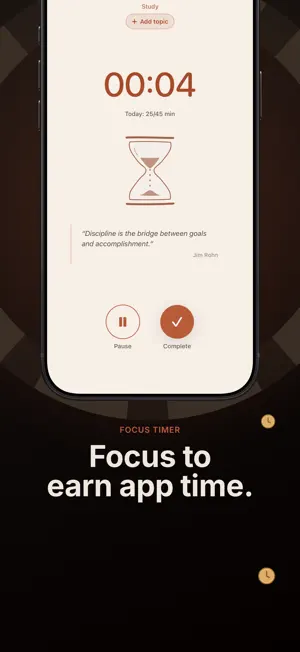
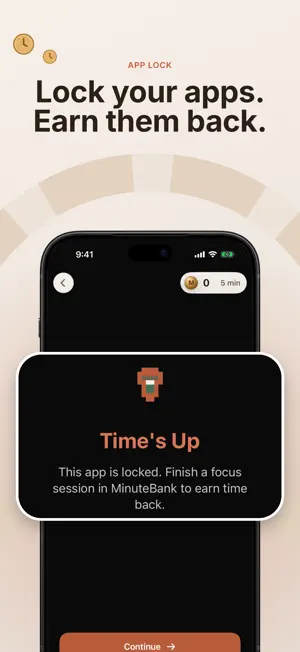
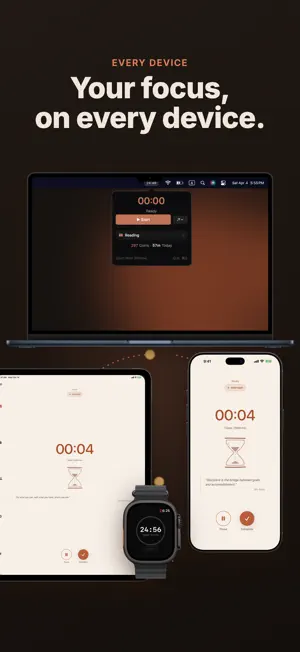
Your apps steal your attention. MinuteBank makes you earn it back. MinuteBank locks the apps that pull you away and opens them only with focus time. Start a focus session, earn coins for every minute, then spend those coins to open the apps you chose to block. When the coins run out, the apps lock again until you focus some more. HOW IT WORKS • Pick the apps, websites, and categories you want blocked • Focus in count-up, Pomodoro countdown, or Endurance Challenge mode • Earn coins for every minute of focus • Spend coins on app time, or bank them as time for things you name, like free time • Short on coins? Borrow a few and pay them back with future focus APP LOCK (ON IPHONE AND IPAD) Lock any apps, websites, and categories, and spend earned coins on app time. App Lock uses Apple's Screen Time system. Three ways to lock: • Earn-back lock: apps stay blocked until you buy time with coins, and lock again when the time runs out • Scheduled lock: block apps during set hours, with no buy-back • Auto Mode: your coins drain only for the minutes you spend in locked apps, and the apps lock again at zero 14 DAYS FREE, THEN PRO On iPhone and iPad, MinuteBank starts with a 14-day free trial of Pro on the yearly plan. After the trial, you need a Pro plan to keep using the app. The yearly plan renews unless you cancel in Settings before the trial ends. You can also pay monthly, or pay once for lifetime Pro, which lasts for as long as MinuteBank is offered; these have no trial. One purchase covers iPhone, iPad, and Mac. Pro includes everything: • Unlimited App Lock: Unlimited apps, websites and categories; scheduled locks • Instant sync: A running timer follows you across iPhone, iPad, and Mac, and changes arrive in seconds • Advanced stats: Timelines, heatmaps, comparisons, and history • Unlimited tags: Track every subject and project separately • Topics: Split a focus area into topics, like Chemistry and Biology • CSV export: Download every session • The focus timer, coins, daily and weekly goals, time banks, streaks, the friends leaderboard, and group challenges ON ALL YOUR DEVICES • iPhone, iPad, Mac, and Apple Watch • Mac menu bar app for quick timer access • Widgets, Live Activities, and Dynamic Island on iPhone • Sign in once and your coins, sessions, and streaks follow you BUILT FOR CONSISTENCY • A study timer for students and a focus timer for anyone who procrastinates • Daily goals per subject, on the days you pick • Your master streak and weekly minutes set your place on the friends leaderboard • Group challenges with a shared minute target • Works offline, syncs when you are back online Terms of Use (EULA): https://www.apple.com/legal/internet-services/itunes/dev/stdeula/ Privacy Policy: https://minutebank.app/privacy
Ratings & reviews
5.0
5 ratings
What’s new
Version 1.5 · Updated October 19, 2026
Thanks for focusing with MinuteBank. What's new in 1.5: • Weekly goals: aim for a total each week, and Home shows what is left for today. • See your group's week on Home: a dot for every day each friend hits the challenge goal. • A new "This week" widget keeps your goals on your Home Screen. • Topics with Pro: split a focus area into topics, like courses or chapters, and see where your time went.
App privacy
The developer, Berfin Aydin, reported these privacy practices to Apple.
Data Linked to You
The following data, which may be collected and linked to your identity, may be used for the following purposes:
- Purchases: Purchase History
- Identifiers: User ID, Device ID
- Usage Data: Product Interaction, Other Usage Data
- Other Data: Other Data Types
- Location: Coarse Location
- Contact Info: Email Address, Name, Phone Number
- Contacts: Contacts
- User Content: Gameplay Content, Other User Content
- Diagnostics: Crash Data, Performance Data, Other Diagnostic Data
Used for: Analytics, App Functionality
Alternatives to MinuteBank: Focus & App Lock
Looking for apps like MinuteBank: Focus & App Lock? Here are 6 similar apps on the App Store. The highest rated is Focus Keeper - Pomodoro Timer (4.8/5), and all 6 are free to download.
-
 MinuteBack
2.0
-
 TimerTiTi - Timer for Study
4.3
-
 Focus Keeper - Pomodoro Timer
4.8
-
 Unrot: Earn your Screen Time
4.7
-
 FocusPomo · Pomodoro Timer
4.8
-
 Focustown: Pomodoro Timer
4.8
| App | Rating | Price | Last updated | Compare |
|---|---|---|---|---|
| MinuteBank: Focus & App Lock | 5.0 / 5 (5 ratings) | Free | October 19, 2026 | |
| MinuteBack | 2.0 / 5 (4) | Free | Sep 24, 2026 | Compare |
| TimerTiTi - Timer for Study | 4.3 / 5 (24) | Free | Sep 20, 2026 | Compare |
| Focus Keeper - Pomodoro Timer | 4.8 / 5 (31,718) | Free | Jul 17, 2026 | Compare |
| Unrot: Earn your Screen Time | 4.7 / 5 (56,978) | Free | Oct 21, 2026 | Compare |
| FocusPomo · Pomodoro Timer | 4.8 / 5 (7,950) | Free | Oct 18, 2026 | Compare |
| Focustown: Pomodoro Timer | 4.8 / 5 (8,519) | Free | Oct 24, 2026 | Compare |