

JFin
Jayhope LLC Finance iPhoneiPadiPod touch
JFin is a free Finance app for iPhone and iPad by Jayhope LLC. Rated 5.0/5 from 2 ratings. Requires iOS 26.1. Updated June 10, 2026.
- Rating
- 5.0
- 2 ratings
- Price
- Free
- on the App Store
- Size
- 17 MB
- Age 4+
- Updated
- Jun 10
- 2026 · v2.2.2
Screenshots



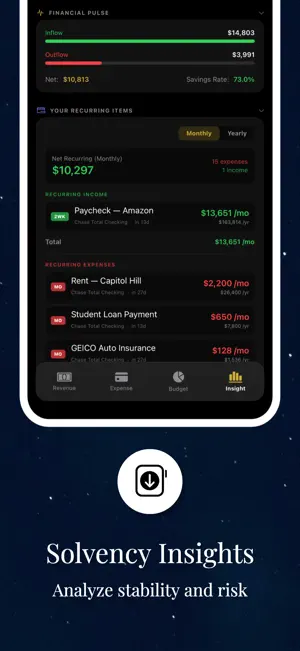
About JFin
JFin is a privacy-first financial command center designed for individuals serious about wealth creation, offering a comprehensive system to track net worth, manage cash flow, and forecast future growth without relying on invasive bank connections. Built with a high-performance, manual-entry architecture, the application ensures complete data sovereignty by keeping your financial information localized and secured behind biometric authentication, while providing professional-grade tools to analyze solvency ratios, monitor liquidity, and simulate long-term retirement scenarios. By stripping away the noise of automated trackers and focusing on high-level financial strategy, JFin provides a clear, distraction-free environment for mastering your financial narrative and executing a precise roadmap toward financial freedom.
What’s new
Version 2.2.2 · Updated June 10, 2026
Moved the Gain/Period toggle to the top of the tab as a full-width master control with a sliding gold selector and icons; it now drives the headline, chips, the accounts list, and benchmarks. Removed tap-to-chart from the "Your Accounts" rows — they're display-only now. Turned the Benchmarks section from a card carousel into a list (matching "Your Accounts" styling: gradient icon, sparkline, return pill). Benchmarks now show in both Gain and Period modes, measured over the date filter. Bug fixes Fixed the sparklines leaking outside their boxes (added chart plot clipping). Fixed the gain sort: Net Worth is no longer pinned to the top, so "Biggest gain" actually puts the largest gainer first; each row now shows the gain $ amount, total value, and % so every sort key is visible. Gain math Gain mode now shows true capital gain vs cost (P&L excluding deposits), not balance change. Stock portfolios use the exact same formula as the stock data tab (InvestmentView): market value − invested, % = P&L / invested, cash excluded — pulled from the same live cached value the stock tab uses. Extracted one shared stockGainVsCost helper so the graph's headline/chip and the accounts list use identical math (and both match the stock data tab). Made the displayed % consistent with the value and gain shown in each row.
App privacy
The developer, Jayhope LLC, reported these privacy practices to Apple.
Data Not Collected
The developer does not collect any data from this app.
Alternatives to JFin
Looking for apps like JFin? Here are 6 similar apps on the App Store. The highest rated is Variant: Investment Avatars (5.0/5), and all 6 are free to download.
-
 Finiteck
-
 FinPulseAI
-
 Variant: Investment Avatars
5.0
Variant: Investment Avatars
5.0
-
 SolScope
5.0
SolScope
5.0
-
 EMI Calculator : All Loan Calc
-
 MAGMA Finance
| App | Rating | Price | Last updated | Compare |
|---|---|---|---|---|
| JFin | 5.0 / 5 (2 ratings) | Free | June 10, 2026 | |
| Finiteck | – | Free | Aug 9, 2026 | Compare |
| FinPulseAI | – | Free | Feb 10, 2026 | Compare |
| Variant: Investment Avatars | 5.0 / 5 (10) | Free | Oct 18, 2026 | Compare |
| SolScope | 5.0 / 5 (4) | Free | May 15, 2026 | Compare |
| EMI Calculator : All Loan Calc | – | Free | Jan 28, 2026 | Compare |
| MAGMA Finance | – | Free | Mar 19, 2026 | Compare |
Compare JFin with the top alternatives: ratings, updates, ASO score and keyword gaps →