

OWL Alerts
Kevin Koplin Productivity iPhoneiPadiPod touch
OWL Alerts is a free Productivity app for iPhone and iPad by Kevin Koplin. Rated 5.0/5 from 1 ratings. Requires iOS 15.1. Updated January 15, 2026.
- Rating
- 5.0
- 1 ratings
- Price
- Free
- on the App Store
- Size
- 23 MB
- Age 4+
- Updated
- Jan 15
- 2026 · v1.0.2
Screenshots


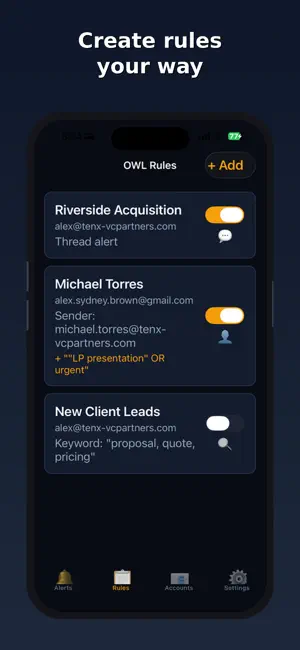
About OWL Alerts
WHY Because being reachable shouldn’t mean being constantly interrupted. HOW OWL turns interruptions into something you control. You choose exactly which emails are urgent by setting simple rules (senders, domains, keywords, or specific threads) and optional schedules for when those rules are allowed to alert you. WHAT OWL is an alert layer for your existing Gmail/Outlook accounts—not another inbox. When new mail arrives, OWL checks it in the background and sends a push alert only when an email matches your rules. Everything else stays quiet, so you can stop checking “just in case.” What you’ll see in the push alert • Rule label (e.g., “Boss”) • Sender • Subject line What push alerts do NOT include • Email body content • Attachments • Full inbox access inside the app Alert Details (in-app and on the web) When you open an alert, OWL can show up to 10,000 characters of context for that matched email—so you can decide quickly without opening your full inbox. Attachments are never included. Rule setup • Create and manage rules in the app or on the OWL website (vip.foundopportunity.com). Built for “can’t-check-right-now” moments Meetings, dinner, sleep, driving, and anything else where you want to stay present without missing the one email that matters. Important This is a companion app and requires an active OWL subscription. You must first sign up and connect your email account through the OWL website (vip.foundopportunity.com). Privacy & security Email processing happens server-side on the secure OWL platform. Push alerts contain only the rule label, sender, and subject. OWL does not include email bodies or attachments in push notifications.
What’s new
Version 1.0.2 · Updated January 15, 2026
Improved responsiveness.
App privacy
The developer, Kevin Koplin, reported these privacy practices to Apple.
Data Linked to You
The following data, which may be collected and linked to your identity, may be used for the following purposes:
- Contact Info: Email Address
- User Content: Emails or Text Messages
- Identifiers: User ID, Device ID
Used for: App Functionality
Alternatives to OWL Alerts
Looking for apps like OWL Alerts? Here are 6 similar apps on the App Store. The highest rated is MailSage AI (5.0/5), and all 6 are free to download.
-
 Owl VIP Email Alerts
4.3
-
 MailSage AI
5.0
-
 Write Once
-
 Go Postal - AI Email Assistant
5.0
-
 ContactDrive
5.0
-
 So Mail
5.0
| App | Rating | Price | Last updated | Compare |
|---|---|---|---|---|
| OWL Alerts | 5.0 / 5 (1 rating) | Free | January 15, 2026 | |
| Owl VIP Email Alerts | 4.3 / 5 (6) | Free | Aug 21, 2026 | Compare |
| MailSage AI | 5.0 / 5 (1) | Free | May 28, 2026 | Compare |
| Write Once | – | Free | Jun 8, 2026 | Compare |
| Go Postal - AI Email Assistant | 5.0 / 5 (3) | Free | Apr 24, 2026 | Compare |
| ContactDrive | 5.0 / 5 (2) | Free | Aug 31, 2026 | Compare |
| So Mail | 5.0 / 5 (1) | Free | Oct 16, 2026 | Compare |
Compare OWL Alerts with the top alternatives: ratings, updates, ASO score and keyword gaps →