

PDF Compressor App
Kirti Arya Business iPhoneiPadiPod touch
PDF Compressor App is a free Business app for iPhone and iPad by Kirti Arya. Requires iOS 18.5. Updated June 3, 2026.
- Price
- Free
- on the App Store
- Size
- 8 MB
- Age 4+
- Updated
- Jun 3
- 2026 · v1.0.8
Screenshots


About PDF Compressor App
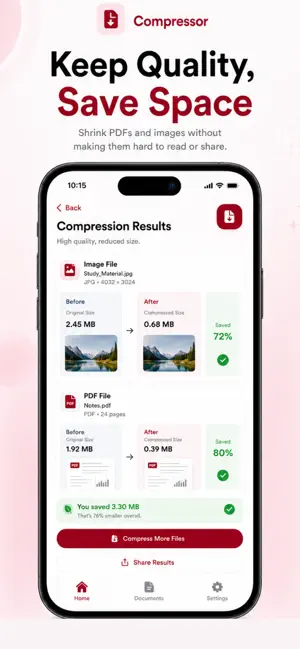
PDF Converter & Compressor – Fast, Smart & Secure Easily compress PDF files and images on your iPhone with PDF Converter & Compressor — a simple, powerful, and privacy-focused tool designed to reduce file size without compromising quality. Whether you need to share documents faster, save storage space, or upload files with size limits, this app helps you compress PDFs and images in just a few taps. Powerful PDF & Image Compression Reduce file size quickly with smart compression technology. You can compress: • PDF documents • Images (JPG, PNG, and more) • Scanned files and large documents Choose the compression level that fits your needs and get instant results. 3 Compression Levels – Full Control You decide how much to compress your files: • Maximum Compression – Best for sharing and saving space • Balanced Compression – Reduced size with good quality • Low Compression – Minimal size reduction with high quality Ideal for emails, cloud uploads, messaging apps, and professional use. All Compressed Files in One Place Never lose track of your documents. All compressed PDFs and images are automatically saved in a dedicated section, allowing you to: • View all compressed files • Preview documents anytime • Manage your files easily Everything stays organized and accessible. Save or Share Instantly Once compression is complete, you can: • Save files directly to the Files app • Share via WhatsApp, Mail, AirDrop, or any supported app • Send documents instantly without size issues No extra steps. No confusion. Fast, Offline & Secure • Lightning-fast processing • Works offline with no internet required • Files stay on your device • No uploads, no tracking, full privacy Your documents remain completely secure. Simple & Elegant iOS Design Designed specifically for iOS with a clean, modern interface that feels natural and easy to use. No technical knowledge needed — just select, compress, and share. Why Choose PDF Converter & Compressor? • Compress PDF and image files • Choose from three compression levels • Manage all compressed files in one place • Save to device or share instantly • Offline and privacy-friendly • Fast, simple, and reliable Subscription - Just $4.99 for lifetime subscription Privacy Poliy - https://compressedpdfimg.blogspot.com/2026/01/privacy-policy.html
What’s new
Version 1.0.8 · Updated June 3, 2026
We’ve updated the app with a cleaner and smoother UI for a better compression experience. This version also improves the PDF and image compression flow, saved file management, and file actions like share, export, rename, and delete.
App privacy
The developer, Kirti Arya, reported these privacy practices to Apple.
Data Not Collected
The developer does not collect any data from this app.
Alternatives to PDF Compressor App
Looking for apps like PDF Compressor App? Here are 6 similar apps on the App Store. The highest rated is Tasbeeh Streak (5.0/5), and 5 of the 6 are free to download.
-
 InvoX – Voice to Invoice
-
 SubClear
-
 MyMark – Sign PDF
-
 PDF Scanner App - OCR & Scan
4.7
PDF Scanner App - OCR & Scan
4.7
-
 Tasbeeh Streak
5.0
Tasbeeh Streak
5.0
-
 WorkIntent - Time Tracker
| App | Rating | Price | Last updated | Compare |
|---|---|---|---|---|
| PDF Compressor App | – | Free | June 3, 2026 | |
| InvoX – Voice to Invoice | – | Free | Apr 1, 2026 | Compare |
| SubClear | – | Free | Jul 6, 2026 | Compare |
| MyMark – Sign PDF | – | Free | Jul 27, 2026 | Compare |
| PDF Scanner App - OCR & Scan | 4.7 / 5 (3) | Free | Oct 9, 2025 | Compare |
| Tasbeeh Streak | 5.0 / 5 (1) | Free | Oct 2, 2026 | Compare |
| WorkIntent - Time Tracker | – | 12.99 USD | Sep 13, 2026 | Compare |
Compare PDF Compressor App with the top alternatives: ratings, updates, ASO score and keyword gaps →