
TickTappy: Simple Time Tracker
Aleksander Kowalczyk Productivity iPhoneiPadiPod touchApple Watch
TickTappy: Simple Time Tracker is a free Productivity app for iPhone and iPad by Aleksander Kowalczyk. Requires iOS 15.1. Updated October 25, 2026.
- Price
- Free
- on the App Store
- Size
- 41 MB
- Age 4+
- Updated
- Oct 25
- 2026 · v1.3.0
Screenshots


About TickTappy: Simple Time Tracker
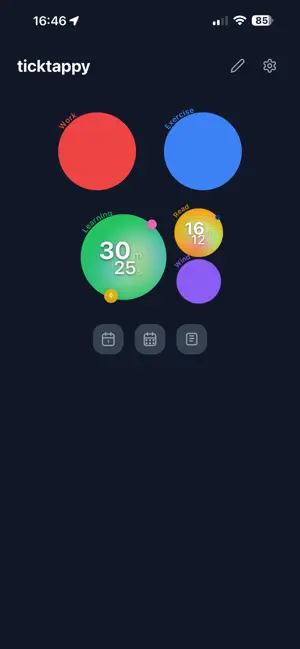
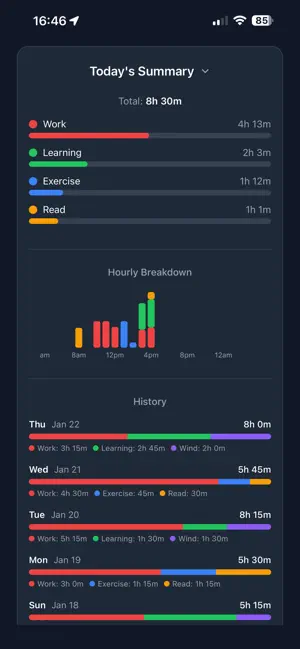
TickTappy is one-tap time tracking that’s fast, visual, and built for real life. Create colorful tags and tap a circle to start tracking. Tap again to stop — and if you switch to another tag, TickTappy automatically stops the previous timer (unless you pin it). Made for Apple devices: • Home Screen widgets (Small/Medium) with interactive tag circles • Live Activity for your running timer on the Lock Screen and Dynamic Island • Control Center widget (iOS 18+) • Apple Watch app + complications so your timer is always one tap away Why you’ll love it: • One-tap start/stop on tag circles • One timer at a time (with optional pinned background timers) • Quick time adjustment right after you start/stop (fix “oops” moments instantly) • Start retroactively (e.g., “started 30 min ago”) • Offline-first: track anywhere, sync later when you’re online • Day & week summaries with charts and progress bars • Organize tags into groups, reorder with drag & drop, and archive tags without losing history • Optional sound reminders per tag • Full entry management: view, edit, and delete past time entries No account required. Everything works offline, stays on your device, and there is no limit on tags or entries. Sync & Premium: TickTappy is fully usable offline with local storage. Premium adds cloud sync and cloud backup, so your tags and entries stay the same on every device you use. The Apple Watch app, widgets and Live Activities are free. Terms: https://ticktappy.com/terms
What’s new
Version 1.3.0 · Updated October 25, 2026
Hold a tag circle to set its times. One sheet starts a timer at a time you choose, fixes the start of a running one or stops it at a time you choose, and lets you pin or delete the entry. It also opens from the clock in Entries and from a small button that shows for 10 seconds after you start or stop a timer. Also new: • Entries under a minute show seconds, like 22s instead of 0m • An entry shorter than your minimum is no longer dropped silently: tap Keep to save it • Pick a starter set of tags in one tap • Day, Week and Entries open where you can see them • Settings has four tabs: General, Theme, Time and Data • Fixed an entry that could stay Running in Entries after it was stopped on another device
App privacy
The developer, Aleksander Kowalczyk, reported these privacy practices to Apple.
Data Linked to You
The following data, which may be collected and linked to your identity, may be used for the following purposes:
- Contact Info: Email Address
- Identifiers: User ID
Used for: App Functionality
Data Not Linked to You
The following data, which may be collected but is not linked to your identity, may be used for the following purposes:
- Usage Data: Product Interaction
Used for: Analytics
Alternatives to TickTappy: Simple Time Tracker
Looking for apps like TickTappy: Simple Time Tracker? Here are 6 similar apps on the App Store. The highest rated is ProdMaceAudio Music (5.0/5), and all 6 are free to download.
-
 Local Hours - Simple Timesheet
-
 Day Mark - Work Log
-
 Time-Trace
-
 TimeBox Focus
-
 ProdMaceAudio Music
5.0
-
 Nostora: Time Tracking
| App | Rating | Price | Last updated | Compare |
|---|---|---|---|---|
| TickTappy: Simple Time Tracker | – | Free | October 25, 2026 | |
| Local Hours - Simple Timesheet | – | Free | Aug 5, 2026 | Compare |
| Day Mark - Work Log | – | Free | Nov 1, 2026 | Compare |
| Time-Trace | – | Free | Jan 16, 2026 | Compare |
| TimeBox Focus | – | Free | Feb 16, 2026 | Compare |
| ProdMaceAudio Music | 5.0 / 5 (2) | Free | Oct 24, 2026 | Compare |
| Nostora: Time Tracking | – | Free | Aug 31, 2026 | Compare |