

SwiftQuantum: Quantum IDE
EUNMIN PARK Developer Tools iPhoneiPadiPod touchMac
SwiftQuantum: Quantum IDE is a free Developer Tools app for iPhone and iPad by EUNMIN PARK. Requires iOS 18.0. Updated October 26, 2026.
- Price
- Free
- on the App Store
- Size
- 32 MB
- Age 4+
- Updated
- Oct 26
- 2026 · v10.3.9
Screenshots



About SwiftQuantum: Quantum IDE
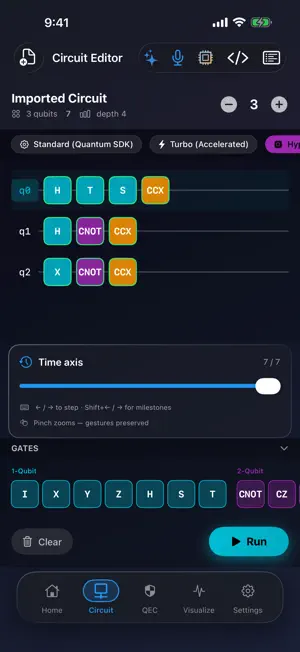
Design a quantum circuit, run it on your own device and watch every qubit — on iPhone, iPad and Mac. SwiftQuantum is a quantum circuit IDE for learners, students, educators and developers. Drag gates onto the canvas, tap Run and see the result as a Bloch sphere, a histogram and a state vector. RUN IT ON YOUR DEVICE • Free: circuits up to 10 qubits • Scholar: any circuit up to 25 qubits • Master and Enterprise: Clifford circuits up to 127 qubits, even offline • Circuits with non-Clifford gates run up to 25 qubits. Larger ones aren't simulated anywhere: the app tells you what to change and sends nothing • A circuit leaves your device only after you tap Send BUILD CIRCUITS YOUR WAY • Drag-and-drop editor with ready-made circuits such as Bell and GHZ states • Free gates: H, X, Y, Z and CNOT. Scholar adds S, T, RX, RY, RZ, CZ and SWAP; Master adds Toffoli and Fredkin • Three engines — Standard (Free), Turbo (Scholar) and HyperCore (Master) — each computes exactly the circuit you drew, in shot mode too • Import and export OpenQASM 2.0 • Larger text and VoiceOver support on Home, the circuit editor and the subscription screen SEE WHAT YOUR QUBITS DO • A Bloch sphere for each qubit, plus a measurement histogram and the state vector for every run • Export results: PNG and CSV on Scholar; LaTeX, PDF and SVG on Master • Paid plans: view the unitary matrix of small circuits; Master also compares gate fidelity ERROR-CORRECTION LAB (MASTER AND ENTERPRISE) • Surface-code experiments: choose the code distance, physical error rate and decoder • Logical error rate with a 95% confidence interval, computed on our servers (network needed) • Every curve says where it came from: our servers, your device (distance 3, offline) or a dashed reference formula AI THAT STAYS ON YOUR DEVICE • Optional: download a compact AI model once, describe a circuit in plain language and get a circuit back — generated without a network on supported devices • Your prompts stay on your device. Off by default; delete the model any time • Accepted results are sealed in a local, tamper-evident record: proof of where a circuit was made, not that it is correct NUMBERS YOU CAN CHECK • Benchmark (signed in): median run time per engine with a 95% confidence interval, measured on your device • Master and Enterprise: convert circuits to PennyLane and CUDA-Q code; each conversion shows its measured state overlap with your circuit, or "Not verified" • Q-Footprints: an opt-in log of your on-device runs that records only the shape of each run, never the circuit. Not a score or a certificate PLANS — FREE TO START • Free: 10 qubits, 10 simulations a day when signed in, 5 saved circuits • Scholar: 25 qubits, 100 simulations a day, 50 saved circuits • Master: Clifford circuits up to 127 qubits, 2,000 simulations a day, 1,000 saved circuits • Enterprise: contact us All results are classical simulations; SwiftQuantum does not run circuits on quantum hardware. — SwiftQuantum is free to download with optional auto-renewable subscriptions. Payment is charged to your Apple ID at confirmation of purchase and renews automatically unless cancelled at least 24 hours before the end of the current period. Manage or cancel anytime in your App Store account settings. Prices are shown in-app. SwiftQuantum is an independent tool for education and research and is not affiliated with or endorsed by any quantum hardware vendor. Terms of Use: https://legal.swiftquantum.tech/en/terms/ Privacy Policy: https://legal.swiftquantum.tech/en/privacy/
What’s new
Version 10.3.9 · Updated October 26, 2026
Your language, your currency, tidier circuits — and a hands-on look at error correction. • New in the QEC tab: a hands-on illustration of how a distance-3 surface code spots an error. Drop X, Z or Y errors on nine data qubits and watch which of the eight checks light up. It runs offline on your device — no decoder, no quantum hardware, nothing sent. • The whole app follows the language you choose, right away: pick one during setup or in Settings and every tab switches, Home included. A new install starts in your device’s language. • Prices on Home are shown in your own currency, straight from the App Store. • Neater circuits: a two- or three-qubit gate now sits in the same column on every wire it touches, and the gates after it stay lined up. • A clearer histogram: bars start at the 0% line, and each bar is labelled with its basis state, such as |00>. • Larger text: Home, the circuit editor and the subscription screen follow your text-size setting. At the largest sizes the tab bar shows icons only; touch and hold a tab to see its name. • VoiceOver: icon-only buttons now have names, sign-up checkboxes say whether they are ticked, and every gate on a wire can be reached. Gates and buttons are also easier to tap. • Shortcuts say exactly what they do: "Load Starter Circuit from Text" opens a Bell, GHZ, QFT or random circuit by name, on your device, and the export shortcut now says OpenQASM 2.0. • Subscription Limits (Settings) lists only what the app has: the VQE and PQC Migration rows are gone, and the Free plan reads “Free”. Thank you for building with us.
App privacy
The developer, EUNMIN PARK, reported these privacy practices to Apple.
Data Linked to You
The following data, which may be collected and linked to your identity, may be used for the following purposes:
- Contact Info: Email Address
- Identifiers: User ID, Device ID
- Purchases: Purchase History
- Usage Data: Product Interaction
Used for: Analytics, Product Personalization, App Functionality
Data Not Linked to You
The following data, which may be collected but is not linked to your identity, may be used for the following purposes:
- Diagnostics: Performance Data, Other Diagnostic Data
- Contact Info: Other User Contact Info
Used for: Developer’s Advertising or Marketing, Analytics, Product Personalization, App Functionality
Alternatives to SwiftQuantum: Quantum IDE
Looking for apps like SwiftQuantum: Quantum IDE? Here are 6 similar apps on the App Store. The highest rated is CodeMan - VSCode (3.9/5), and 5 of the 6 are free to download.


| App | Rating | Price | Last updated | Compare |
|---|---|---|---|---|
| SwiftQuantum: Quantum IDE | – | Free | October 26, 2026 | |
| SQQuantum | – | Free | Mar 17, 2026 | Compare |
| Pingly Uptime | – | Free | Sep 10, 2025 | Compare |
| Noesis A.I. | – | Free | Mar 16, 2026 | Compare |
| STL to STEP Assistant | – | Free | Oct 12, 2026 | Compare |
| Infer Ring | – | Free | May 19, 2026 | Compare |
| CodeMan - VSCode | 3.9 / 5 (7) | 4.99 USD | Oct 22, 2026 | Compare |