

Shift4You
Omer ELMAS Productivity iPhoneiPadiPod touch
Shift4You is a free Productivity app for iPhone and iPad by Omer ELMAS. Rated 5.0/5 from 1 ratings. Requires iOS 26. Updated October 21, 2026.
- Rating
- 5.0
- 1 ratings
- Price
- Free
- on the App Store
- Size
- 34 MB
- Age 12+
- Updated
- Oct 21
- 2026 · v1.3.1
Screenshots


About Shift4You
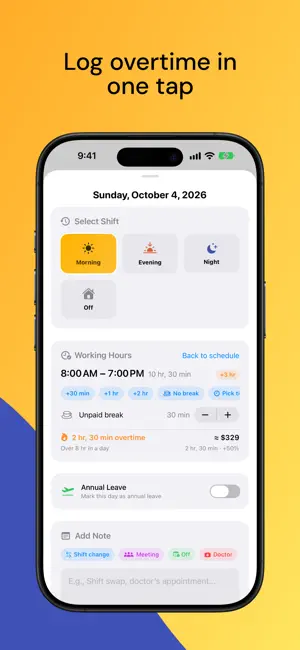
If you work shifts, your schedule is always on your mind. Shift4You keeps track of it for you: choose your pattern once and see your shift in widgets, on the Lock Screen and in the Dynamic Island. PICK YOUR PATTERN, THE REST TAKES CARE OF ITSELF DuPont, Continental, Pitman (2-2-3), Panama (2-3-2), 12x36, 4/4, 3/3, 4/2, Mon–Fri and more — 12 ready-made patterns. Choose your team and start day, and your calendar fills in months ahead. Not on the list? Build your own: cycles from 1 to 56 days, up to 8 teams and your own shift types like on-call or training — or start from a template such as 24/48. KNOW WITHOUT OPENING THE APP Home Screen and Lock Screen widgets show today and the week. The time until your shift — and, once it starts, the time until it ends — counts down on the Lock Screen and in the Dynamic Island. Ask Siri: "Shift4You, what shift do I have today?" NEVER MISS A HOLIDAY OPPORTUNITY Public holidays for 50+ countries are on your calendar; in the US, Canada, Germany, the UK and more, pick your state or province to see only yours. Shift4You combines holidays with your days off and shows opportunities like "1 day of leave for 4 days off" — plan the one you like as annual leave in one tap. It also tracks your leave allowance and how much is left. OVERTIME & EARNINGS Your hours are already known from your shifts — you only enter the difference: “+1 hr”, “No break”. Shift4You applies your country’s rules — FLSA and California, every Canadian province, the NHS, Europe, the Gulf and 70+ more — to calculate overtime, night and holiday premiums and your estimated gross. It explains every day and lets you check your payslip. When a shift ends, add extra time straight from the notification. CHANGES IN ONE TAP Swapped a shift with a colleague? Open the day and pick the new shift. Add a note, mark leave — your pattern stays intact, and "Reset" undoes it whenever you like. SHARE WITH YOUR TEAM “Share My Pattern” in Settings turns your pattern into a QR code or link. Your coworker scans it with “Scan QR” and gets the same calendar in seconds — shift hours and team names included if you like. Pay and salary are never shared. REMINDERS ON TIME Get reminded as far ahead of your shift as you choose. Separate reminders for your notes, and a weekly summary before the new week begins. Shift Alarm rings before your shift even in silent mode and with a Focus on, full screen on the Lock Screen, with a separate lead time for each shift type. YOUR MONTH IN NUMBERS How many days you worked, which shift dominated, your longest streak — all on the Stats screen. YOUR DATA STAYS WITH YOU No account needed. With iCloud, your calendar comes back even if you change phones or reinstall the app. You can also save a backup as a file. AND MORE • Team Schedule: see who works when. • The weather for your next shift, right on the shift card (Apple Weather). • Export your shifts to Apple Calendar, or share the month as an image. • First day of the week, time format and °C/°F follow your region. • High Contrast theme, VoiceOver and large text support. • On iPhone and iPad, in 10 languages.
What’s new
Version 1.3.1 · Updated October 21, 2026
• Statistics, redesigned: days off, annual leave and public holidays are now counted separately. Switch months with the arrows and see your next time off, longest streaks and free weekends. • Weather tips now look at your whole shift: rain on the way home, a temperature drop by the time you finish, icy roads and fog. • If you didn’t open the app for two weeks, the widget could go blank. Fixed. • Alarms and reminders stopped if the app wasn’t opened for a long time. They now renew in the background, and if they can’t, you’re told before they run out. • Restoring a backup left out your own shift types and team names. Fixed. The pattern you’re using can no longer be deleted by accident. • After a first setup without internet, iCloud Sync could stay off. Fixed.
App privacy
The developer, Omer ELMAS, reported these privacy practices to Apple.
Data Used to Track You
The following data may be used to track you across apps and websites owned by other companies:
- Identifiers: Device ID
- Usage Data: Product Interaction
Data Linked to You
The following data, which may be collected and linked to your identity, may be used for the following purposes:
- Location: Coarse Location
- Identifiers: Device ID
- Usage Data: Product Interaction, Advertising Data
Used for: Third-Party Advertising, Developer’s Advertising or Marketing, Analytics, App Functionality
Data Not Linked to You
The following data, which may be collected but is not linked to your identity, may be used for the following purposes:
- Diagnostics: Performance Data, Other Diagnostic Data, Crash Data
Used for: Third-Party Advertising, Developer’s Advertising or Marketing, Analytics, App Functionality
Alternatives to Shift4You
Looking for apps like Shift4You? Here are 6 similar apps on the App Store.
-
 Shiftpad: Shift Calendar
-
 ShiftAlarm – Shift Calendar
-
 Shift Calendar – Shift Cycle
-
 Shift Calendar: Work Schedules
-
 Shift Calendar: Work Roster
-
 VardiyaCep
| App | Rating | Price | Last updated | Compare |
|---|---|---|---|---|
| Shift4You | 5.0 / 5 (1 rating) | Free | October 21, 2026 | |
| Shiftpad: Shift Calendar | – | Free | Aug 31, 2026 | Compare |
| ShiftAlarm – Shift Calendar | – | Free | Oct 10, 2026 | Compare |
| Shift Calendar – Shift Cycle | – | Free | Sep 27, 2026 | Compare |
| Shift Calendar: Work Schedules | – | Free | Oct 21, 2026 | Compare |
| Shift Calendar: Work Roster | – | Free | Sep 20, 2026 | Compare |
| VardiyaCep | – | Free | Aug 26, 2026 | Compare |
Compare Shift4You with the top alternatives: ratings, updates, ASO score and keyword gaps →