

AI Photo Assistant: Enhance
Yuri Margaryan Photo & Video iPhoneiPadiPod touch
AI Photo Assistant: Enhance is a free Photo & Video app for iPhone and iPad by Yuri Margaryan. Requires iOS 15.6. Updated July 29, 2026.
- Price
- Free
- on the App Store
- Size
- 44 MB
- Age 4+
- Updated
- Jul 29
- 2026 · v1.0.4
Screenshots


About AI Photo Assistant: Enhance
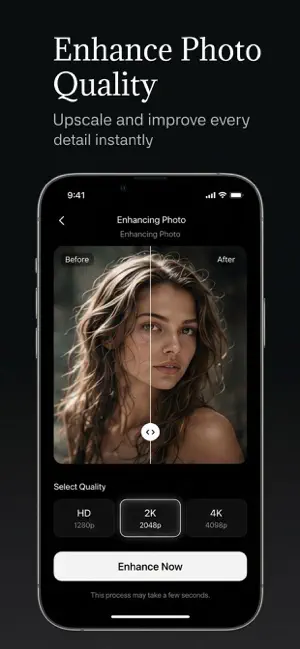
AI Photo Assistant is a smart AI-powered photo editor that transforms ordinary and old photos into vivid, polished, and high-quality images in seconds. Using advanced artificial intelligence, you can restore damaged vintage photos, brighten dark shots, remove backgrounds, enhance resolution up to 4K, apply artistic paint styles, and make precise edits with the pencil tool — all from one clean iPhone app. ## Features • **Photo Enhancement (HD / 2K / 4K)** Upscale quality, improve sharpness, color, and detail while keeping faces natural • **Old Photo Restoration** Remove scratches and damage, enhance faces, or restore faded colors • **Brighten / HDR** Fix underexposed and dark photos with balanced, natural lighting • **Background Removal** Cut out subjects with transparent or white background in one tap • **Pencil Edits** Mark areas on your photo and describe changes — AI applies precise local edits • **Artistic Paint Effects** Oil paint, watercolor, sketch, and cartoon styles • **AI Chat Assistant** Get photo tips and answers on any topic in English, Russian, or Arabic • **History & Export** Save results, share, and revisit recent creations • **Clean, Modern UI** Designed for iPhone with a simple dark interface ## Why AI Photo Assistant? • Fast AI processing powered by Google Gemini • Works with old and new photos • Perfect for social media and memories • No professional editing skills required Bring your photos back to life with AI Photo Assistant! --- ## Subscription Information AI Photo Assistant offers auto-renewable subscriptions (plans and prices are shown in the app before purchase): • **Weekly Subscription** • **Yearly Subscription** Premium unlocks unlimited AI photo generations, high-quality export (up to 4K), and full access to all tools including photo enhancement. Payment will be charged to your Apple ID account at confirmation of purchase. Subscriptions automatically renew unless auto-renew is turned off at least 24 hours before the end of the current period. Your account will be charged for renewal within 24 hours prior to the end of the current period. You can manage or cancel your subscription anytime in your Apple ID account settings after purchase. Privacy Policy and Terms of Use are available in the app Settings. Privacy Policy: https://docs.google.com/document/d/1u3EjzM9D6go2ipRmGuQ3OjkTUIzqjrhVzaurnWfGGXI/edit?tab=t.0#heading=h.33r39au4sxsh Terms of Use (EULA): https://docs.google.com/document/d/1tLbRbISH4OJQR5vPBCwWjRf07Zz0iG7QQSGKbZcU3ck/edit?tab=t.0#heading=h.oqh0thdr35db
What’s new
Version 1.0.4 · Updated July 29, 2026
• New AI model for quality enhancement up to 4K • Backup models for more reliable generation • Bug fixes and performance improvements
App privacy
The developer, Yuri Margaryan, reported these privacy practices to Apple.
Data Not Collected
The developer does not collect any data from this app.
Alternatives to AI Photo Assistant: Enhance
Looking for apps like AI Photo Assistant: Enhance? Here are 6 similar apps on the App Store. The highest rated is PetifyAI – AI Pet Photo Editor (1.0/5), and all 6 are free to download.
-
 AI Image Enhancer - Retouch.
-
 CHIARIVE: AI Photo Editor
-
 Memora: AI Photo Enhancer
-
 Lutro: Photo Editor
-
 Magic ID Photo
-
 PetifyAI – AI Pet Photo Editor
1.0
| App | Rating | Price | Last updated | Compare |
|---|---|---|---|---|
| AI Photo Assistant: Enhance | – | Free | July 29, 2026 | |
| AI Image Enhancer - Retouch. | – | Free | Sep 9, 2026 | Compare |
| CHIARIVE: AI Photo Editor | – | Free | Sep 2, 2026 | Compare |
| Memora: AI Photo Enhancer | – | Free | Oct 8, 2026 | Compare |
| Lutro: Photo Editor | – | Free | Jul 29, 2026 | Compare |
| Magic ID Photo | – | Free | Jan 8, 2026 | Compare |
| PetifyAI – AI Pet Photo Editor | 1.0 / 5 (1) | Free | Sep 10, 2025 | Compare |