

DaysDown
Vedant Jain Productivity iPhoneiPadiPod touch
DaysDown is a free Productivity app for iPhone and iPad by Vedant Jain. Requires iOS 16.6. Updated January 27, 2026.
- Price
- Free
- on the App Store
- Size
- 29 MB
- Age 4+
- Updated
- Jan 27
- 2026 · v1.1
Screenshots

About DaysDown
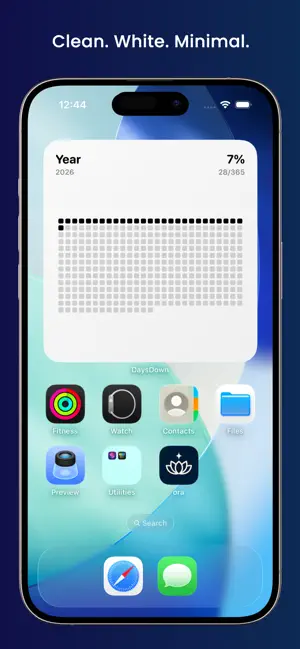
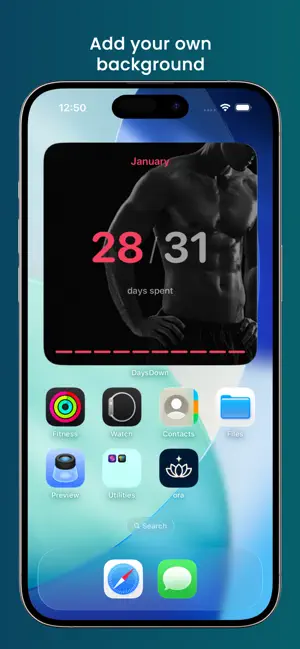
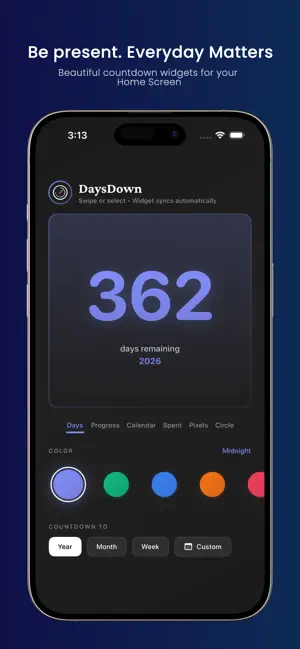
Be Conscious of the Days Passing. DaysDown helps you track days smartly. Instead of letting time slip away unnoticed, stay aware of each passing day with beautiful widgets on your Home Screen and Lock Screen—gentle reminders to live consciously. WHY DAYSDOWN? Where did 2025 go? If you've ever asked yourself that, DaysDown is for you. We built this app for people who want to feel time, not just watch it disappear. Whether you're counting down to a milestone or reflecting on the year so far, DaysDown keeps you conscious of the days passing—smartly. 7 MINDFUL WIDGET STYLES ◆ Days — A clear, focused view of remaining days ◆ Progress — Watch your journey unfold through time ◆ Calendar — Stay grounded with today's date ◆ Spent — Reflect on days lived alongside days remaining ◆ Pixels — Each day becomes a pixel in your story ◆ Circle — Time's cycle, beautifully visualized ◆ Bars — Your timeline in vertical bars, filling day by day LOCK SCREEN WIDGETS 4 widget types designed for your Lock Screen: circular, rectangular, inline, and pixel. Check your countdown with a glance—no unlock needed. MAKE IT TRULY YOURS - 8 Visual Styles: Modern, Neon, Minimal, Glass, Gradient, Bold, Soft, Retro - 17 Color Themes: From serene cyans to clean Mono white - Custom Backgrounds: Add your own photos - Flexible Targets: Track the Year, Month, Week, or any Custom date PERFECT FOR → Tracking progress toward personal goals and milestones → Staying conscious of days remaining in the year, month, or week → Building awareness of each passing day → Counting down to birthdays, anniversaries, and celebrations → Creating visual reminders of what matters most Every glance at your screen becomes an invitation to pause and appreciate the day. Track days smartly. Be conscious of the days passing.
What’s new
Version 1.1 · Updated January 27, 2026
New: Bars Widget Timeline visualization with vertical bars. Watch your year, month, or week fill up — one bar at a time. Inspired by the progress bars you love on X. New: Lock Screen Widgets 4 new widgets for your Lock Screen: circular, rectangular, inline, and pixel. Glance at your countdown without unlocking. New: Custom Backgrounds Add your own photos as widget backgrounds. Your countdown, your aesthetic. Also new: - Mono theme — clean white background for minimal setups - Improved pixel grid with header and percentage display
App privacy
The developer, Vedant Jain, reported these privacy practices to Apple.
Data Not Collected
The developer does not collect any data from this app.
Alternatives to DaysDown
Looking for apps like DaysDown? Here are 6 similar apps on the App Store. The highest rated is Taska: To-Do List & Planner (4.9/5), and all 6 are free to download.
-
 Left: Widgets for Time Left
4.6
Left: Widgets for Time Left
4.6
-
 Easlo Experiments
4.6
Easlo Experiments
4.6
-
 Time Left • Be Present
4.6
Time Left • Be Present
4.6
-
 DailyHack
4.7
DailyHack
4.7
-
 Taska: To-Do List & Planner
4.9
Taska: To-Do List & Planner
4.9
-
 SyncTasks
4.6
SyncTasks
4.6
| App | Rating | Price | Last updated | Compare |
|---|---|---|---|---|
| DaysDown | – | Free | January 27, 2026 | |
| Left: Widgets for Time Left | 4.6 / 5 (458) | Free | Oct 20, 2026 | Compare |
| Easlo Experiments | 4.6 / 5 (24) | Free | Aug 27, 2026 | Compare |
| Time Left • Be Present | 4.6 / 5 (240) | Free | Oct 12, 2026 | Compare |
| DailyHack | 4.7 / 5 (106) | Free | Oct 18, 2026 | Compare |
| Taska: To-Do List & Planner | 4.9 / 5 (204) | Free | Oct 17, 2026 | Compare |
| SyncTasks | 4.6 / 5 (356) | Free | Sep 24, 2026 | Compare |
Compare DaysDown with the top alternatives: ratings, updates, ASO score and keyword gaps →