

APSense: Expense Reports
Ademero, Inc. Finance iPhoneiPadiPod touch
APSense: Expense Reports is a free Finance app for iPhone and iPad by Ademero, Inc. Rated 5.0/5 from 7 ratings. Requires iOS 13.0. Updated October 28, 2026.
- Rating
- 5.0
- 7 ratings
- Price
- Free
- on the App Store
- Size
- 141 MB
- Age 4+
- Updated
- Oct 28
- 2026 · v1.0.382
Screenshots


About APSense: Expense Reports
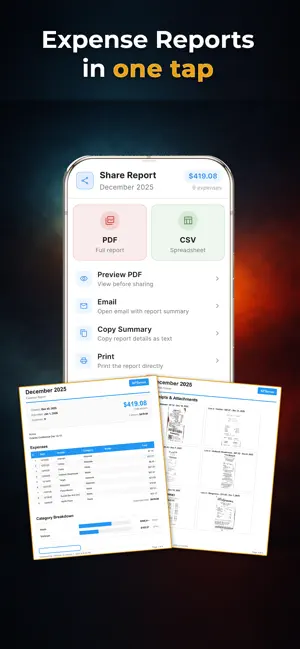
STOP LOSING RECEIPTS. START GETTING REIMBURSED. APSense is the expense tracker that actually works. Powered by Ademero's Cortexa AI—built on 20+ years of document extraction expertise—it reads receipts with industry-leading accuracy, learns from your corrections, and creates professional expense reports in seconds. ———————————————————— WHY APSENSE IS DIFFERENT ———————————————————— CORTEXA AI—STATE OF THE ART Built on Ademero's two decades of document extraction expertise. Our AI doesn't just read text—it uses multiple extraction strategies that vote against each other using intelligent scoring. When OCR misreads the total (happens 40-50% of the time with other apps), APSense calculates it correctly from subtotals, taxes, and tips. IT LEARNS FROM YOU Fix a vendor name or category once, and APSense remembers. Your corrections are synced across all your devices, making every future receipt from that vendor faster and more accurate. The more you use it, the smarter it gets. EMAIL YOUR RECEIPTS The feature competitors don't have. Forward any receipt to [email protected] and it's automatically added to your account. Tag with #workspace or @category. Get instant confirmation. No scanning required. GPS MILEAGE THAT ACTUALLY WORKS Other apps count every GPS wobble as distance traveled. APSense uses smart filtering: - Rejects impossible speeds (>150 mph GPS jumps) - Filters drift when you're stationary (no phantom mileage) - Ignores inaccurate readings (weak GPS signals) - Adapts polling to save battery ———————————————————— CORE FEATURES ———————————————————— RECEIPT SCANNING - Cortexa AI extracts vendor, amount, date, category - Works with crumpled, faded, or partial receipts - Multi-page PDF support - Email receipt forwarding MILEAGE TRACKING (4 Ways) - GPS: Start trip, drive, stop. Automatic. - Odometer: Enter start/end readings - Map: Pick addresses, calculate driving distance - Manual: Just enter the miles PROFESSIONAL REPORTS - One-tap PDF generation - Category breakdowns with charts - Receipt thumbnails included - CSV export for accounting - Share via email instantly APPROVAL WORKFLOWS - Submit reports to approvers - Approvers review from email-NO LOGIN REQUIRED - Real-time status updates ORGANIZATION - Workspaces for clients/projects - Default Reports auto-assign expenses - Expense splitting - Bulk actions PLATFORM - iOS - Web at apsense.app ———————————————————— BUILT FOR PROFESSIONALS ———————————————————— - Secure cloud sync - Human support at [email protected] Download APSense and never lose a receipt again.
Ratings & reviews
5.0
7 ratings
What’s new
Version 1.0.382 · Updated October 28, 2026
Bug fixes and performance improvements.
App privacy
The developer, Ademero, Inc., reported these privacy practices to Apple.
Data Linked to You
The following data, which may be collected and linked to your identity, may be used for the following purposes:
- Contact Info: Email Address
- Diagnostics: Crash Data, Other Diagnostic Data
- User Content: Photos or Videos, Other User Content
Used for: Analytics, App Functionality
Alternatives to APSense: Expense Reports
Looking for apps like APSense: Expense Reports? Here are 6 similar apps on the App Store.
-
 Budget Envelope Planner: Pla
-
 Ez Expense Log
-
 Expense Complete: Tax Receipts
-
 Ledge Personal Finance
-
 TAX Resident
-
 Debt & IOU Tracker
| App | Rating | Price | Last updated | Compare |
|---|---|---|---|---|
| APSense: Expense Reports | 5.0 / 5 (7 ratings) | Free | October 28, 2026 | |
| Budget Envelope Planner: Pla | – | Free | Jul 9, 2026 | Compare |
| Ez Expense Log | – | Free | Jul 10, 2026 | Compare |
| Expense Complete: Tax Receipts | – | Free | Sep 24, 2026 | Compare |
| Ledge Personal Finance | – | Free | May 11, 2026 | Compare |
| TAX Resident | – | Free | Oct 16, 2026 | Compare |
| Debt & IOU Tracker | – | Free | Jul 6, 2026 | Compare |