

FrameFlip
YUTAKA MIMURA Photo & Video iPhoneiPadiPod touch
FrameFlip is a free Photo & Video app for iPhone and iPad by YUTAKA MIMURA. Requires iOS 18.2. Updated June 21, 2026.
- Price
- Free
- on the App Store
- Size
- 7 MB
- Age 4+
- Updated
- Jun 21
- 2026 · v2.1
Screenshots


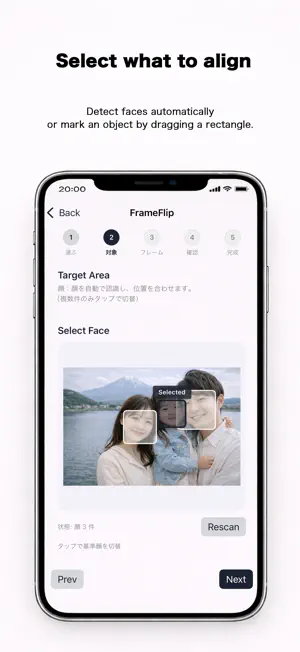
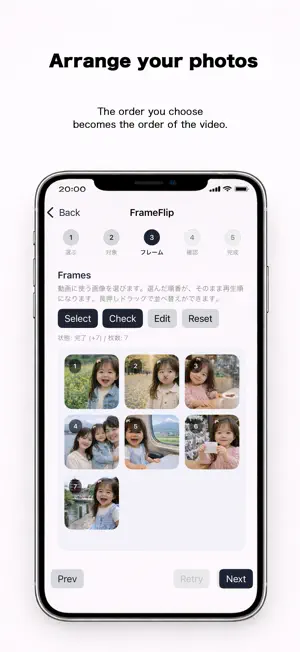
About FrameFlip
---------------- FrameFlip ---------------- Align photos. Change over time FrameFlip automatically aligns multiple photos to a single reference image and exports the result as a short MP4 video. By using a person’s face or a selected part of an object as the reference, photos are aligned to the same position and scale, making changes over time easy to see. This makes FrameFlip suitable for growth records, travel memories, and visualizing creative processes. -------------- Key Features -------------- ■ Automatic face and object alignment When using Face mode, faces are detected automatically. When using Object mode, simply drag to select the reference area. No complex settings are required. The app handles alignment automatically. ■ Simple, step-by-step workflow Just choose a reference image and select the frame images. The guided interface makes it easy to use, even for first-time users. ■ Preview before exporting Check the alignment result in the preview first. If everything looks good, export it as an MP4 video. ■ Videos ready for Photos and social apps Exported videos can be saved directly to the Photos app, or shared easily with social and messaging apps. ■ No account required No account registration or login is needed. You can start using the app right after installing it. --------------- How to Use --------------- 1. Select one reference photo 2. Choose a face or object as the target 3. Select multiple frame photos 4. Preview and export the video ■ Recommended Uses - Create a growth record from photos taken over time - Visualize changes during a trip - Show the progress of artwork or creative projects - Record changes or assembly of objects ------------ Privacy & Terms ------------ ■ Privacy With FrameFlip, all photo processing and video generation are performed entirely on your device. Selected photos and generated videos are never sent to external servers. Privacy Policy: https://www.atlascope.idatabase.info/app/en/privacy.html ■ Free Version and Pro FrameFlip (Free) provides access to the basic features. FrameFlip Pro offers additional features, including ad removal, unlimited exports, and high-quality video export options. Please refer to the Terms of Use below for the conditions applicable to both the free version and FrameFlip Pro. Terms of Use: https://www.atlascope.idatabase.info/app/en/terms.html -------------------------------------------- Just line up your photos, and see time take shape. Tell a new story with your photos using FrameFlip.
What’s new
Version 2.1 · Updated June 21, 2026
Fixed a bug.
App privacy
The developer, YUTAKA MIMURA, reported these privacy practices to Apple.
Data Used to Track You
The following data may be used to track you across apps and websites owned by other companies:
- Location: Coarse Location
- Identifiers: Device ID
- Usage Data: Product Interaction, Advertising Data
- Diagnostics: Crash Data, Performance Data
Data Linked to You
The following data, which may be collected and linked to your identity, may be used for the following purposes:
- Location: Coarse Location
- Identifiers: Device ID
- Usage Data: Product Interaction, Advertising Data
- Diagnostics: Performance Data
Used for: Third-Party Advertising
Data Not Linked to You
The following data, which may be collected but is not linked to your identity, may be used for the following purposes:
- Diagnostics: Crash Data
Used for: Third-Party Advertising
Alternatives to FrameFlip
Looking for apps like FrameFlip? Here are 6 similar apps on the App Store. The highest rated is Tagged Paws: Trim Raw Footage (5.0/5), and all 6 are free to download.
-
 Tagged Paws: Trim Raw Footage
5.0
Tagged Paws: Trim Raw Footage
5.0
-
 ReelAlign: Match Cut Editor
-
 MorphMovie
-
 Motion Stitch: Align Photos
5.0
Motion Stitch: Align Photos
5.0
-
 Timerlayer
-
 Align: Stop Motion Camera
| App | Rating | Price | Last updated | Compare |
|---|---|---|---|---|
| FrameFlip | – | Free | June 21, 2026 | |
| Tagged Paws: Trim Raw Footage | 5.0 / 5 (3) | Free | Oct 18, 2026 | Compare |
| ReelAlign: Match Cut Editor | – | Free | Oct 12, 2026 | Compare |
| MorphMovie | – | Free | Aug 6, 2026 | Compare |
| Motion Stitch: Align Photos | 5.0 / 5 (1) | Free | Oct 14, 2026 | Compare |
| Timerlayer | – | Free | Mar 4, 2026 | Compare |
| Align: Stop Motion Camera | – | Free | Jun 4, 2026 | Compare |
Compare FrameFlip with the top alternatives: ratings, updates, ASO score and keyword gaps →