

Document Scan, Edit & Merge
OKAN YUKSEL Productivity iPhoneiPadiPod touch
Document Scan, Edit & Merge is a free Productivity app for iPhone and iPad by OKAN YUKSEL. Rated 4.0/5 from 2 ratings. Requires iOS 15.1.
- Rating
- 4.0
- 2 ratings
- Price
- Free
- on the App Store
- Size
- 53 MB
- Age 4+
- Updated
- Aug 26
- 2026 · vv1.2.4
Screenshots

About Document Scan, Edit & Merge
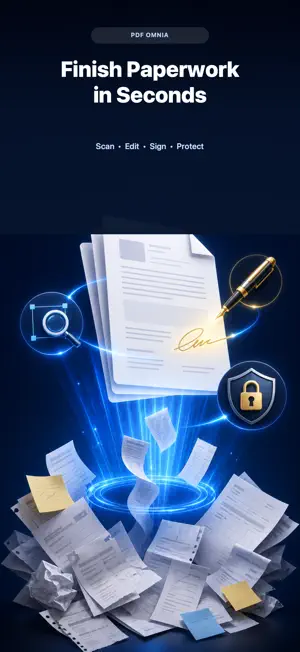
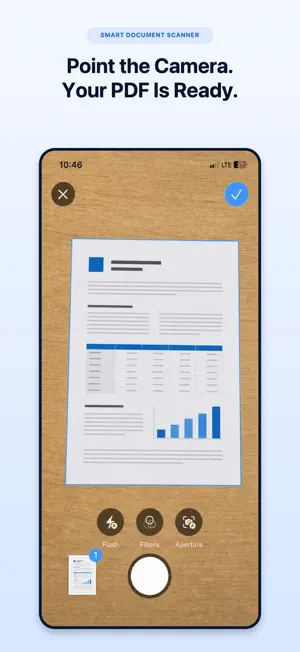
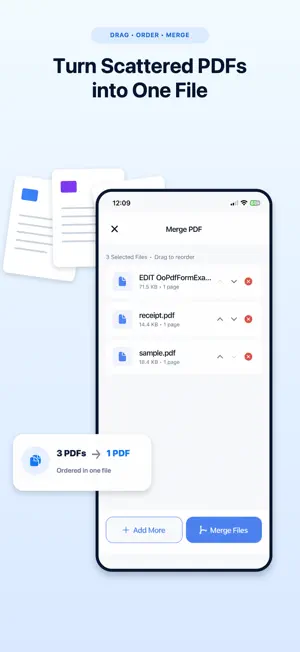
Turn your iPhone into a complete PDF toolkit for everyday documents. Scan documents, read PDF files, edit pages, sign documents, merge files, split PDFs and use OCR — all without uploading your private files to any server. PDF Scanner is built for fast document work. Create clean scans with your camera, open recent PDFs, add bookmarks, jump directly to any page, combine multiple documents into one, extract specific pages, rotate pages, compress large files, convert photos to PDF and sign forms whenever you need a quick result. Why users choose PDF Scanner: • Scan documents and save instantly as PDF • Full PDF reader with recent files, search and bookmarks • OCR converts scanned text into selectable, copyable content • Merge multiple PDFs into one file • Split and extract pages from any PDF • Sign PDF documents with your finger or Apple Pencil • Compress PDFs to reduce file size before sharing • Convert images and photos to PDF format • Rotate, reorder and delete pages • Works entirely on-device — no account, no cloud upload required Use it for receipts, invoices, notes, contracts, forms, school files, tax documents and everyday PDF tasks. PDF Scanner is free to use, with all features available to every user. The app contains a single optional in-app purchase, "Remove Ads" — a one-time, non-consumable purchase that removes advertisements permanently and supports continued development. There is no subscription, no recurring charges, and no free trial. All app features remain fully accessible regardless of purchase. Download PDF Scanner now and manage your documents faster. Terms of Use: https://www.pdfomnia.com/terms Privacy Policy: https://www.pdfomnia.com/privacy
What’s new
Version v1.2.4 · Updated August 26, 2026
• Performance and stability improvements
App privacy
The developer, OKAN YUKSEL, reported these privacy practices to Apple.
Data Used to Track You
The following data may be used to track you across apps and websites owned by other companies:
- Location: Coarse Location
- Identifiers: Device ID
- Usage Data: Product Interaction, Advertising Data
Data Linked to You
The following data, which may be collected and linked to your identity, may be used for the following purposes:
- Location: Coarse Location
- Identifiers: Device ID
- Usage Data: Product Interaction, Advertising Data
Used for: Third-Party Advertising, Analytics, App Functionality
Alternatives to Document Scan, Edit & Merge
Looking for apps like Document Scan, Edit & Merge? Here are 6 similar apps on the App Store. The highest rated is WhereBox – Home Inventory (5.0/5), and 4 of the 6 are free to download.
-
 Clarity Reader for Safari
-
 WhereBox – Home Inventory
5.0
WhereBox – Home Inventory
5.0
-
 SoloWrite
4.5
SoloWrite
4.5
-
 Reader Pro: Files Reader
4.0
Reader Pro: Files Reader
4.0
-
 Copia: Clipboard Manager
5.0
Copia: Clipboard Manager
5.0
-
 Smart Notepad AI, Chat, Learn
3.7
Smart Notepad AI, Chat, Learn
3.7
| App | Rating | Price | Last updated | Compare |
|---|---|---|---|---|
| Document Scan, Edit & Merge | 4.0 / 5 (2 ratings) | Free | August 26, 2026 | |
| Clarity Reader for Safari | – | 2.99 USD | Jul 30, 2026 | Compare |
| WhereBox – Home Inventory | 5.0 / 5 (3) | Free | Mar 18, 2026 | Compare |
| SoloWrite | 4.5 / 5 (2) | 3.99 USD | Oct 7, 2026 | Compare |
| Reader Pro: Files Reader | 4.0 / 5 (2) | Free | Oct 1, 2026 | Compare |
| Copia: Clipboard Manager | 5.0 / 5 (1) | Free | Sep 24, 2026 | Compare |
| Smart Notepad AI, Chat, Learn | 3.7 / 5 (3) | Free | Feb 27, 2026 | Compare |