

Voicera
JUNICHI KOHMURA Productivity iPhoneiPadiPod touchApple Watch
Voicera is a free Productivity app for iPhone and iPad by JUNICHI KOHMURA. Requires iOS 17.6. Updated September 3, 2026.
- Price
- Free
- on the App Store
- Size
- 18 MB
- Age 4+
- Updated
- Sep 3
- 2026 · v2.0
Screenshots

About Voicera
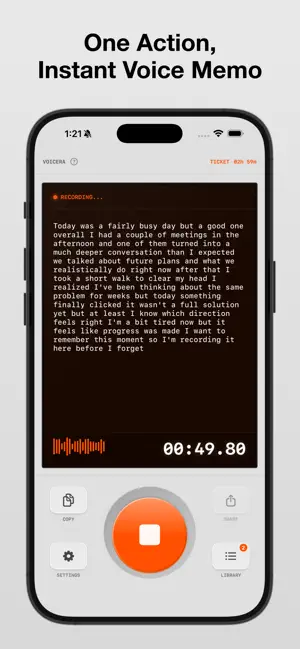
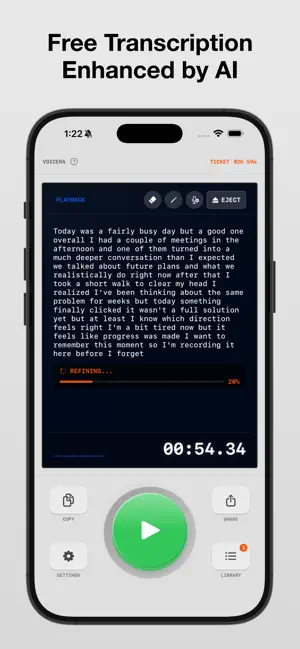
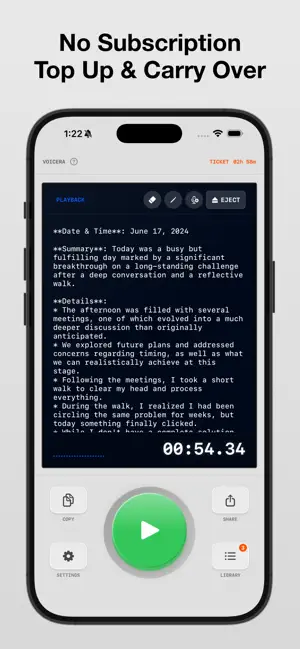
Voicera is a voice memo app that helps you quickly capture ideas and conversations, transcribe them, and refine the results into readable text with AI. Voicera can remove filler words and unnecessary repetition while preserving the original meaning and specific details of what you said. Key features • One-tap voice recording • Live transcription while recording • AI-powered transcription and text refinement • AI processing for longer recordings • A library for recordings and transcripts • Playback, copy, and sharing • Record on Apple Watch and transfer recordings to iPhone • Start recording from a Home Screen widget • View your AI balance, saved memo count, and latest memo in widgets • Japanese and English display • View and purchase additional AI processing time While recording, Voicera prevents the screen from automatically locking. Your normal device auto-lock setting resumes after recording stops. Use Voicera for meeting notes, capturing ideas, journaling, drafting documents, or whenever you want to turn spoken thoughts into useful text. An internet connection and available AI balance are required for AI processing.
What’s new
Version 2.0 · Updated September 3, 2026
This update fixes multiple issues based on user reports and improves the reliability of recording, transcription, and AI-powered text refinement. Bug fixes • Fixed an issue where AI processing time (tickets) could disappear when linking an Apple Account • Fixed an issue that could cause the app to freeze or close when starting a recording • Fixed an issue that could cause the app to crash during launch • Fixed an issue where Apple Watch transfers could remain stuck on “Syncing” • Fixed an issue where a successfully retrieved AI balance could incorrectly return to an error state • Fixed an issue where transcription could remain marked as in progress after completion • Fixed unwanted white margins around widgets • Improved recovery from AI authentication errors Other improvements • Prevented auto-lock during recording and live transcription • Added AI processing support for longer recordings • Added quick recording from the Home Screen widget • Improved widget layout and Japanese/English display • Improved the return of reserved AI time when processing fails
App privacy
The developer, JUNICHI KOHMURA, reported these privacy practices to Apple.
Data Linked to You
The following data, which may be collected and linked to your identity, may be used for the following purposes:
- Purchases: Purchase History
- Contact Info: Email Address, Name
- User Content: Audio Data, Other User Content
- Identifiers: User ID, Device ID
- Usage Data: Product Interaction
Used for: App Functionality
Alternatives to Voicera
Looking for apps like Voicera? Here are 6 similar apps on the App Store. The highest rated is Subtle Voicebuds (5.0/5), and all 6 are free to download.
-
 ThinkCapture: Notes That Sort
-
 Clak – Voice to Text
-
 BizScan Pro AI
-
 Subtle Voicebuds
5.0
Subtle Voicebuds
5.0
-
 RecTapApp - AI Notes & Summary
-
 VoiceWrite
| App | Rating | Price | Last updated | Compare |
|---|---|---|---|---|
| Voicera | – | Free | September 3, 2026 | |
| ThinkCapture: Notes That Sort | – | Free | Aug 19, 2026 | Compare |
| Clak – Voice to Text | – | Free | Oct 23, 2026 | Compare |
| BizScan Pro AI | – | Free | Sep 18, 2026 | Compare |
| Subtle Voicebuds | 5.0 / 5 (4) | Free | Oct 20, 2026 | Compare |
| RecTapApp - AI Notes & Summary | – | Free | Oct 18, 2026 | Compare |
| VoiceWrite | – | Free | Oct 26, 2024 | Compare |
Compare Voicera with the top alternatives: ratings, updates, ASO score and keyword gaps →