

Viewer3D
北京秤鑫科技有限公司 Utilities iPhoneiPadiPod touch
Viewer3D is a paid Utilities app for iPhone and iPad by 北京秤鑫科技有限公司. Requires iOS 15.0. Updated April 16, 2026.
- Price
- 0.99 USD
- on the App Store
- Size
- 24 MB
- Age 4+
- Updated
- Apr 16
- 2026 · v1.1
Screenshots


About Viewer3D
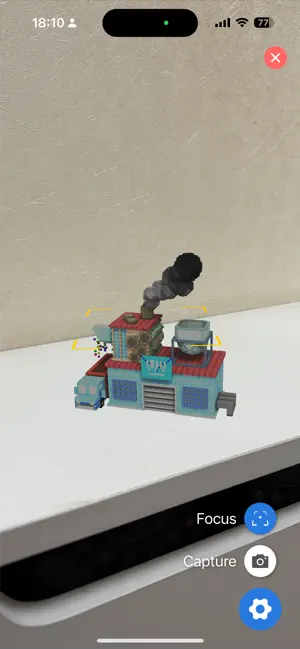
Powerful 3D Visualization. Absolute Privacy. Viewer3D is a high-performance, fully offline tool engineered for professionals, designers, and 3D printing enthusiasts. View, inspect, and interact with your models instantly—without cloud uploads or data privacy concerns. Why Choose Viewer3D? 100% Offline & Secure: Your intellectual property never leaves your device. No internet required, no tracking, and zero data collection. Zero Storage Overhead: Using advanced in-place file access, Viewer3D opens models directly without creating redundant copies, saving your device’s storage. Industry-Grade 3MF Support: Fully compatible with multi-color models and plate layouts from popular 3D printing slicers. Immersive AR Experience: Bring your designs into the real world. Visualize models in your physical environment with high-precision Augmented Reality. Key Features: Multi-Color 3MF Management: Seamlessly render multi-part 3MF files. Customize filament colors directly within the app to preview your final print. Intuitive Gesture Control: Optimized spatial navigation with fluid two-finger panning and pinch-to-zoom for precise inspection. Seamless Integration: Open 3D models instantly via the "Share" menu from Files, Mail, or any other app. Supported Formats: Comprehensive support for STL, PLY, OBJ, 3MF, STEP, and 3DM. What’s Next? (Our Roadmap): We are constantly evolving! Upcoming features include: • Enhanced STEP Support: Read and manage individual parts/assemblies. • Professional Tools: Section views, Material settings, and Exploded views. Support & Feature Requests: [email protected]
What’s new
Version 1.1 · Updated April 16, 2026
1、Advanced 3MF Support: You can now view multi-color 3D printing models. The app now recognizes slicer-defined plate layouts and allows you to customize filament colors for each part directly in-app. 2、Augmented Reality (AR) Mode: Visualize your models in the real world! Use the new AR feature to project and scale your designs in your actual environment. 3、Optimized Gesture Controls: We’ve refined the interaction engine. Use two-finger gestures to effortlessly pan and zoom for a smoother, more natural navigation experience. 4、Performance Improvements: Faster loading times for complex assemblies and enhanced rendering stability.
App privacy
The developer, 北京秤鑫科技有限公司, reported these privacy practices to Apple.
Data Not Collected
The developer does not collect any data from this app.
Alternatives to Viewer3D
Looking for apps like Viewer3D? Here are 6 similar apps on the App Store.


| App | Rating | Price | Last updated | Compare |
|---|---|---|---|---|
| Viewer3D | – | 0.99 USD | April 16, 2026 | |
| WiseBeginner | – | Free | Sep 1, 2026 | Compare |
| TraceSky | – | Free | May 25, 2026 | Compare |
| Slicer2: for 3d Printers | – | 1.99 USD | Mar 24, 2026 | Compare |
| SnapRemote Go | – | Free | Jun 6, 2025 | Compare |
| My G-code Editor | – | Free | Dec 15, 2025 | Compare |
| 3D Mesh Doctor | – | Free | Jun 12, 2026 | Compare |
Compare Viewer3D with the top alternatives: ratings, updates, ASO score and keyword gaps →