

Scrollie: Long Screenshot
锋 邹 Utilities iPhoneiPadiPod touch
Scrollie: Long Screenshot is a free Utilities app for iPhone and iPad by 锋 邹. Rated 4.7/5 from 22 ratings. Requires iOS 16.0. Updated October 27, 2026.
- Rating
- 4.7
- 22 ratings
- Price
- Free
- on the App Store
- Size
- 49 MB
- Age 4+
- Updated
- Oct 27
- 2026 · v2.3.1
Screenshots
About Scrollie: Long Screenshot
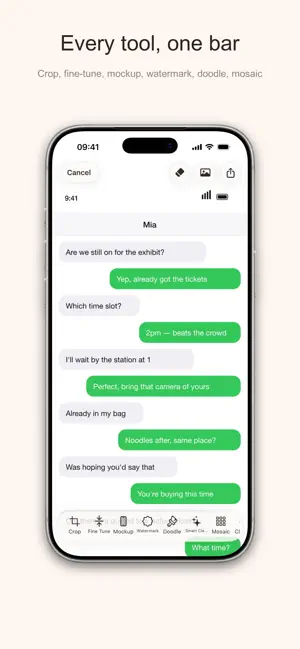
Scrollie turns screen recordings, sequential screenshots, or even a single image into a clean, seamless long screenshot in seconds. Whether you are saving chat history, social feeds, web pages, documents, or notes, Scrollie makes capture, stitching, editing, and export easier. Key features: • Turn screen recordings into long screenshots, with automatic stop after scrolling ends • Stitch multiple screenshots into one seamless image, with more reliable long screenshot detection in manual stitching • Open a single image directly in the editor for annotation, mosaic, watermark, and export • Smart overlap detection and Smart Cleanup for more natural results and cleaner scrollbars • Export to JPEG, PNG, HEIC, PDF, or sliced images for different layouts and platforms • Slide to select multiple photos, and add more directly even under limited photo access • Auto-save drafts with separate portrait and landscape recovery • Use URL Scheme and Shortcuts to open the latest screenshot or screen recording • Optimized for iPhone and iPad, with improved dark mode and clearer save, share, and permission feedback Privacy first: All processing is done on-device. Your screenshots and recordings are not uploaded to our servers. Scroll, Stitch, Share. In-App Purchases: • Lifetime Pro Access • Pro Monthly Subscription (1 month) • Pro Annual Subscription (1 year) Prices may vary by region and are shown in the app before purchase. Terms of Use (EULA): https://www.apple.com/legal/internet-services/itunes/dev/stdeula/
Ratings & reviews
4.7
22 ratings
What’s new
Version 2.3.1 · Updated October 27, 2026
- [New]Screen recording to long image: scrolling upward works too, e.g. scrolling up through a chat history - [Improved]System screen recordings are processed automatically too: after recording, return to Scrollie and it's detected and opened straight in the editor - [Improved]Auto-processing can be turned off: in Settings, turn off Auto-Stitch Screenshots and Auto-Open Recordings separately
App privacy
The developer, 锋 邹, reported these privacy practices to Apple.
Data Not Collected
The developer does not collect any data from this app.
Alternatives to Scrollie: Long Screenshot
Looking for apps like Scrollie: Long Screenshot? Here are 6 similar apps on the App Store. The highest rated is My NAT (5.0/5), and all 6 are free to download.
-
 Aurader: Read Aloud Ebook TTS
4.7
-
 Jinx - System-Wide Ad Blocker
4.6
-
 Device Status⁺ CPU x Monitor z
4.8
-
 Neko Dash - Just a Dashboard
4.8
-
 LudyServer - File Transfer
3.7
-
 My NAT
5.0
| App | Rating | Price | Last updated | Compare |
|---|---|---|---|---|
| Scrollie: Long Screenshot | 4.7 / 5 (22 ratings) | Free | October 27, 2026 | |
| Aurader: Read Aloud Ebook TTS | 4.7 / 5 (177) | Free | Oct 27, 2026 | Compare |
| Jinx - System-Wide Ad Blocker | 4.6 / 5 (187) | Free | Oct 31, 2026 | Compare |
| Device Status⁺ CPU x Monitor z | 4.8 / 5 (191) | Free | Nov 1, 2026 | Compare |
| Neko Dash - Just a Dashboard | 4.8 / 5 (8) | Free | Sep 24, 2026 | Compare |
| LudyServer - File Transfer | 3.7 / 5 (3) | Free | Sep 8, 2026 | Compare |
| My NAT | 5.0 / 5 (2) | Free | Sep 17, 2026 | Compare |