

Quick Expense: Receipt Scanner
Faruq Rasid Finance iPhoneiPadiPod touch
Quick Expense: Receipt Scanner is a free Finance app for iPhone and iPad by Faruq Rasid. Requires iOS 17.0. Updated October 24, 2026.
- Price
- Free
- on the App Store
- Size
- 21 MB
- Age 4+
- Updated
- Oct 24
- 2026 · v2.2.0
Screenshots



About Quick Expense: Receipt Scanner
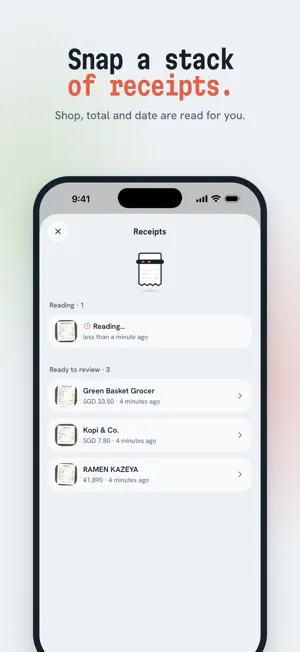
Quick Expense is a receipt scanner and expense tracker that logs your spending in seconds and keeps it private. Snap a receipt and the shop, total, date and line items are filled in for you. Pay with Apple Pay and the expense logs itself. Set budgets, watch your trends, and share a project with the people you split costs with, in any currency. SCAN RECEIPTS IN SECONDS • Point your camera at a receipt and the shop, total, currency, date and line items are read for you • On iPhone and iPad with Apple Intelligence, receipts can be read right on your device • Discounts and member savings are kept, so the items add up to what you paid • Snap a whole stack of receipts and review them when you're ready • Paid cash with no receipt? Enter the amount and the shop in a few taps EXPENSES THAT LOG THEMSELVES • Add a Shortcuts automation once, and every Apple Pay tap with the cards you choose becomes an expense, sorted into a category • On iOS 27, payment notifications from your bank apps can log themselves too (Beta) • Receipt emails can log themselves with the Shortcuts Mail trigger (Beta) • It all happens in the background: no app to open and nothing to type afterwards BUDGETS AND TRENDS • Set a monthly budget overall or for each category, and see what's on track at a glance • Give a trip or project its own budget, per month or for the whole thing • Trends shows your months over time, categories against your usual, and your top shops • Search finds expenses by shop, note or any item on the receipt TRACK SPENDING IN ANY CURRENCY • Each expense keeps the amount in the currency you paid, from yen to dinar • Totals show in your home currency, so trips and purchases abroad simply add up SPLIT COSTS WITH ANYONE • Create shared projects for your home, a trip or a group • Invite people with a link, or let them scan an invite QR code • Everyone adds their own expenses and sees one shared total MADE FOR IPHONE AND IPAD • Built natively for iOS, fast and smooth • On iPad and an unfolded iPhone Duo, your list and the details sit side by side PRIVATE BY DESIGN • Stored on your phone: works offline, and nothing waits on a server • End-to-end encrypted: synced data and receipt backups are encrypted on your phone first • No account and no tracking: we never ask for your name or email, and there are no analytics FREE AND PRO Quick Expense is free to use. Log as many expenses as you like, with 20 cloud receipt scans a month, budgets, trends and automatic logging. Pro is an optional monthly subscription that adds unlimited cloud scans, encrypted sync across your devices, shared projects and recurring expenses for rent and subscriptions. Terms of Use: https://quickexpense.app/terms.html Privacy Policy: https://quickexpense.app/privacy.html
What’s new
Version 2.2.0 · Updated October 24, 2026
- Create your own categories and subcategories, in budgets and trends - Projects now have their own shared categories - Import a CSV - Filter expenses by any date range - Smarter auto-entry: skips duplicates and notifications with no amount - Scan Receipt and Add Expense in Spotlight and Siri - Fixes and improvements
App privacy
The developer, Faruq Rasid, reported these privacy practices to Apple.
Data Not Collected
The developer does not collect any data from this app.
Alternatives to Quick Expense: Receipt Scanner
Looking for apps like Quick Expense: Receipt Scanner? Here are 6 similar apps on the App Store.
-
 RiFin
-
 Total Networth
-
 Fuluflow
-
 Tipid Expense Calendar
-
 Lumy: AI Family Budget Tracker
-
 Cento - Daily Expenses AI
| App | Rating | Price | Last updated | Compare |
|---|---|---|---|---|
| Quick Expense: Receipt Scanner | – | Free | October 24, 2026 | |
| RiFin | – | Free | May 15, 2026 | Compare |
| Total Networth | – | 0.99 USD | Feb 20, 2026 | Compare |
| Fuluflow | – | Free | Apr 20, 2026 | Compare |
| Tipid Expense Calendar | – | Free | Sep 1, 2026 | Compare |
| Lumy: AI Family Budget Tracker | – | Free | Nov 6, 2026 | Compare |
| Cento - Daily Expenses AI | – | Free | Nov 11, 2026 | Compare |