

Stickey’s Garage
SAS Services LLC Productivity iPhoneiPadiPod touch
Stickey’s Garage is a free Productivity app for iPhone and iPad by SAS Services LLC. Rated 5.0/5 from 8 ratings. Requires iOS 13.0. Updated May 29, 2026.
- Rating
- 5.0
- 8 ratings
- Price
- Free
- on the App Store
- Size
- 43 MB
- Age 4+
- Updated
- May 29
- 2026 · v1.0.7
Screenshots



About Stickey’s Garage
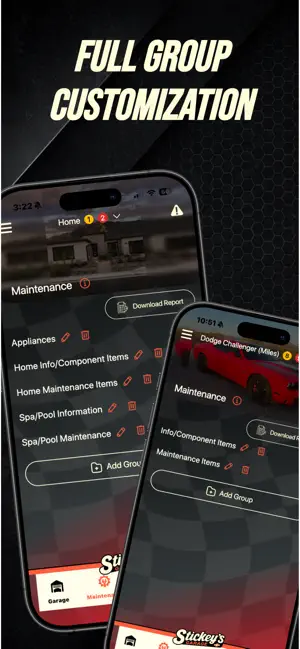
Stickey’s Garage is built for everyone. Whether you want simple reminders, detailed time-and-use tracking, or just a single spot to store information, this app adapts to you. It’s flexible, customizable, and built to match your vision, making it truly one of a kind. We all spend time and money on our hobbies, homes, and the things we’re passionate about. Stickey’s Garage gives you a centralized hub to track, monitor, and maintain those investments, whether it’s your racing operation, your family’s vehicles, a trucking or farming business, home maintenance, or the toys and hobbies you care about. You can track your assets by time and use. Or you can use Stickey’s Garage as a log for what you own, from photos, notes, important information, warranty details, or insurance records. Even better, it serves as a safeguard if disaster strikes, keeping all your critical information in one place. Stop juggling sticky notes, random folders, and notebooks. Stickey’s Garage is where your assets live. Make it your go-to hub where you can organize, protect, and simplify the things you invest in. Spend less time stressed and more time enjoying what you own. It’s time to trust Stickey’s Garage, not your memory. Customizable Maintenance Cards Start with suggested maintenance items based on the asset type you choose. If you don’t see the items you need, search to determine if it’s already in the system. If it’s not, you can add your own. You can rename items, delete the ones you don’t want, and build your own groups. On top of that, you can transfer any items to the Parts Room. Whether they’re spares or duplicates, the Parts Room keeps everything organized and easy to access since it’s universal between all of your assets. Reminders & Glovebox View all maintenance items and thresholds at a glance. From any maintenance card, flag items to the Glovebox for quick access. For both Reminders and Glovebox, you can create custom entries with notes, photos and attachments. Usage Logging Track by runs, miles, hours, laps, pulls, races, events, loads or nights. Each entry automatically updates your maintenance cards based on the thresholds you’ve set. Asset Management Transferring an asset means giving up ownership. To keep its maintenance cards, you’ll have the ability to make a clone. A clone resets thresholds to zero, along with any other information not carrying over. When you transfer, the new owner gets all its information, essentially a full sale. If you are keeping certain items off of the asset, move them to the Parts Room before transferring since they’ll no longer be tied to that asset. Parts Room Use the Parts Room for any extra items you have. Items here aren’t tied to an asset, but you can still view their details and thresholds. Alongside that, you can transfer items in your parts room to any asset in your garage. The Parts Room is critical, first as storage for spare items you still own, and second as a holding spot if you sell or transfer an asset but want to keep certain parts. In that case, just move those items into the Parts Room since you still physically have them. You can also search for items in our inventory list while creating custom groups to organize them however you like. Team/Family Members Assign team or family members to help manage assets. Each member must have their own account. They can access and edit, but ownership stays with the main asset holder. Tech Card During asset setup, you’ll choose racing or non-racing. If racing, the Tech Card is enabled. Items added generate a downloadable report with field names, data and the lifespan field. This keeps racing-specific info accurate, organized and inspection-ready. Asset Report Every item you service and maintain in the maintenance card tab will be added to a downloadable report, where you can view the full service history, including intervals, completion dates and details of each service performed. Terms of Use: https://stickeysgarage.com/terms-and-conditions
Ratings & reviews
5.0
8 ratings
What’s new
Version 1.0.7 · Updated May 29, 2026
Improved UI experience
App privacy
The developer, SAS Services LLC, reported these privacy practices to Apple.
Data Not Collected
The developer does not collect any data from this app.
Alternatives to Stickey’s Garage
Looking for apps like Stickey’s Garage? Here are 6 similar apps on the App Store. The highest rated is Park Smarter (4.5/5), and all 6 are free to download.
-
 Midco Wi-Fi
3.7
Midco Wi-Fi
3.7
-
 OneControl Auto
2.7
OneControl Auto
2.7
-
 Quantum Fiber from AT&T
3.5
Quantum Fiber from AT&T
3.5
-
 Cox WiFi by Spectrum
4.3
Cox WiFi by Spectrum
4.3
-
 Park Smarter
4.5
Park Smarter
4.5
-
 My CenturyLink
4.4
My CenturyLink
4.4
| App | Rating | Price | Last updated | Compare |
|---|---|---|---|---|
| Stickey’s Garage | 5.0 / 5 (8 ratings) | Free | May 29, 2026 | |
| Midco Wi-Fi | 3.7 / 5 (344) | Free | Sep 9, 2026 | Compare |
| OneControl Auto | 2.7 / 5 (818) | Free | Sep 16, 2026 | Compare |
| Quantum Fiber from AT&T | 3.5 / 5 (6,732) | Free | Oct 26, 2026 | Compare |
| Cox WiFi by Spectrum | 4.3 / 5 (132,932) | Free | Oct 23, 2026 | Compare |
| Park Smarter | 4.5 / 5 (11,862) | Free | Apr 17, 2026 | Compare |
| My CenturyLink | 4.4 / 5 (137,802) | Free | Oct 2, 2026 | Compare |
Compare Stickey’s Garage with the top alternatives: ratings, updates, ASO score and keyword gaps →