

Oareo
Venkata Sai Dutt Ganduri Productivity iPhoneiPadiPod touch
Oareo is a free Productivity app for iPhone and iPad by Venkata Sai Dutt Ganduri. Rated 5.0/5 from 9 ratings. Requires iOS 26.0. Updated May 3, 2026.
- Rating
- 5.0
- 9 ratings
- Price
- Free
- on the App Store
- Size
- 36 MB
- Age 4+
- Updated
- May 3
- 2026 · v1.2
Screenshots

About Oareo
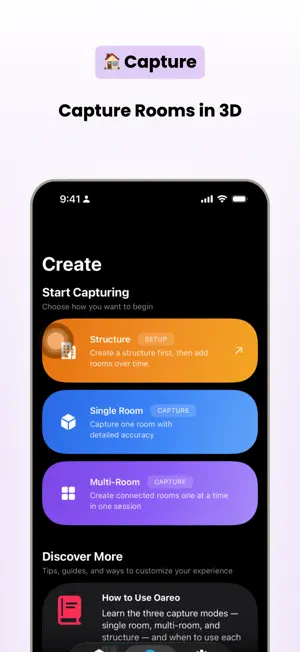
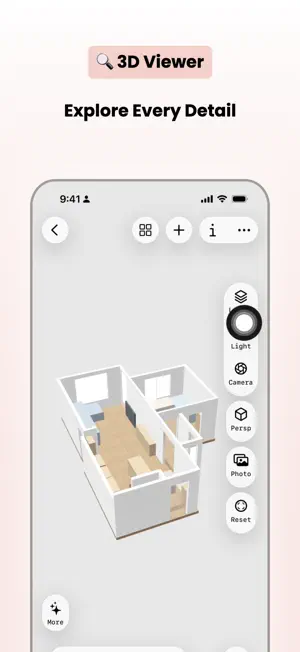
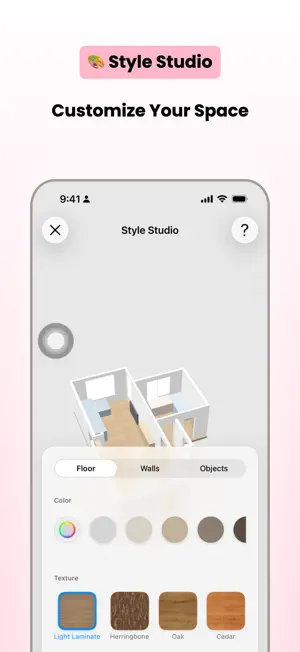
Oareo is a professional LiDAR-powered app for capturing indoor spaces as accurate 3D models — entirely offline and private by default. CAPTURE Choose the workflow that fits your project: • Single Room — fast one-room results with real-time progress • Multi-Room — walk through connected spaces in one session • Structure — build and expand larger projects over time, adding rooms across sessions EXPLORE • Interactive 3D viewer with pan, zoom, and orbital controls • Layer toggles for walls, floor, ceiling, furniture, and openings • Camera presets: Top, Front, Side, Isometric • Style Studio — customize floors with textures, walls with individual colors, and recolor every object • Free Roam — walk through your capture in first person with dual-joystick controls • AR Quick Look — preview any model in your real environment MEASURE • Ruler mode for precise point-to-point distances on 3D surfaces • Area mode for multi-point polygon measurements • Drag to adjust points with real-time recalculation FLOOR PLANS • Automatic 2D blueprint generation with walls, doors, windows, and furniture • Dimension lines with perimeter measurements • Multi-room and multi-floor support • Export to PDF (vector) or PNG (raster) EXPORT • 3D formats: USDZ, OBJ, STL, PLY, XYZ • Floor plans: PDF, PNG • Screenshot editor with annotation tools • Native iOS share sheet MANAGE • Visual library with structure and room cards • Rich room info: dimensions, detected objects, location map, technical specs • iCloud backup (optional, disabled by default) PRIVATE BY DESIGN • All data on-device — works 100% offline • No analytics, no tracking, no third-party services • No account required • Optional iCloud backup uses your private CloudKit container Requirements: • LiDAR-capable iPhone or iPad (iPhone 12 Pro+, iPad Pro 2020+) • iOS/iPadOS 17 or later
Ratings & reviews
5.0
9 ratings
What’s new
Version 1.2 · Updated May 3, 2026
This update is built on your feedback. Thanks to everyone who's written in. Special thanks to the Reddit interior-design community, whose questions sparked Measure Wall. NEW: Measure Wall Tap any wall in the 3D scene to open a head-on 2D elevation. See the wall with every door, window, and archway at its real position and size. The details panel lists widths, heights, sill and header heights, and distances from each opening to the wall corners. Export as PDF or PNG straight from the share menu, letter size and fabricator-ready. Works on single-room captures and multi-room structures. NEW: Per-segment floor plan dimensions The floor plan now labels every door, window, and wall section between them on the innermost dimension layer. Toggle "Opening measurements" in the Advanced sheet. IMPROVED: Live library Edits made on a room or structure show up immediately when you go back to the library: favorites, renames, deletions, room counts. No more pull-to-refresh, no more re-launching the app. IMPROVED: Floor plan labels Dimension labels under 2 m no longer hide the dimension line behind them. FIXED • Structure detail view reflects rename and favorite changes the moment you make them • Heart toggles update instantly with the "favorites only" filter off • Empty-structure delete now shows the correct "Structure deleted" message • Several error messages normalized to clearer wording • Measure Wall now handles long perimeter walls at T-junctions correctly • Distinct icon for Measure Wall so it stands out from the existing ruler tool Keep the feedback coming. Every release is shaped by it.
App privacy
The developer, Venkata Sai Dutt Ganduri, reported these privacy practices to Apple.
Data Not Linked to You
The following data, which may be collected but is not linked to your identity, may be used for the following purposes:
- Location: Precise Location
Used for: App Functionality
Alternatives to Oareo
Looking for apps like Oareo? Here are 6 similar apps on the App Store. The highest rated is IntelliNote — AI Notebook (5.0/5), and all 6 are free to download.
-
 Outline -Draw lines & notes
4.3
Outline -Draw lines & notes
4.3
-
 IntelliNote — AI Notebook
5.0
IntelliNote — AI Notebook
5.0
-
 Glazr File Manager Pro
-
 VoiceStream: AI Voice Notes
-
 Notes Buddy Kit
-
 sort & find documents: DocSort
| App | Rating | Price | Last updated | Compare |
|---|---|---|---|---|
| Oareo | 5.0 / 5 (9 ratings) | Free | May 3, 2026 | |
| Outline -Draw lines & notes | 4.3 / 5 (3) | Free | Jul 24, 2026 | Compare |
| IntelliNote — AI Notebook | 5.0 / 5 (2) | Free | May 10, 2026 | Compare |
| Glazr File Manager Pro | – | Free | Oct 27, 2026 | Compare |
| VoiceStream: AI Voice Notes | – | Free | Oct 8, 2026 | Compare |
| Notes Buddy Kit | – | Free | Nov 2, 2026 | Compare |
| sort & find documents: DocSort | – | Free | Apr 15, 2026 | Compare |
Compare Oareo with the top alternatives: ratings, updates, ASO score and keyword gaps →