

File Locker - Scanner, Vault
Jamaludeen Mara Abdullakunhihaji Utilities iPhoneiPadiPod touch
File Locker - Scanner, Vault is a free Utilities app for iPhone and iPad by Jamaludeen Mara Abdullakunhihaji. Requires iOS 13.0. Updated January 31, 2026.
- Price
- Free
- on the App Store
- Size
- 68 MB
- Age 17+
- Updated
- Jan 31
- 2026 · v1.0.5
Screenshots
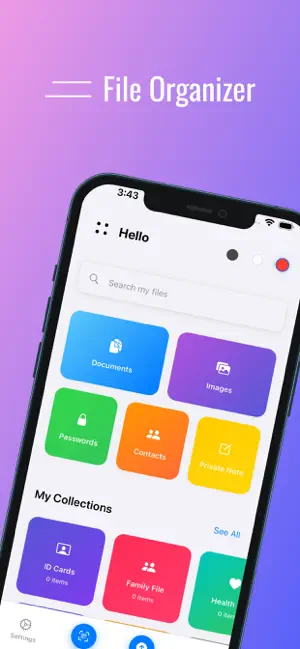


About File Locker - Scanner, Vault
File Locker - Your Ultimate Secure File Management Solution Protect your sensitive data with military-grade encryption. File Locker is a comprehensive security app that keeps your files, passwords, contacts, and notes safe with standard encryption - the same standard used SECURE FILE STORAGE Store any type of file with complete privacy. Organize documents, PDFs, images, and more into custom folders. All files are encrypted before storage, ensuring your data remains private even if your device is compromised. NOTES Create and organize private notes with full encryption. Organize your thoughts into folders, use rich text formatting, and keep your ideas secure. Perfect for personal journals, business notes, or sensitive information. PASSWORD MANAGER Never forget a password again. Securely store all your passwords in one encrypted vault. Features include: • Built-in password generator with customizable options • Password strength checker • Quick copy functionality CONTACTS Keep sensitive contacts separate from your main contact list. Import contacts from your device or add them manually. All contacts are encrypted and protected with your PIN. DOCUMENT SCANNER Transform your device into a powerful document scanner. Features include: • High-quality document capture • Multiple filter options for enhanced readability • Automatic edge detection • Image enhancement and optimization • Export to PDF GOOGLE DRIVE BACKUP Backup your encrypted data to Google Drive and restore it on any device. Your data remains encrypted even in the cloud, ensuring maximum security. Optional feature - your data stays local if you prefer. MULTI-LANGUAGE SUPPORT Available in 10+ languages including English, Arabic, Spanish, French, German, Hindi, Japanese, Chinese, Russian, Portuguese, and more. Switch languages anytime from settings. DARK & LIGHT THEMES Choose your preferred theme or use system default. Beautiful, modern interface designed for both light and dark modes. SECURITY FEATURES • PIN/Password Protection - Secure access control • Auto-Lock - Automatically locks after inactivity • Privacy Mode - Hide app content in recent apps • Local Storage - All data stored on your device • No Data Collection - We don't track or collect your information FULL OFFLINE FUNCTIONALITY Works completely offline. No internet connection required for core features. Your data never leaves your device unless you choose to use cloud backup. KEY FEATURES • Secure file storage with folder organization • Password manager with generator • Private contact storage • Document scanner with filters • Photo gallery with organization • Google Drive backup (optional) • Multi-language support (10+ languages) • Dark/Light theme • OCR scan, Image to text, PDF to text • PIN/Password protection • Auto-lock functionality • 100% offline operation • No data collection or tracking PRIVACY FIRST Your privacy is our top priority. We don't collect, track, or share your data. Everything is stored locally on your device with standard encryption. No analytics, no tracking, no data collection - just pure privacy. PERFECT FOR • Personal file organization • Business document management • Password security • Private note keeping • Contact privacy • Document scanning • Secure data backup Download File Locker today and take control of your digital privacy. Your data, your control, your security.
App privacy
The developer, Jamaludeen Mara Abdullakunhihaji, reported these privacy practices to Apple.
Data Linked to You
The following data, which may be collected and linked to your identity, may be used for the following purposes:
- Contact Info: Email Address
- Identifiers: User ID, Device ID
Used for: App Functionality, Other Purposes
Data Not Linked to You
The following data, which may be collected but is not linked to your identity, may be used for the following purposes:
- Contact Info: Physical Address, Name, Phone Number
- Contacts: Contacts
- User Content: Emails or Text Messages, Photos or Videos, Other User Content
- Other Data: Other Data Types
Used for: App Functionality