

WiFi Device – Network Scanner
Vladimir Ivakhnenko Productivity iPhoneiPadiPod touch
WiFi Device – Network Scanner is a free Productivity app for iPhone and iPad by Vladimir Ivakhnenko. Requires iOS 18.6. Updated October 22, 2026.
- Price
- Free
- on the App Store
- Size
- 32 MB
- Age 4+
- Updated
- Oct 22
- 2026 · v1.2.2
Screenshots



About WiFi Device – Network Scanner
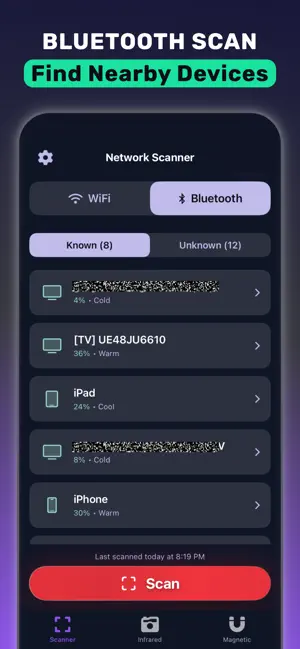
WiFi Device – Network Scanner is an iOS app for seeing every device connected to your WiFi or local network. Use this app to scan a home or small-office network and list phones, laptops, smart TVs, cameras, printers, and other gear with an IP address and a name. It is for anyone who wants to know who is on their WiFi without router admin access. No router login and no technical setup. The scan runs on your iPhone. WHO IS ON MY WIFI? Internet suddenly slow, or a device name you do not recognize? WiFi Device – Network Scanner scans your local network and lists connected devices in one place. Compare the list with the devices you own. Anything you cannot identify may be a neighbor or a stranger on your WiFi. Change your WiFi password in your router, scan again, and confirm they are gone. WHAT YOU CAN DO - See all devices connected to your WiFi network - Find unknown devices on your home network - View IP address, hostname, and device details - Count how many devices are on your network - Keep an inventory of your home network devices - Check the LAN when a device will not connect - Discover nearby Bluetooth devices and their signal strength FIND A LOST BLUETOOTH DEVICE Misplaced earbuds, headphones, a watch, or a speaker? Open the Bluetooth list, pick the device, and walk with the hot/cold proximity meter. The signal gets stronger as you get closer. It helps you search; it cannot promise the device is still in range. CHECK A HOTEL ROOM OR RENTAL Traveling? Connect to the hotel or vacation rental WiFi and scan it to see which cameras and smart devices share the network. Use the camera filter and flashlight to look for lens reflections, the magnetometer near suspicious objects, and the Bluetooth scanner for nearby devices. No app can guarantee to find every hidden camera, but these tools give you a fast first check. EXTRA TOOLS - Bluetooth scanner – list nearby Bluetooth devices by name and signal strength - Magnetometer – notice magnetic field changes near cables and electronics - Infrared-style camera filters – green, red, blue, and monochrome views WHO IT'S FOR - Anyone asking who is using my WiFi - Parents who want to know which devices are on the family network - People looking for lost earbuds or headphones - Travelers checking hotel and rental WiFi - Small offices that need a simple network device list FAQ How do I see who is connected to my WiFi on iPhone? Open WiFi Device – Network Scanner, allow Local Network access when iOS asks, and tap Scan. You get a list of devices on your WiFi. Do I need my router password or admin access? No. WiFi Device – Network Scanner scans from your iPhone. No router login is required. How do I remove an unknown device from my WiFi? The app shows who is connected. To block a device, change your WiFi password or block it in your router settings, then scan again. Does it work on mobile data? Connect to the WiFi network you want to check. The app scans the local network your iPhone is on. Is it private? Scanning runs on your device and only covers the network you are connected to. Use it on networks you own or are allowed to check. PRICING Premium features are available through an optional in-app purchase. Download WiFi Device – Network Scanner and see who is on your WiFi. Terms of Use: https://c-basso.xyz/terms.html Privacy Policy: https://c-basso.xyz/privacy.html
What’s new
Version 1.2.2 · Updated October 22, 2026
This version of WiFi Device – Network Scanner includes small fixes
App privacy
The developer, Vladimir Ivakhnenko, reported these privacy practices to Apple.
Data Not Linked to You
The following data, which may be collected but is not linked to your identity, may be used for the following purposes:
- Purchases: Purchase History
- Identifiers: User ID, Device ID
- Usage Data: Product Interaction
- Diagnostics: Crash Data, Other Diagnostic Data
Used for: Analytics, App Functionality, Other Purposes
Alternatives to WiFi Device – Network Scanner
Looking for apps like WiFi Device – Network Scanner? Here are 6 similar apps on the App Store. The highest rated is Fing - Network Scanner (4.6/5), and all 6 are free to download.
-
 iNet - Network Scanner
4.5
iNet - Network Scanner
4.5
-
 Ekahau Analyzer
2.1
Ekahau Analyzer
2.1
-
 Device Monitor & Diagnostics
3.9
Device Monitor & Diagnostics
3.9
-
 Fing - Network Scanner
4.6
Fing - Network Scanner
4.6
-
 Network Toolbox Net security
4.6
Network Toolbox Net security
4.6
-
 UTM Remote Virtual Machines
3.7
UTM Remote Virtual Machines
3.7
| App | Rating | Price | Last updated | Compare |
|---|---|---|---|---|
| WiFi Device – Network Scanner | – | Free | October 22, 2026 | |
| iNet - Network Scanner | 4.5 / 5 (2,565) | Free | Oct 23, 2026 | Compare |
| Ekahau Analyzer | 2.1 / 5 (74) | Free | Oct 26, 2026 | Compare |
| Device Monitor & Diagnostics | 3.9 / 5 (132) | Free | Oct 5, 2026 | Compare |
| Fing - Network Scanner | 4.6 / 5 (116,616) | Free | Oct 19, 2026 | Compare |
| Network Toolbox Net security | 4.6 / 5 (3,399) | Free | Dec 16, 2024 | Compare |
| UTM Remote Virtual Machines | 3.7 / 5 (52) | Free | Oct 22, 2026 | Compare |