

BrewGuide: Coffee Timer
Onur Sencan Food & Drink iPhoneiPadiPod touch
BrewGuide: Coffee Timer is a free Food & Drink app for iPhone and iPad by Onur Sencan. Requires iOS 18.0. Updated May 30, 2026.
- Price
- Free
- on the App Store
- Size
- 102 MB
- Age 4+
- Updated
- May 30
- 2026 · v1.2 IAP integration
Screenshots

About BrewGuide: Coffee Timer
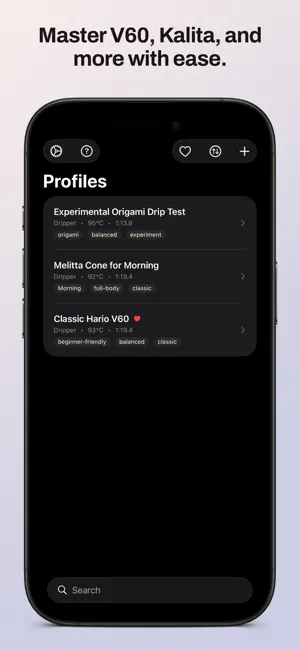
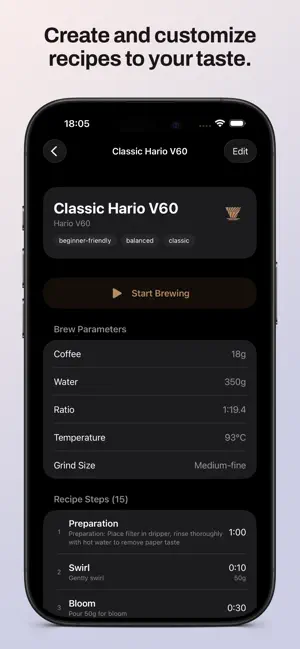
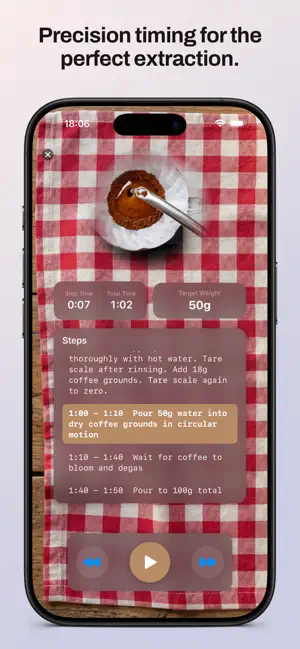
The difference between good pour-over and great pour-over? A few degrees, a few seconds or a slightly different grind? BrewGuide is your personal pour-over coffee coach, guiding you through every step of the brewing process with precision timing and visual demonstrations. Whether you're new to pour-over or a seasoned home barista, BrewGuide helps you achieve consistently delicious results with every brew. PERFECT POUR-OVER EVERY TIME Stop watching the clock and second-guessing your technique. BrewGuide provides step-by-step instructions timed perfectly for your dripper and recipe, so you can focus on the craft of brewing exceptional coffee. STEP-BY-STEP BREWING TIMER • Clear instructions for each phase: bloom, pour, pause, and drawdown • Automatic timer advances through each step—no manual tracking needed • Visual weight targets guide your pour amounts • Audio and haptic alerts keep you on track without staring at your phone • Always-on display mode perfect for your kitchen counter TECHNIQUE VIDEO GUIDES Watch looping demonstrations of proper pouring technique right in the app. See exactly how to bloom your coffee, execute the perfect spiral pour, and understand the difference between gentle and agitated pours. Learn by watching, then practice with confidence. SUPPORT FOR YOUR EQUIPMENT BrewGuide includes optimized recipes for the most popular drippers: • Hario V60 (plastic, ceramic, glass, metal) • Kalita Wave (155, 185) • Chemex (3-cup, 6-cup, 8-cup) • Origami Dripper • Fellow Stagg [X] and [XF] • Melitta • Plus the ability to add your own custom dripper Each dripper type comes with professionally tested default recipes optimized for flow rate and brewing characteristics. FULLY CUSTOMIZABLE RECIPES Start with expert-designed defaults, then make them your own: • Adjust bloom time, pour intervals, and total brew time • Modify water amounts and coffee-to-water ratios • Add or remove steps to match your preferred technique • Save unlimited custom profiles • Organize with tags for easy searching • Duplicate and modify profiles to experiment with variations TASTE NOTES JOURNAL Track your results and refine your technique over time what works and what doesn't: • Rate acidity, sweetness, body and overall quality • Record detailed tasting notes and observations • Review your brewing history for any profile BEAUTIFUL, DISTRACTION-FREE DESIGN BrewGuide's clean interface keeps you focused on brewing: • Choose from many elegant background themes to match your kitchen • Large, readable timer display visible from across the room • Intuitive controls that don't interrupt your flow • Dark mode support for early morning brewing sessions • Designed specifically for one-handed use while brewing WORKS COMPLETELY OFFLINE Everything works without an internet connection. No account required, no login needed. Your recipes, notes and preferences stay private GETTING STARTED IS SIMPLE 1. Choose from pre-loaded dripper profiles or create your own 2. Gather your equipment: dripper, filter, kettle, scale and fresh coffee 3. Tap "Start Brewing" and follow the step-by-step guidance 4. Record taste notes to remember what worked 5. Refine your technique with each brew WHO BREWGUIDE IS FOR • Coffee beginners learning pour-over fundamentals • Home baristas perfecting their morning routine • Coffee enthusiasts experimenting with new beans and techniques • Anyone who wants café-quality coffee at home • Specialty coffee lovers who appreciate precision and consistency YOUR COFFEE DESERVES BETTER You spent money on quality beans, a good grinder, brewing units and a precision kettle. Don't let inconsistent timing ruin your brew. BrewGuide ensures you extract the best flavor from every bean Whether you're brewing your daily morning cup, dialing in a new single-origin, or impressing guests with your barista skills, BrewGuide is there to help you brew better coffee. Download BrewGuide today and start your journey to pour-over perfection.
What’s new
Version 1.2 IAP integration · Updated May 30, 2026
BrewGuide Pro is now easier to find and purchase. A dedicated Pro tab has been added to the tab bar, giving you direct access to the upgrade screen at any time, no need to navigate through settings or trigger a content gate first. After purchase, the Pro tab disappears automatically and all recipes become available. This update also resolves an issue where the purchase flow could hang on iPad without completing. The fix ensures the purchase sheet processes correctly on all devices. The Hario V60 recipe is free to use with no time limit. Try the full brewing experience before deciding to upgrade. No changes to recipes, timers or the brewing session experience.
App privacy
The developer, Onur Sencan, reported these privacy practices to Apple.
Data Not Collected
The developer does not collect any data from this app.
Alternatives to BrewGuide: Coffee Timer
Looking for apps like BrewGuide: Coffee Timer? Here are 6 similar apps on the App Store.






| App | Rating | Price | Last updated | Compare |
|---|---|---|---|---|
| BrewGuide: Coffee Timer | – | Free | May 30, 2026 | |
| Kaffiene | – | Free | Jan 13, 2026 | Compare |
| Star Brew Timer | – | Free | Jan 27, 2026 | Compare |
| MugBee | – | Free | Mar 18, 2026 | Compare |
| Coffeera | Brew Guide | – | Free | May 7, 2026 | Compare |
| Logica Coffee | – | Free | Sep 28, 2026 | Compare |
| BrewLens: Coffee Brewing Lab | – | Free | Mar 11, 2026 | Compare |