

CentsCheck
Kah Mun Lam Finance iPhoneiPadiPod touchApple Watch
CentsCheck is a free Finance app for iPhone and iPad by Kah Mun Lam. Requires iOS 17.0. Updated October 18, 2026.
- Price
- Free
- on the App Store
- Size
- 110 MB
- Age 9+
- Updated
- Oct 18
- 2026 · v2.7.29
Screenshots


About CentsCheck
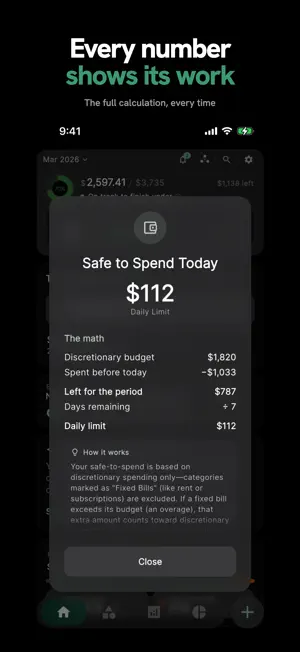
Know what you can safely spend today. CentsCheck gives you one number for today. It takes your fixed bills and what you have already spent off your monthly budget, then spreads the rest over the days left in your budget month. Log a purchase and the number updates. Tap it to see the calculation, line by line. Works with your AI agent Connect an AI assistant such as Claude, Grok or Cursor to CentsCheck with AI Link, free. Tell it what you spent, send it a photo of a receipt, or ask how your month is going. It logs the spend in CentsCheck and answers from your real numbers, and it can change entries when you ask. Every entry it adds carries an AI badge, you can undo an action within five minutes, and a full budget plan waits for your approval in CentsCheck. Disconnect any time. No account linking. No ads. No data selling. Sign-in is optional. Free - Safe-to-Spend, your daily number, and the calculation behind it. - AI Link: log, ask and plan through your AI assistant. - Forecast to payday shows where you will land at your current pace, once you set your payday. - Opt in to a Morning Check notification with today's number and a button to log a spend. - See your number on a Home Screen widget or Apple Watch, or ask Siri. - Log in seconds with the built-in calculator, Apple Watch or Siri, plus a monthly allowance of free receipt scans. - A weekly Money Brief with your spending against budget, your top categories and one trend. - Budgets per category, with fixed bills kept out of your daily pace. - Up to 3 savings goals. - Shared Pools for trips, housemates and partners, with invite codes, live balances and your share synced to your personal budget. Equal and exact splits are free, and you can join as many pools as you like. Pro - Up to 40 expense, 15 income and 15 investment categories, with renaming and archiving. - Up to 15 savings goals. - Full spending signals, budget and unusual-spending alerts, and a shareable PDF of your weekly brief. - An investment portfolio for stocks and crypto, with market prices. - Percentage and share splits, settlements and budgets in Shared Pools. - Unlimited receipt scans. Private by design CentsCheck works offline and keeps your spending data on your iPhone. Optional Apple or Google sign-in adds backup and sync. CentsCheck encrypts your personal spending fields on your iPhone before they upload. Subscription terms CentsCheck Pro is optional. It comes as a monthly or yearly auto-renewing subscription, or as Pro Lifetime, a one-time purchase that never renews. The app shows the price and any free trial before you buy, and prices vary by region. Payment is charged to your Apple Account at confirmation. A subscription renews unless auto-renew is turned off at least 24 hours before the end of the current period. Manage or cancel in Settings > Apple Account > Subscriptions. Any unused part of a free trial ends when you buy a subscription. Terms of Use (EULA): https://www.apple.com/legal/internet-services/itunes/dev/stdeula/ Privacy Policy: https://centscheck.com/privacy
What’s new
Version 2.7.29 · Updated October 18, 2026
- If your budget month starts after the 1st, Home, Categories and new entries now follow the period you're in. - With AI Link, ask your AI assistant what you can safely spend today and get the same number Home shows. - Savings goals your AI assistant creates now appear in Savings Goals. - Using CentsCheck without signing in? Deleting your account now also removes your data from our servers. - Heard about CentsCheck from a creator? Add their code on the Pro screen or in Settings.
App privacy
The developer, Kah Mun Lam, reported these privacy practices to Apple.
Data Linked to You
The following data, which may be collected and linked to your identity, may be used for the following purposes:
- Identifiers: User ID, Device ID
- Usage Data: Product Interaction
- Purchases: Purchase History
- Financial Info: Other Financial Info
- Contact Info: Email Address, Name
- User Content: Photos or Videos, Other User Content
Used for: Analytics, App Functionality
Data Not Linked to You
The following data, which may be collected but is not linked to your identity, may be used for the following purposes:
- Usage Data: Other Usage Data
- Diagnostics: Other Diagnostic Data, Crash Data, Performance Data
Used for: Analytics, App Functionality
Alternatives to CentsCheck
Looking for apps like CentsCheck? Here are 6 similar apps on the App Store. The highest rated is NetHaven: Budget & Net Worth (5.0/5), and all 6 are free to download.
-
 NetHaven: Budget & Net Worth
5.0
NetHaven: Budget & Net Worth
5.0
-
 Finlynq
-
 Kesto: Couples Budget
-
 Spending Pulse: Daily Budget
-
 Tallya: AI Money & Budget
3.5
Tallya: AI Money & Budget
3.5
-
 Cashcaded, your money manager
| App | Rating | Price | Last updated | Compare |
|---|---|---|---|---|
| CentsCheck | – | Free | October 18, 2026 | |
| NetHaven: Budget & Net Worth | 5.0 / 5 (1) | Free | Sep 30, 2026 | Compare |
| Finlynq | – | Free | Oct 16, 2026 | Compare |
| Kesto: Couples Budget | – | Free | Oct 17, 2026 | Compare |
| Spending Pulse: Daily Budget | – | Free | May 19, 2026 | Compare |
| Tallya: AI Money & Budget | 3.5 / 5 (2) | Free | Jul 15, 2026 | Compare |
| Cashcaded, your money manager | – | Free | Aug 11, 2026 | Compare |
Compare CentsCheck with the top alternatives: ratings, updates, ASO score and keyword gaps →