

RoughPlan - Floor Plan Measure
Taiga Nishimura Utilities iPhoneiPadiPod touch
RoughPlan - Floor Plan Measure is a free Utilities app for iPhone and iPad by Taiga Nishimura. Requires iOS 17.6. Updated August 7, 2026.
- Price
- Free
- on the App Store
- Size
- 7 MB
- Age 4+
- Updated
- Aug 7
- 2026 · v1.14
Screenshots
About RoughPlan - Floor Plan Measure
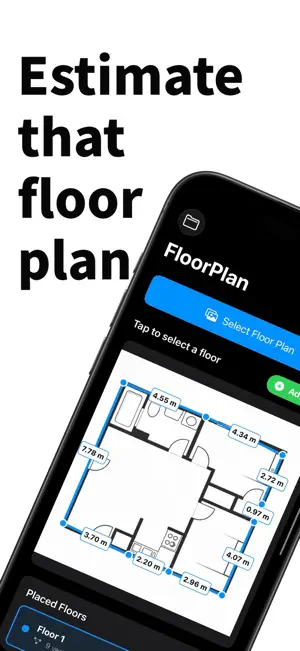
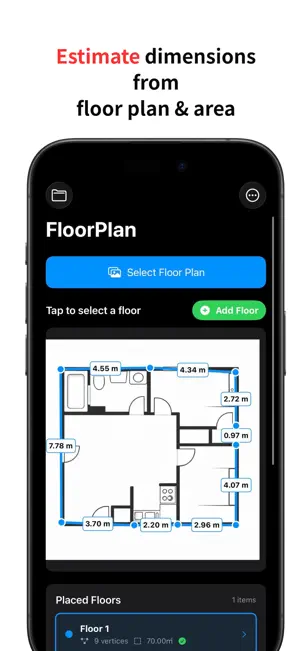
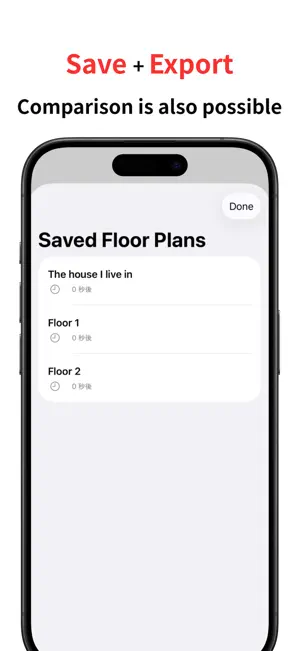
"Will my sofa fit in this room?" "I need dimensions, but I only have a floor plan image." RoughPlan solves these problems instantly. Calculate real-world dimensions from any floor plan image just by entering the total area size. No measuring tape required! Perfect for house hunting, moving, interior design, and renovation planning. 【Key Features】 Auto-Scale from Area Just input the total area (sq ft or m²) listed on the property listing. RoughPlan uses advanced geometry (Shoelace formula) to calculate the scale and determine the length of every wall instantly. Easy to Draw - Simply tap the corners of the room on the image. - Supports complex polygon shapes. - Magnifying glass feature ensures precise corner placement. Save & Organize - Auto-save protects your work. - Manage multiple projects for different properties. - Fully localized in English, Japanese, Chinese, and Korean. 【More Convenient with Pro Plan】 You can use Pro features even just for the busy period of moving or house hunting (Plans start from 1 week). - Remove Ads Remove ads to maximize screen space and focus on your work without distractions. - Unlimited Saves Save and manage as many property projects as you need without limits, perfect for comparing multiple options. - High-Quality Image Export Save and export floor plans with dimensions in high resolution so text is crisp and clear. Perfect for sharing with family or partners, and for meetings with contractors. 【How to Use】 1. Load a floor plan image. 2. Enter the total area size (e.g., 50 m²). 3. Trace the room shape by tapping the corners. Instantly see the length of every wall! *Note: Results are estimates based on the image accuracy. Please use for rough planning purposes. Use RoughPlan to understand real dimensions from floor plans and confidently plan your move or redecoration! Terms of Use (EULA): https://www.apple.com/legal/internet-services/itunes/dev/stdeula/
What’s new
Version 1.14 · Updated August 7, 2026
You can now view measurements in imperial units. - See floor areas in square feet (ft) and dimensions in feet, to match local listings - Minor stability improvements
App privacy
The developer, Taiga Nishimura, reported these privacy practices to Apple.
Data Used to Track You
The following data may be used to track you across apps and websites owned by other companies:
- Usage Data: Product Interaction
Data Not Linked to You
The following data, which may be collected but is not linked to your identity, may be used for the following purposes:
- Usage Data: Product Interaction
Used for: Analytics, App Functionality
Alternatives to RoughPlan - Floor Plan Measure
Looking for apps like RoughPlan - Floor Plan Measure? Here are 6 similar apps on the App Store. The highest rated is Spacialize Floor Plan (5.0/5), and all 6 are free to download.
-
 Spacialize Floor Plan
5.0
Spacialize Floor Plan
5.0
-
 FloorAce
-
 Floor Plan+ 3D Room Scanner
4.0
Floor Plan+ 3D Room Scanner
4.0
-
 Room Planner: 3D AI Design
4.1
Room Planner: 3D AI Design
4.1
-
 Room Scanner - Easy Measure Rm
4.7
Room Scanner - Easy Measure Rm
4.7
-
 Floor Plan Creator Room Wizard
4.4
Floor Plan Creator Room Wizard
4.4
| App | Rating | Price | Last updated | Compare |
|---|---|---|---|---|
| RoughPlan - Floor Plan Measure | – | Free | August 7, 2026 | |
| Spacialize Floor Plan | 5.0 / 5 (2) | Free | Sep 22, 2025 | Compare |
| FloorAce | – | Free | Dec 11, 2024 | Compare |
| Floor Plan+ 3D Room Scanner | 4.0 / 5 (10) | Free | Mar 22, 2026 | Compare |
| Room Planner: 3D AI Design | 4.1 / 5 (74) | Free | Mar 5, 2026 | Compare |
| Room Scanner - Easy Measure Rm | 4.7 / 5 (98) | Free | Oct 22, 2025 | Compare |
| Floor Plan Creator Room Wizard | 4.4 / 5 (91) | Free | Oct 1, 2024 | Compare |