

ReceiptSplit: Split & Scan
Adam Drojewski Finance iPhoneiPadiPod touch
ReceiptSplit: Split & Scan is a free Finance app for iPhone and iPad by Adam Drojewski. Rated 5.0/5 from 2 ratings. Requires iOS 18.5.
- Rating
- 5.0
- 2 ratings
- Price
- Free
- on the App Store
- Size
- 13 MB
- Age 4+
- Updated
- Oct 28
- 2026 · v1.8.0
Screenshots

About ReceiptSplit: Split & Scan
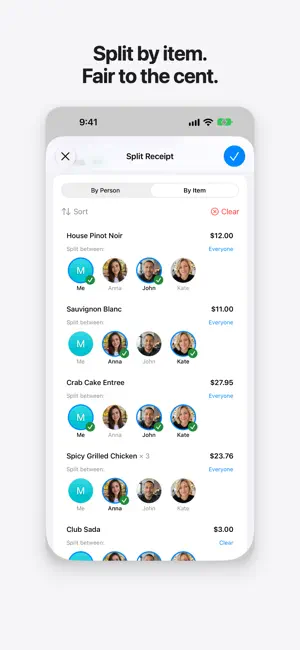
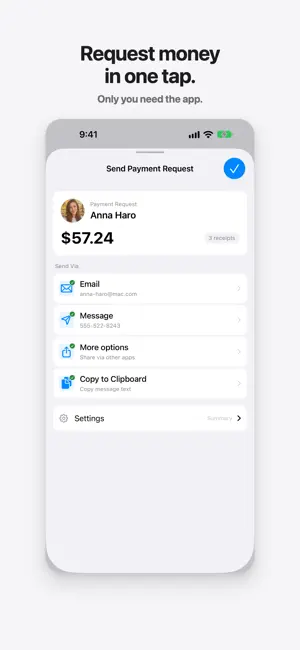
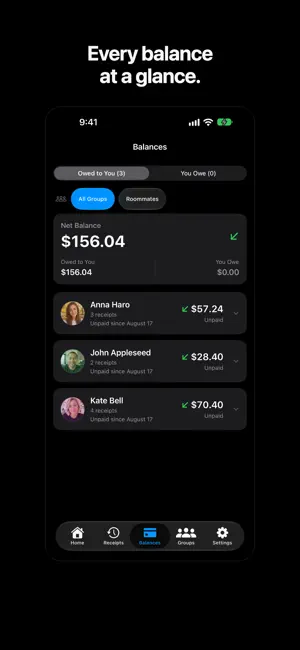
Split the bill by item. Only you need the app. Scan the receipt, tap who had what, and send everyone their share with a payment link. Your friends get a text. They don't need the app, an account, or a signup. Scan any receipt AI reads every item, price, tax, and tip. Long receipts can be scanned in up to three pages, in any language, with the currency detected for you. Split by item, fair to the cent Assign each item to whoever ordered it. Tax and tip are shared in proportion, so nobody pays for someone else's steak. Request money in one tap Send an itemized breakdown with a Venmo, PayPal, Cash App, or Revolut link — or a Pix code. Share it by text, email, or any messaging app, or export a PDF for a group trip. See every balance at a glance Know who has paid and who hasn't. Record payments, see the history of each receipt, and get balance reminders, so you don't have to chase anyone. Ask Siri Say "What do I owe in ReceiptSplit" to hear your balance, or use it in Shortcuts. Keep your warranties Add a warranty date to any receipt and get a reminder 30 days before it runs out. Private by design No account. No ads. No tracking. Your receipts and balances are stored on your iPhone. To read a scan, only the receipt photo is sent to an AI service, and we don't store it. Enter receipts by hand at any time — it's free, unlimited, and works offline. 10 free AI scans. Unlimited with Pro. Terms of Use (EULA): https://www.apple.com/legal/internet-services/itunes/dev/stdeula/ Privacy Policy: https://receiptsplit.work/privacy
What’s new
Version 1.8.0 · Updated October 28, 2026
- Groups tab: every group and event in one place, with totals, receipts and people - Events for trips and projects, no people needed - Export Report: a PDF or CSV of a group or event, with receipt photos - Add a receipt right from a group: scan, photo or manual entry - Faster manual entry: Return moves to the next field, "+" adds a line - Archive groups you're done with, and still settle what's owed
App privacy
The developer, Adam Drojewski, reported these privacy practices to Apple.
Data Not Linked to You
The following data, which may be collected but is not linked to your identity, may be used for the following purposes:
- Location: Coarse Location
- Usage Data: Product Interaction
- Diagnostics: Performance Data, Other Diagnostic Data
- Contact Info: Email Address, Name, Phone Number
- Contacts: Contacts
- User Content: Photos or Videos
Used for: Analytics, App Functionality
Alternatives to ReceiptSplit: Split & Scan
Looking for apps like ReceiptSplit: Split & Scan? Here are 6 similar apps on the App Store. The highest rated is Split - Receipt Scanner (5.0/5), and all 6 are free to download.
-
 Tabify - AI Receipt Splitter
4.9
Tabify - AI Receipt Splitter
4.9
-
 Split - Receipt Scanner
5.0
Split - Receipt Scanner
5.0
-
 SPLIIT Pro: Bill Splitter
5.0
SPLIIT Pro: Bill Splitter
5.0
-
 SplitEven: AI Bill Splitter
5.0
SplitEven: AI Bill Splitter
5.0
-
 Splitzz – Dinner Bill Splitter
-
 BillSplit AI
| App | Rating | Price | Last updated | Compare |
|---|---|---|---|---|
| ReceiptSplit: Split & Scan | 5.0 / 5 (2 ratings) | Free | October 28, 2026 | |
| Tabify - AI Receipt Splitter | 4.9 / 5 (19) | Free | May 11, 2026 | Compare |
| Split - Receipt Scanner | 5.0 / 5 (7) | Free | Jan 23, 2026 | Compare |
| SPLIIT Pro: Bill Splitter | 5.0 / 5 (2) | Free | Sep 7, 2026 | Compare |
| SplitEven: AI Bill Splitter | 5.0 / 5 (1) | Free | Jul 30, 2026 | Compare |
| Splitzz – Dinner Bill Splitter | – | Free | Oct 11, 2026 | Compare |
| BillSplit AI | – | Free | Oct 18, 2026 | Compare |