

Screen Mirroring | TV Casting
Pinki . Utilities iPhoneiPadiPod touch
Screen Mirroring | TV Casting is a free Utilities app for iPhone and iPad by Pinki . Rated 4.5/5 from 8 ratings. Requires iOS 16.4.
- Rating
- 4.5
- 8 ratings
- Price
- Free
- on the App Store
- Size
- 143 MB
- Age 4+
- Updated
- Nov 24
- 2026 · v1.0.32
Screenshots
Save to Pinterest


About Screen Mirroring | TV Casting
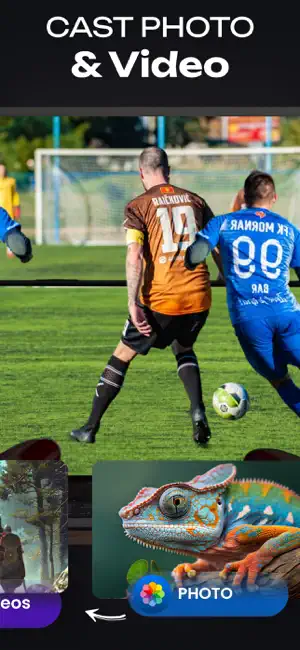
Mirror your iPhone or iPad to any compatible TV - no cables, no account, no setup. Cast photos, videos, live camera, and web pages to the big screen over your own Wi-Fi. Fast, smooth, and private. Screen mirroring, media casting, whiteboard, and a TV remote - all in one app. ----------------------------- HOW IT WORKS ----------------------------- 1. Connect your iPhone and TV to the same Wi-Fi network 2. Open the app and tap your device from the list 3. Start casting - that's it ----------------------------- WHAT YOU CAN DO ----------------------------- SCREEN MIRRORING Show your screen in real time - presentations, meetings, gaming, or everyday viewing on a larger display. PHOTO & VIDEO CASTING Stream photos and videos from your device with smooth playback and clear quality. WEB CASTING Browse inside the app and send what you find straight to the big screen. SKETCH & WHITEBOARD Draw and explain ideas live with the built-in sketch tool. Built for teaching and brainstorming. LIVE CAMERA Share your camera view on a larger display as it happens. TV REMOTE Navigate, play, pause, and control volume right from your phone. YOUR OWN MEDIA Play your own links, playlists, and files. ----------------------------- PRIVATE BY DESIGN ----------------------------- - Works only on your own local Wi-Fi network - Sharing is always started by you - No media or personal data is stored or uploaded - No account, login, or sign-up required ----------------------------- WHY PEOPLE KEEP IT ----------------------------- - Set up in seconds, not minutes - Clean interface with no clutter - Every casting mode in a single app - Works for personal and professional use ----------------------------- IMPORTANT ----------------------------- Screen Mirroring | TV Casting is a screen mirroring and display utility. It does not host, stream, or distribute any content. Users are responsible for ensuring they hold the rights to any media they display. Not affiliated with or endorsed by any third-party platform, service, or device manufacturer. Requires a compatible receiver device on the same Wi-Fi network.
Ratings & reviews
4.5
8 ratings
What’s new
Version 1.0.32 · Updated November 24, 2026
A brighter Screen Cast — and a look you can make your own. A NEW BLUE The app now leads with a clean blue accent, carried across every screen, widget and Live Activity. DELUXE GOLD, STILL HERE Prefer the classic look? The premium gold theme is one tap away in Settings › Theme Color, alongside 18 more accent colours. A REBUILT WELCOME A new five-screen intro that shows what the app actually does — including casting YouTube straight to your TV. SHARPER ON iPAD Type, spacing and layout retuned for the bigger screen, in both light and dark mode. Plus the usual round of fixes and performance work. Enjoying Screen Cast? A rating really does help. Ideas or problems: Settings › Feedback.
App privacy
The developer, Pinki ., reported these privacy practices to Apple.
Data Not Collected
The developer does not collect any data from this app.
Alternatives to Screen Mirroring | TV Casting
Looking for apps like Screen Mirroring | TV Casting? Here are 6 similar apps on the App Store. The highest rated is All In 1: 100 Tools (5.0/5), and all 6 are free to download.
-
 PDF Tools Pro – Edit & Convert
1.0
-
 All In 1: 100 Tools
5.0
-
 Off Lens
-
 BatteryManAI
1.0
-
 AI Smart Recognition
-
 Text Repeater offline
| App | Rating | Price | Last updated | Compare |
|---|---|---|---|---|
| Screen Mirroring | TV Casting | 4.5 / 5 (8 ratings) | Free | November 24, 2026 | |
| PDF Tools Pro – Edit & Convert | 1.0 / 5 (1) | Free | Feb 19, 2026 | Compare |
| All In 1: 100 Tools | 5.0 / 5 (5) | Free | Aug 7, 2026 | Compare |
| Off Lens | – | Free | Dec 1, 2025 | Compare |
| BatteryManAI | 1.0 / 5 (1) | Free | Mar 4, 2026 | Compare |
| AI Smart Recognition | – | Free | Jan 27, 2026 | Compare |
| Text Repeater offline | – | Free | Jan 28, 2026 | Compare |