

QuickTools: Edit & Sign PDF
Pinki . Utilities iPhoneiPadiPod touch
QuickTools: Edit & Sign PDF is a free Utilities app for iPhone and iPad by Pinki . Rated 4.8/5 from 115 ratings. Requires iOS 15.0. Updated October 17, 2026.
- Rating
- 4.8
- 115 ratings
- Price
- Free
- on the App Store
- Size
- 93 MB
- Age 4+
- Updated
- Oct 17
- 2026 · v1.1.13
Screenshots


About QuickTools: Edit & Sign PDF
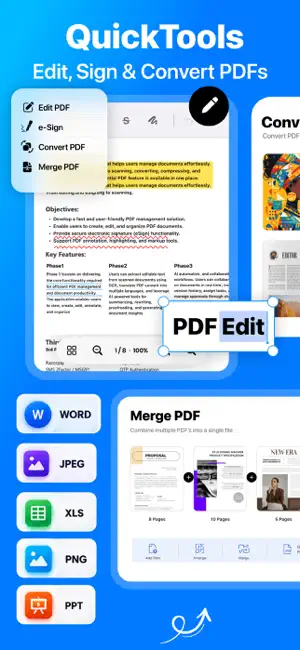
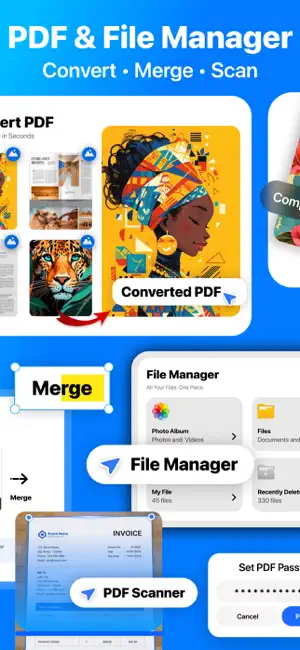
Edit PDFs, compress videos, convert files and organize everything in one app. QuickTools brings 30+ everyday tools for PDFs, documents, photos, videos, GIFs, audio and files into one simple workspace. Get more done without switching between multiple apps. PDF & DOCUMENTS Create, edit and manage PDFs on your iPhone or iPad. • Convert images, Word, PowerPoint and Excel files to PDF • Scan documents and save them as PDFs • Edit and annotate PDF pages with text, drawing and watermarks • Merge and split PDFs, reorder pages and jump to any page • Fill out forms and sign documents with eSign • Protect and unlock PDFs with passwords FILES & ORGANIZATION Keep your documents and media organized. • Import files from Photos or the Files app • Create folders and organize your file library • Search your files and folders • Automatically save files created with QuickTools • Recover deleted files from Recently Deleted PHOTO TOOLS Convert and compress images for everyday use. • Compress photos to save storage space • Convert images between JPG, PNG and HEIC formats • Create passport and ID photos • Capture photos with Dual Camera VIDEO & GIF TOOLS Manage, compress and convert your videos. • Compress videos to a target file size • Convert videos between supported formats • Extract video frames as images • Extract audio from videos • Trim video clips • Convert videos to GIFs and GIFs to videos AUDIO TOOLS Work with audio files in one place. • Convert audio between supported formats • Trim audio files • Merge multiple audio tracks STORAGE & FILE UTILITIES Find and manage files taking up space on your device. • Find large videos and other files • Delete unwanted files • Create ZIP archives and extract ZIP files EVERYDAY UTILITIES Access useful tools for daily tasks. • Generate QR codes • Generate passwords • Test internet speed • Run device and hardware tests FREE TO USE QuickTools is free to use, with no subscription, no subscription-based free trial and no paywalled tools. Built for work, study and everyday tasks on iPhone and iPad. Have a question or feature request? [email protected] Terms & Conditions: https://obsidian-tin-ee3.notion.site/Terms-Conditions-2de09a72d75080ab860ef6fad39842e9
Ratings & reviews
4.8
115 ratings
What’s new
Version 1.1.13 · Updated October 17, 2026
Enjoy a refreshed QuickTools experience with an updated home screen, dark mode, improved compatibility with the latest iOS, and general performance improvements and bug fixes.
App privacy
The developer, Pinki ., reported these privacy practices to Apple.
Data Not Collected
The developer does not collect any data from this app.
Alternatives to QuickTools: Edit & Sign PDF
Looking for apps like QuickTools: Edit & Sign PDF? Here are 6 similar apps on the App Store. The highest rated is All In 1: 100 Tools (5.0/5), and all 6 are free to download.
-
 PDF Fox
1.0
PDF Fox
1.0
-
 PDF Tools Pro – Edit & Convert
1.0
PDF Tools Pro – Edit & Convert
1.0
-
 Record Screen: Video Recorder
4.5
Record Screen: Video Recorder
4.5
-
 All In 1: 100 Tools
5.0
All In 1: 100 Tools
5.0
-
 eBreshna
5.0
eBreshna
5.0
-
 Transcribe Audio to Text: v2md
4.6
Transcribe Audio to Text: v2md
4.6
| App | Rating | Price | Last updated | Compare |
|---|---|---|---|---|
| QuickTools: Edit & Sign PDF | 4.8 / 5 (115 ratings) | Free | October 17, 2026 | |
| PDF Fox | 1.0 / 5 (1) | Free | Feb 12, 2026 | Compare |
| PDF Tools Pro – Edit & Convert | 1.0 / 5 (1) | Free | Feb 19, 2026 | Compare |
| Record Screen: Video Recorder | 4.5 / 5 (41) | Free | May 31, 2026 | Compare |
| All In 1: 100 Tools | 5.0 / 5 (5) | Free | Aug 7, 2026 | Compare |
| eBreshna | 5.0 / 5 (20) | Free | Sep 24, 2026 | Compare |
| Transcribe Audio to Text: v2md | 4.6 / 5 (26) | Free | Oct 22, 2026 | Compare |