

Sound Meter - Decibel dB
SEOKWON YANG Utilities iPhoneiPadiPod touch
Sound Meter - Decibel dB is a free Utilities app for iPhone and iPad by SEOKWON YANG. Requires iOS 15.0. Updated October 5, 2026.
- Price
- Free
- on the App Store
- Size
- 21 MB
- Age 4+
- Updated
- Oct 5
- 2026 · v1.1.0
Screenshots


About Sound Meter - Decibel dB
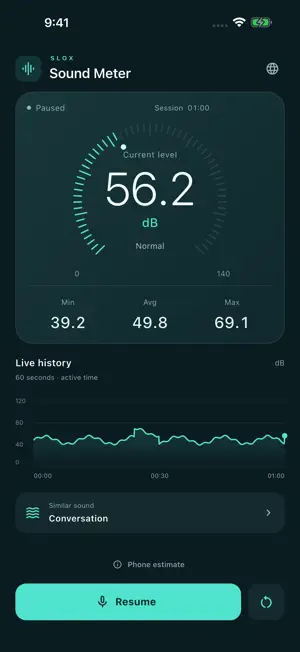
Get a clearer view of the sounds around you. Sound Meter uses your device’s microphone to estimate sound levels and show how they change. • View the current estimated level in dB. • Follow the last 60 seconds of active measurement on a live graph. • Check minimum, average and maximum readings for the whole session. • Pause, resume or reset a measurement. • Explore a guide with familiar sound examples. • Use English, Korean, Japanese, Simplified Chinese, Spanish, Portuguese, German or French. The app follows your device’s preferred supported language automatically. You can also save a language choice or return to Automatic at any time. If none of your device languages are supported, the app uses English. Tap Start and allow microphone access to begin. Measurement pauses when the app leaves the foreground. Microphone audio is processed on your device; the app does not save audio recordings or upload microphone audio. No account is required. Readings vary with your device and microphone and are estimates for general reference. The displayed average is the arithmetic mean of session readings, not an energy average (Leq). This is not a calibrated sound level meter. Use dedicated equipment for precise measurements or safety decisions. The app includes ads. Advertising consent and privacy choices are shown where required. Privacy: https://www.slox.co.kr/privacy/soundmeter Support: [email protected]
What’s new
Version 1.1.0 · Updated October 5, 2026
Sound Meter has a refreshed, easier-to-read measurement screen. • Native layouts for iPhone and iPad. • See current, minimum, average and maximum readings with a 60-second graph. • Pause, resume and reset measurements more easily. • Follow your device language automatically or save a preferred language. • Clearer microphone guidance and advertising privacy choices. Readings are phone-based estimates, not calibrated sound-level measurements.
App privacy
The developer, SEOKWON YANG, reported these privacy practices to Apple.
Data Linked to You
The following data, which may be collected and linked to your identity, may be used for the following purposes:
- Location: Coarse Location
- Identifiers: Device ID
- Usage Data: Product Interaction, Advertising Data
Used for: Third-Party Advertising, Developer’s Advertising or Marketing, Analytics, App Functionality
Data Not Linked to You
The following data, which may be collected but is not linked to your identity, may be used for the following purposes:
- Diagnostics: Performance Data, Other Diagnostic Data, Crash Data
Used for: Third-Party Advertising, Developer’s Advertising or Marketing, Analytics, App Functionality
Alternatives to Sound Meter - Decibel dB
Looking for apps like Sound Meter - Decibel dB? Here are 6 similar apps on the App Store. The highest rated is Sound Meter dB (5.0/5), and all 6 are free to download.
-
 Sound Meter dB
5.0
-
 dB Meter - Sound Level Meter
-
 dB-Meter
-
 Sound Meter - dB Noise Level
-
 비료도사
-
 Text Toolbox: Format & Edit
| App | Rating | Price | Last updated | Compare |
|---|---|---|---|---|
| Sound Meter - Decibel dB | – | Free | October 5, 2026 | |
| Sound Meter dB | 5.0 / 5 (1) | Free | Oct 2, 2026 | Compare |
| dB Meter - Sound Level Meter | – | Free | Jul 24, 2026 | Compare |
| dB-Meter | – | Free | Sep 29, 2026 | Compare |
| Sound Meter - dB Noise Level | – | Free | Mar 31, 2026 | Compare |
| 비료도사 | – | Free | Sep 16, 2026 | Compare |
| Text Toolbox: Format & Edit | – | Free | Aug 19, 2026 | Compare |